Creality Falcon2 Pro Review: Performance & Comparison
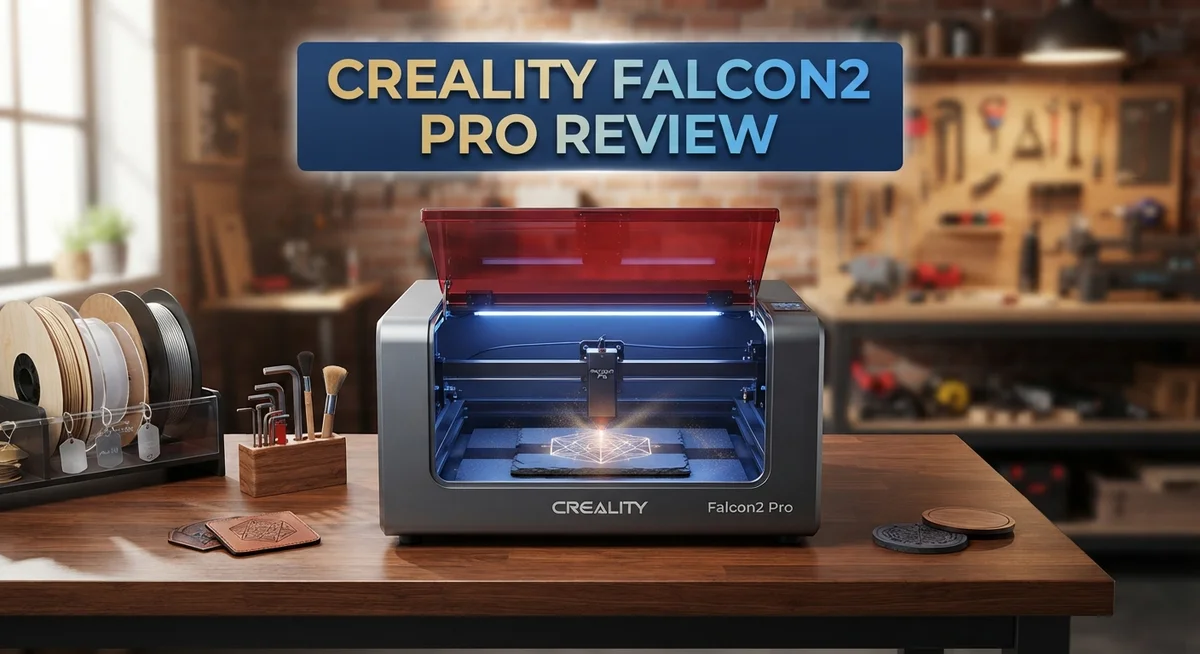
Looking for a laser cutter that does it all? The Creality Falcon2 Pro might be your answer. This machine packs serious power into a safe, enclosed design.
You get laser options up to 60W. That means you can cut through common materials in a single pass. No more running the same cut five times.
Safety matters too. The Falcon2 Pro carries an FDA Class 1 Safety Certification. It also has a rolling lid and a keyed safety switch. You can craft with peace of mind.
In a Nutshell
- FDA Class 1 Safety Certification gives you peace of mind. The enclosed design and keyed safety switch add extra protection during use.
- Air assist and LED lighting work together for cleaner cuts. You get better visibility and less charring on your projects.
- The rolling lid enclosure makes loading materials simple. You don’t fight with awkward openings every time.
- Laser dot precision sits between 0.2mm and 0.24mm. This helps with detailed engraving work.
- Exhaust performance needs work. Many users find the fan too weak for proper fume venting.
- LightBurn software calibration takes patience. You’ll need to spend time getting settings right before your first project.
- Compared to rivals like the XTool S1 40W or LaserPecker LX2, this machine cuts slower. Speed isn’t its strongest feature.
Laser Power and Cutting Capability
The Creality Falcon2 Pro delivers impressive cutting power with laser options ranging from 1.6W up to 60W. This range means you can handle everything from delicate detail work to heavy industrial cuts. The 60W configuration cuts through common materials in a single pass, which saves time on production jobs.
The laser produces a dot size between 0.2mm and 0.24mm. This precision allows for clean, detailed engraving and cutting on wood, acrylic, leather, and fabric. You get consistent results across different material types.
Real world cutting performance shows some trade offs. While the 60W laser is powerful, users report slower cutting speeds compared to direct competitors. The XTool S1 40W and LaserPecker LX2 both move faster through materials. Speed matters if you run production batches or handle high volume orders.
Air assist integration helps improve cut quality. The system blows away debris and smoke during the cutting process. This keeps your lens cleaner and produces smoother edges on materials like acrylic and wood.
The honeycomb slatted bed works with the pull out crumb tray for easy cleanup. Burnt material falls through the slats instead of sitting on your workpiece. You simply slide out the tray, empty it, and you’re ready for the next job.
One weak point is the exhaust fan performance. The built in ventilation system struggles to move smoke and fumes efficiently. Many users add external ventilation to improve air quality and protect their workspace. This becomes necessary if you cut regularly or work in enclosed spaces.
The integrated camera simplifies framing your designs on materials. You see exactly where your cut will happen before you press start. Setup becomes faster and more accurate compared to manual positioning methods.
Bottom line: The Falcon2 Pro offers solid cutting capability with the flexibility of multiple power levels. You get precision and safety features built in. However, slower speeds and weak exhaust performance require workarounds on your part.

- 【Ideal for Cutting Professional】-Newest Creality Falcon2 Pro integrated enclosure 60W laser...
- 【Native 60W Output & 500+mm/s Engraving Speed】-Creality Falcon2 Pro 60W laser engraver power up...
Last update on 2026-08-31 / Affiliate links / Images from Amazon Product Advertising API Some of the links on this website are affiliate links, which means that at no additional cost to you, I earn a commission if you click through and make a purchase. I only recommend products and services that I believe will add value to my readers. Thank you for your support!
Design, Build Quality, and Safety Features
The Creality Falcon2 Pro stands out for its solid construction and thoughtful design choices. The machine features a rolling lid enclosure that makes loading materials straightforward. You can access the work area easily without struggling with heavy components.
The honeycomb slatted bed keeps your materials elevated and stable during cutting. Underneath sits a pull-out crumb tray that collects debris. Cleanup becomes quick and simple instead of tedious scraping. This design choice saves you time between jobs.
Safety gets serious attention here. The machine earned FDA Class 1 Safety Certification, which means it meets strict safety standards. A keyed safety switch prevents accidental operation. The enclosed design protects you from laser exposure during normal use.
The integrated camera is a practical feature for job setup. You can frame your design directly on the material before cutting. This eliminates guesswork and reduces material waste. However, the camera calibration process requires patience and careful attention to detail.
Air assist and LED lighting work together to improve your results. The air assist clears debris from the cutting path for cleaner edges. The LED lighting helps you see exactly where your laser will cut. These additions show Creality thought about the user experience.
The laser dot precision ranges from 0.2mm to 0.24mm, which delivers accurate detail work. This tight focus allows for intricate designs on various materials.
One area that needs improvement is the exhaust fan performance. Many users report that venting is insufficient for heavy cutting sessions. You may need to add external ventilation for optimal performance in a small workshop space.
The overall build quality feels sturdy. The machine handles daily use without obvious flex or movement. Materials feel durable, and the assembly quality appears consistent. The rolling lid design adds convenience without compromising structural integrity.
The Falcon2 Pro prioritizes user safety and ease of use. The enclosed design, camera integration, and simple cleanup make this machine accessible to both beginners and experienced users. The trade off is that you sacrifice some cutting speed compared to open frame competitors.
Ease of Use and Software Integration
The Creality Falcon2 Pro makes getting started simple. The integrated camera removes guesswork from design placement. You frame your project directly on the material before cutting begins.
LightBurn software controls this machine. The software connects quickly to your computer. Setup requires calibration, and this step demands attention to detail. You’ll spend time matching the camera view to the actual cutting area. Once complete, future jobs run smoothly.
The software interface feels intuitive for most users. New operators can learn the basics within an hour. Experienced laser users transition even faster. LightBurn offers tutorials and community support online.
Material loading stays hassle free thanks to the rolling lid design. You lift the enclosure, place your material on the honeycomb bed, and close it back down. No complicated clamps or fasteners slow you down.
The pull out crumb tray simplifies cleanup. Finished projects leave debris behind. You slide the tray out, empty it, and slide it back in. This takes seconds rather than minutes.
Air assist and LED lighting integrate smoothly into the workflow. The air assist activates automatically during cuts. LED lighting illuminates your work area without extra buttons to press. Both features work in the background.
One area requires extra care. Camera calibration can feel tedious if not done correctly. The process involves multiple steps and reference measurements. Rushing through this leads to framing errors on future jobs. Take your time the first time around.
The exhaust system connects easily to your ventilation setup. Installation takes minutes. The fan itself runs quietly, though its power output could be stronger for heavy cutting sessions.
Software updates arrive regularly from Creality. These updates add features and improve performance. You download and install them through LightBurn without complications.
Overall, the Falcon2 Pro balances power with accessibility. Beginners find the learning curve manageable. Advanced users appreciate the software depth and camera precision. The system rewards users who invest time in proper setup and calibration.
Top 3 Alternatives
xTool M1 Laser

- NOTE: CMYK Inkjet module and RA3 Lite Rotary are not included in this M2 standalone, available...
- Ultimate Versatility in One Machine: Innovative dual-mode architecture lets the M2 laser engraver...
Last update on 2026-08-31 / Affiliate links / Images from Amazon Product Advertising API Some of the links on this website are affiliate links, which means that at no additional cost to you, I earn a commission if you click through and make a purchase. I only recommend products and services that I believe will add value to my readers. Thank you for your support!
LaserPecker 4 Pro

- Unrivaled 8K Precision & Cutting Power: LaserPecker delivers groundbreaking engraving precision at...
- Unmatched Compatibility with 300+ Materials: Engrave virtually anything you can imagine thanks to...
Last update on 2026-09-01 / Affiliate links / Images from Amazon Product Advertising API Some of the links on this website are affiliate links, which means that at no additional cost to you, I earn a commission if you click through and make a purchase. I only recommend products and services that I believe will add value to my readers. Thank you for your support!
Omtech 40W Laser

- Global Support, Local Care: Our 24/7 global support team delivers expert assistance, including...
- Powerful 45W Laser Performance: Upgraded to 45W, our laser cutter now slices through 0.4" (10mm...
Last update on 2026-09-01 / Affiliate links / Images from Amazon Product Advertising API Some of the links on this website are affiliate links, which means that at no additional cost to you, I earn a commission if you click through and make a purchase. I only recommend products and services that I believe will add value to my readers. Thank you for your support!
Ventilation and Exhaust System
The exhaust system on the Creality Falcon2 Pro handles smoke and fumes during your cutting work. This machine comes with a built-in exhaust fan that connects to external ventilation. The integration makes setup straightforward for most users.
However, the exhaust performance has a notable limitation. The fan strength doesn’t match the power of the 60W laser in all situations. Heavy cutting jobs produce more smoke than the system can efficiently remove. You may notice some fumes lingering inside the enclosure during intensive work sessions.
For best results, connect the exhaust port to a dedicated air filtration unit or external vent. This extra step significantly improves air quality around your workspace. Many users find that pairing the Falcon2 Pro with an aftermarket exhaust solution works better than relying on the stock fan alone.
The exhaust port connects easily to standard ducting. The rolling lid enclosure helps contain smoke while you’re working. The honeycomb slatted bed also contributes to airflow by allowing smoke to pass through the material. These design elements work together to manage ventilation, even if the fan itself has limits.
The FDA Class 1 Safety Certification shows that Creality addressed safety concerns. The enclosed design keeps the laser contained and reduces exposure to harmful light. The keyed safety switch prevents accidental operation. These features work alongside the exhaust system to create a safer operating environment.
Air assist integration plays an important role in reducing smoke production. This feature blows compressed air across the cut line, which helps clear debris and reduces overall smoke output. When you activate air assist, the exhaust system becomes more effective.
If you work with materials that produce heavy smoke like wood or acrylic, plan your setup carefully. The exhaust fan performs adequately for light to moderate engraving tasks. Heavy cutting sessions benefit from supplemental ventilation. Consider your typical projects when evaluating whether the stock exhaust meets your needs.
Camera and Framing Accuracy
The integrated camera on the Creality Falcon2 Pro gives you a real advantage when setting up your projects. You can see exactly where your laser will cut before you press start. This live preview feature saves time and reduces material waste from mistakes.
The camera captures a clear view of your work surface. The image displays directly in LightBurn software on your computer. You align your design with the camera feed, and the positioning becomes straightforward. This visual confirmation step prevents costly errors.
However, the camera calibration process demands your attention. You need to run a calibration routine to ensure accuracy. The process involves printing a calibration pattern, placing it on the bed, and letting the software analyze it. Some users find this step tedious, especially when recalibrating after moving the machine or adjusting the lens.
Once calibrated properly, framing accuracy improves significantly. The laser dot size of 0.2 to 0.24mm means your cuts stay precise. The camera alignment works well with this tight tolerance. Your designs transfer from screen to material with minimal deviation.
The LED lighting built into the machine helps the camera perform better. Proper illumination means the camera captures sharper images. You see fine details more clearly on your screen. This lighting also helps you inspect materials before cutting starts.
For best results, take time to calibrate the camera correctly. Rushing through this setup leads to misalignment problems later. The software walks you through each step, but patience pays off. Once you establish a good calibration, your framing stays accurate across multiple projects.
The camera system works best in consistent lighting conditions. Shadows or glare on your material can confuse the image capture. Position your machine away from direct sunlight when possible. This simple adjustment improves camera performance noticeably.
Overall, the camera and framing system on the Falcon2 Pro delivers solid accuracy. The initial calibration requires effort, but the payoff justifies the work. You gain confidence knowing your designs will cut exactly where you intend them to.
Pros and Cons
Pros
- 60W laser power cuts through common materials in a single pass, saving you time on most projects
- Sliding crumb tray design makes cleanup quick and effortless after each job
- Built in camera and LED lighting help you frame projects accurately without guesswork
- FDA Class 1 Safety Certification and keyed safety switch give you peace of mind during operation
- Enclosed design with air assist integration keeps your workspace cleaner and safer
Cons
- Cutting speed lags behind similar competitors, meaning some jobs take longer to finish
- Exhaust fan performance falls short, so you’ll need to connect external ventilation for heavy smoke materials
- Camera calibration requires patience and careful setup before you get reliable framing accuracy
- LightBurn software needs thorough calibration to unlock full precision from the machine
Who Should Buy It
The Creality Falcon2 Pro works best for serious hobbyists and small business owners who cut or engrave regularly. You should consider this machine if you need consistent, high-quality results on materials like wood, acrylic, leather, and fabric.
This laser suits you if you value safety and ease of use. The FDA Class 1 certification and keyed safety switch mean you can operate confidently without constant worry. The enclosed design keeps your workspace cleaner than open-frame competitors.
You’ll appreciate the Falcon2 Pro if you work with thick materials frequently. The 60W laser power cuts through common items in one pass, eliminating the need for multiple passes. This saves significant time on production jobs.
The integrated camera and LED lighting make this machine ideal for precision framing work. If you spend hours manually positioning designs, the camera system reduces setup time substantially. You’ll frame projects faster once you complete the initial calibration.
Small production shops benefit from the sliding crumb tray design. Cleanup happens quickly between jobs, keeping your workflow smooth. The honeycomb bed and pull-out tray mean less downtime for maintenance.
However, skip this machine if speed is your priority. The cutting speed lags behind comparable competitors like the XTool S1 40W or LaserPecker LX2. If you run high-volume jobs daily, slower performance becomes frustrating.
You should also reconsider if your workspace lacks proper ventilation options. The exhaust fan alone won’t handle heavy smoke from wood or acrylic. You’ll need to connect external air filtration or ductwork, adding setup complexity and cost.
The Falcon2 Pro isn’t ideal for users who want plug and play simplicity. Camera calibration requires patience and attention to detail. If you prefer minimal setup and immediate use, other models offer faster out-of-box experiences.
Choose this laser if you’re willing to invest time in proper setup for reliable, safe, and precise cutting results. It rewards users who prioritize quality and safety over raw speed.
Final Verdict
The Creality Falcon2 Pro stands out as a strong choice for anyone who wants a safe and capable laser cutter. Its combination of power options and safety features makes it a serious tool for creative projects.
Compared to competitors like the XTool S1 40W and LaserPecker LX2, the Falcon2 Pro takes a different approach. It focuses on safety certification and build quality rather than raw speed.
The rolling lid enclosure adds a practical touch you won’t find on every machine in this category. It keeps the workspace contained while still allowing easy access to your project.
Software setup does require patience. You’ll need to spend time with LightBurn calibration to get consistent results, especially when switching between materials or laser power settings.
This extra setup step might frustrate users who want a plug and play experience. But once configured, the machine performs reliably across different projects.
If speed matters most to you, the LaserPecker LX2 offers faster cutting with swappable modules. The Falcon2 Pro trades some speed for better safety features and build quality.
For those who prioritize precision and safety certification, the Falcon2 Pro makes a compelling case. Its FDA Class 1 rating and keyed switch offer peace of mind that some competitors skip.
The honeycomb slatted bed design also helps with airflow during cuts. This feature works alongside the crumb tray to keep your workspace organized.
Overall, the Falcon2 Pro rewards users who value thoroughness over speed. It asks for some patience during setup but delivers consistent, safe results afterward.
Small business owners who need dependable output will likely find this machine worth the learning curve. Hobbyists who cut occasionally might find simpler machines more suitable for their needs.
The Falcon2 Pro earns its place among serious laser cutting tools. It just requires you to invest time upfront to unlock its full potential.
Frequently Asked Questions
Can the Creality Falcon2 Pro cut through thick materials in a single pass?
Yes, the 60W laser module cuts most common materials in one pass. This includes thick acrylic, wood, leather, and fabric. You won’t need multiple passes for standard thickness items, which saves time on production jobs.
What makes the camera feature useful for framing projects?
The integrated camera lets you see your exact cutting area before you start. You frame your design directly on screen without guesswork. Combined with the LED lighting, you get clear visibility of where your laser will cut or engrave.
Is the exhaust system strong enough for my workspace?
The built in exhaust fan works, but it’s not powerful enough for heavy smoke materials on its own. You’ll need to connect external ventilation for best results. This is especially important if you cut acrylic or other materials that produce thick smoke.
How does the sliding crumb tray make cleanup easier?
The honeycomb bed has a pull out tray underneath that catches all debris and ash. After each job, you simply slide it out and empty it. No need to reach inside the machine or disassemble anything. Small production shops find this design saves serious cleanup time.
Do I need special software skills to operate this laser?
LightBurn software controls the Falcon2 Pro. Camera calibration takes patience and care, but the process is straightforward once you understand the steps. Most users get comfortable within a few sessions. The keyed safety switch and enclosed design also mean fewer safety worries during operation.

Hi, I’m Amelia Thornton, the founder of ElectroPro.blog.
I write about smart devices, gadgets, electronics, and tech essentials from Amazon.
My goal is to help you discover reliable and innovative tech that truly makes life easier.
From home automation to everyday gear, I test and share what’s worth your investment.
Join me as I explore the smartest tech trends—one gadget at a time.