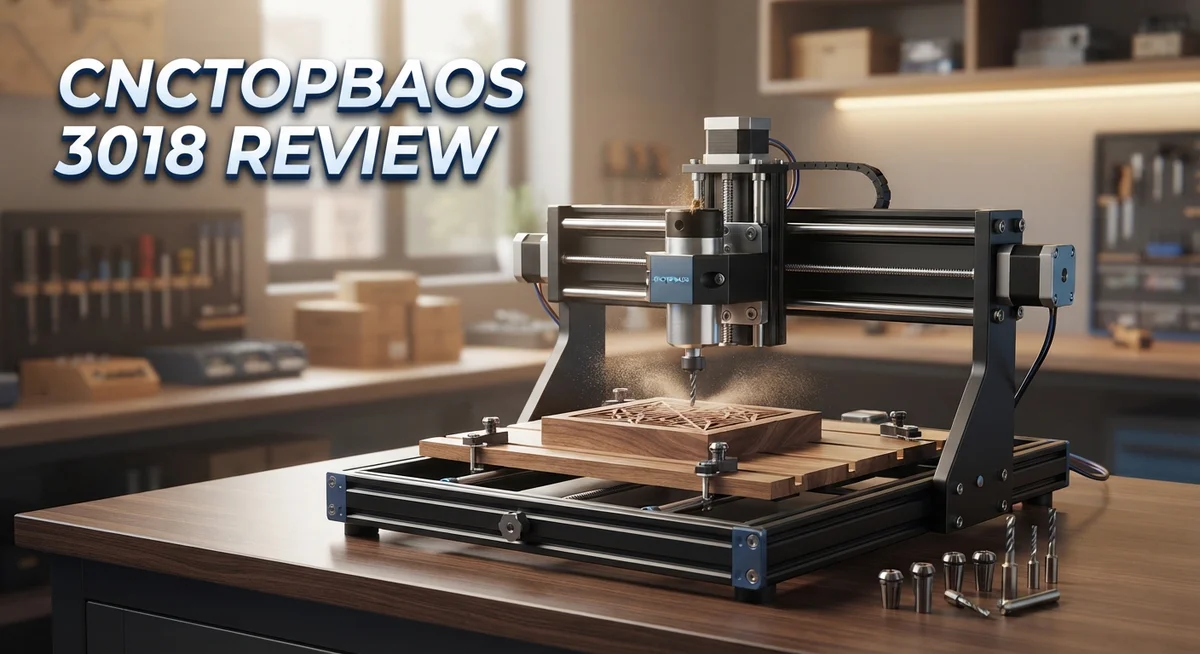
CNCTOPBAOS 3018 CNC Router Review: Beginner Guide
Are you looking for a small CNC router that fits on your desk? The CNCTOPBAOS 3018 might catch your eye. It promises big capability in a compact frame.
This machine targets beginners who want to try CNC milling. It works with wood, plastic, acrylic, PCB, and even aluminum. That versatility makes it a fun tool for hobby projects.
Setup takes less than two hours. You get a sturdy resin frame paired with a 775 DC motor spindle. The spindle spins up to 10,000 rpm, which handles light cutting jobs well.
In a Nutshell
- Work area measures 300×180×45mm. This gives you enough room for small crafts and signs but limits larger builds.
- The 775 DC spindle spins up to 10,000 rpm. It handles wood, plastic, acrylic, and even thin aluminum or PCB boards.
- Power runs on 12-36V, with 24V as the standard setup. This keeps the motor steady during most cuts.
- The PRO-MAX version adds an offline controller. You can run jobs without a laptop tethered nearby, though some users note occasional glitches.
- Control happens through USB with GRBL firmware. This makes it compatible with popular CNC software packages.
- The build feels lightweight and portable. You can move it between workspaces without much hassle.
Specifications and Work Area
The CNCTOPBAOS 3018 gives you a compact work platform that fits tight spaces. Your cutting area spans 300×180×45mm, which translates to 11.8×7.1×1.8 inches. This size works well for small engravings, PCB prototyping, and hobby projects.
The aluminum and resin frame measures 420×350×270mm overall. This construction keeps the machine lightweight and portable. You can move it between workbenches or store it in a closet without strain. The compact footprint makes it ideal for makers with limited workshop space.
The 775 DC spindle motor delivers 120W of power and reaches up to 10,000 rpm. This speed range handles wood, plastic, acrylic, and thin aluminum cuts. The motor runs on 12 to 36 volts, with 24V as the standard configuration. Most users find this voltage sweet spot for consistent performance on soft materials.
The 3-axis system gives you full XY movement plus vertical Z-axis control. The Z-axis depth of 45mm limits your material thickness, but it covers most hobby applications. You get smooth motion across all three axes for detailed work.
USB connectivity with GRBL firmware makes operation straightforward. The PRO-MAX version adds an offline controller, so you can run cuts without a computer tethered to the machine. This feature appeals to users who want more flexibility in their workshop.
The frame construction does show limitations under heavy load. Rigidity issues emerge when you push the spindle hard or apply sustained cutting pressure. The resin components flex slightly, which affects precision on intricate designs. This trait reminds users that the 3018 operates as a hobby tool, not an industrial system.
For your first CNC experience or small batch projects, the work area and specifications suit the task. The machine handles materials well within its design scope. Just keep project size realistic and material hardness moderate. The specifications match what beginners need to learn CNC fundamentals without overwhelming complexity.

- Type: Upgraded CNC 3018-PRO with Offline Controller; We have added E-Stop button and XYZ limit...
- With offline controller: You can operate this machine without connect to the computer; offline...
Last update on 2026-08-31 / Affiliate links / Images from Amazon Product Advertising API Some of the links on this website are affiliate links, which means that at no additional cost to you, I earn a commission if you click through and make a purchase. I only recommend products and services that I believe will add value to my readers. Thank you for your support!
Build Quality and Frame Design
The aluminum and resin construction gives this machine a solid foundation for entry-level work. The frame measures 420×350×270mm overall, making it compact enough for desktop setups without sacrificing stability in normal use cases.
The 775 DC spindle motor sits at the heart of the cutting system. This motor delivers 120W of power and reaches 10,000 rpm maximum, which handles soft materials like wood, plastic, and acrylic effectively. The spindle assembly connects to a 3-axis gantry that moves smoothly across the work platform.
Where build quality shows its limitations is rigidity. The frame and spindle assembly lack the stiffness needed for aggressive cuts or extended high-speed operation. Users report vibration increases noticeably when you push the motor hard or work with denser materials. This doesn’t mean the machine falls apart—it simply means you need to work within its design limits.
The resin components keep weight down for portability. This trade-off means less mass to absorb vibration, which affects precision on detailed cuts. The aluminum rails and linear bearings function reliably for light to medium projects, but they’re not industrial-grade components.
Assembly takes less than two hours for most users. The frame arrives partially pre-assembled, and the instructions guide you through connecting the spindle motor, mounting the control board, and securing the linear motion components. Bolts and fasteners feel secure once tightened properly.
The overall design philosophy prioritizes accessibility over performance. This is a beginner’s machine, not a production tool. The compact work area of 300×180×45mm restricts project size, but that limitation actually suits the frame’s structural capabilities.
For small hobby projects and learning CNC basics, the build quality proves adequate. The machine won’t win races against professional equipment, but it delivers consistent results when you respect its boundaries. The lightweight construction makes it easy to move between workspaces, which appeals to makers with limited shop space.
Spindle Performance and Cutting Capability
The 775 DC spindle motor forms the core of this machine’s cutting system. It delivers 120W of power and spins up to 10,000 rpm, which handles soft materials well. Wood, plastic, acrylic, and PCB boards all cut cleanly at standard speeds. You can also tackle aluminum, though results depend on your feed rate and cutting strategy.
The 3-axis design gives you full control over X, Y, and Z movements. This means you can cut intricate patterns, engrave designs, and mill shallow pockets across your entire 300×180×45mm work area. The motor responds quickly to command changes, so precision work becomes possible when you dial in the right settings.
Real-world performance reveals some trade-offs. The spindle performs best on lighter cuts and softer materials. Push it hard on aluminum or thick acrylic, and vibration increases noticeably. The frame lacks the stiffness needed for aggressive cutting passes. Operators report cleaner results when they reduce feed rates and take multiple shallow passes instead of one deep cut.
The USB connection with GRBL firmware lets you control spindle speed and movement from your computer. This gives you flexibility in how you approach different projects. The offline controller option (PRO-MAX version) adds convenience for repetitive jobs without needing a computer nearby.
For hobby projects and small batch work, this spindle performs adequately. Engravings come out sharp, and detail cuts in wood look professional. The machine handles PCB milling surprisingly well, making it useful for electronics hobbyists.
Cutting capability depends heavily on material choice. You’ll see the best results with wood and soft plastics. Harder materials like aluminum demand patience and proper technique. The spindle motor itself is reliable, but the frame’s limited rigidity becomes the real limiting factor when you push cutting speeds and depths.
Overall, the spindle and cutting system suit beginners and hobbyists who understand the machine’s boundaries. Realistic expectations about material compatibility and cutting speeds lead to satisfying results.
Top 3 Alternatives
Ortur Laser Master

- Come with Y-axis Rotary Chuck and the Foldable Feet - With the help of ORTUR rotary chuck YRC1.0 and...
- Higher Speed with Powerful 10000mW Laser Module - ORTUR's first real 10000mW optical power laser...
Last update on 2026-09-01 / Affiliate links / Images from Amazon Product Advertising API Some of the links on this website are affiliate links, which means that at no additional cost to you, I earn a commission if you click through and make a purchase. I only recommend products and services that I believe will add value to my readers. Thank you for your support!
xTool M1

- 3-in-1 Versatility: Laser Engraving, Laser Cutting, Blade Cutting: Meet the world's first desktop...
- Powerful Performance with High Precision: Equipped with dual laser head technology, the xTool M...
Last update on 2026-09-01 / Affiliate links / Images from Amazon Product Advertising API Some of the links on this website are affiliate links, which means that at no additional cost to you, I earn a commission if you click through and make a purchase. I only recommend products and services that I believe will add value to my readers. Thank you for your support!
LaserPecker Pro

- Pocket-Sized Portable: So compact and lightweight, it travels in your backpack. Your mobile...
- Start in 2 Minutes: From unboxing to first engraving in under 2 minutes—no complex calibration...
Last update on 2026-08-31 / Affiliate links / Images from Amazon Product Advertising API Some of the links on this website are affiliate links, which means that at no additional cost to you, I earn a commission if you click through and make a purchase. I only recommend products and services that I believe will add value to my readers. Thank you for your support!
Assembly and Setup Process
Getting your CNCTOPBAOS 3018 up and running is straightforward. Most users complete assembly in under two hours, making it ideal for beginners who want to start machining quickly.
The machine arrives with all major components pre assembled. You’ll need to attach the spindle motor, secure the control board, and connect the USB cable. The aluminum and resin frame pieces fit together easily without requiring specialized tools.
Start by mounting the spindle motor to the Z axis carriage. Use the provided bolts and ensure everything sits flush. Loose connections here cause vibration during cutting, so double check your work.
Next, install the control board inside the machine frame. This board communicates with your computer via USB and manages all motor movements. Make sure the power connections are secure before proceeding.
Connect the X, Y, and Z stepper motors to their corresponding ports on the control board. The connectors are keyed, so they only fit one way. Take your time here—reversed connections prevent the machine from operating correctly.
USB connection comes last. Plug the cable into your computer and the machine. Your system should recognize the device automatically. If not, install the GRBL firmware drivers from the manufacturer’s website.
Before your first cut, run a test operation. Move each axis manually through its full range. Listen for grinding sounds or unusual noises that suggest misalignment.
Check that all bolts remain tight after assembly. The aluminum frame can settle slightly during initial use, so revisit connections after your first few projects.
The offline controller option (PRO MAX version) adds an extra step. This allows cutting without a computer connected. Setup involves programming your design into the controller beforehand.
Cable management matters more than you’d expect. Keep USB and power cables away from moving parts. Route them securely to prevent accidental snagging during operation.
Once assembly finishes, calibrate your work surface. Use a flat reference point to ensure consistent cutting depth across projects. This simple step dramatically improves your results from day one.
Software, Firmware, and Control Options
The CNCTOPBAOS 3018 runs on GRBL firmware, which is an open source control system built for small CNC machines. GRBL interprets G-code commands from your computer and translates them into motor movements. This firmware is widely supported across the maker community, so finding help online is easy.
You control the machine through a USB connection to your PC or laptop. Software options include free tools like Carbide Create, Lightburn, and Universal Gcode Sender. These programs let you design cuts, adjust spindle speed, and monitor real time progress from your desktop.
The PRO MAX version includes an offline controller option. This wireless pendant lets you run jobs without keeping your computer connected. The offline mode adds convenience for repeated cuts, though some users report occasional bugs during extended sessions.
Firmware updates are straightforward if you want to customize behavior. The GRBL system accepts modifications through the Arduino bootloader. Most beginners stick with default settings since they work well for standard projects.
Spindle speed control happens through software commands. You can adjust RPM between idle and the 10,000 maximum, giving you flexibility across different materials. Slower speeds work better for harder materials like thin aluminum, while faster speeds suit wood and plastic.
The control board connects to three stepper motors for X, Y, and Z axis movement. Each motor responds to individual commands, letting you program precise paths. The system handles standard G-code files from any CAM software.
One limitation is that the machine lacks hardware limit switches on most budget versions. This means you must manually position the cutting head before each job. Some users add aftermarket switches for automatic homing, though this requires technical skill.
Software compatibility extends across Windows, Mac, and Linux systems. The USB interface uses standard drivers, so setup rarely causes problems. Overall, the control system balances simplicity with enough power for hobby work. Beginners appreciate the straightforward workflow, while experienced users can dig deeper into firmware tweaks if needed.
Pros and Cons
Pros
- Easy assembly in under 2 hours with most components pre mounted
- Works well on wood, soft plastics, acrylic, and PCB materials
- Portable and lightweight design fits small workshops and home spaces
- Offline controller option (PRO MAX version) gives you flexibility beyond USB connection
- Stable aluminum and resin frame holds up through repeated hobby projects
Cons
- Frame and spindle assembly lack rigidity, limiting precision and cut quality
- Small work area of 300×180mm restricts the size of projects you can complete
- Low power 120W spindle performs best only on light cuts and softer materials
- Offline cutting mode reportedly has bugs that affect reliability during operation
Who Should Buy It
The CNCTOPBAOS 3018 works best for specific types of users. Let’s break down who should buy it and why.
Hobbyists and makers are the primary audience. You enjoy small projects in your garage or home workshop. You want to create custom designs on wood, plastic, and acrylic without spending months learning complex software. This machine gets you started quickly.
Students and educators benefit from this CNC router. Schools use it to teach basic machining concepts. Students learn how stepper motors, firmware, and digital design work together. The simple assembly process means less setup time and more learning time.
DIY enthusiasts who already work with electronics and PCBs should consider this model. You can cut circuit board layouts and engrave designs on small components. The GRBL firmware integrates well with existing maker tools and software you may already use.
Small business owners running craft or custom engraving services fit this profile too. You handle orders for personalized items like wooden signs, acrylic plaques, or plastic badges. The portable design lets you move the machine between locations if needed.
Budget conscious beginners want to test CNC technology before investing in larger equipment. This machine offers a low risk way to explore what CNC can do. You’re not ready for industrial machines, but you want hands on experience.
Workshop space limited users appreciate the compact footprint. You work in apartments, small studios, or shared maker spaces. The lightweight frame doesn’t require reinforced tables or special infrastructure.
People who value offline flexibility should choose the PRO MAX version. You want to cut designs without keeping your computer connected. This option adds convenience for repeated production runs.
Precision work professionals should look elsewhere. This machine lacks the rigidity needed for tight tolerances. If your projects demand accuracy within small fractions of a millimeter, you need something more robust.
The CNCTOPBAOS 3018 shines when expectations match its capabilities. It excels at hobby projects, learning, and small batch production. Success depends on choosing projects that fit the machine’s strengths, not fighting its limitations.
Final Verdict
The CNCTOPBAOS 3018 earns its place as a solid starting point for anyone new to CNC machining. It teaches real skills without overwhelming a first time user.
This machine shines as a learning tool. You get hands on experience with G-code, software setup, and basic machining principles.
Think of it as a stepping stone. Many users upgrade to bigger machines once they outgrow this one’s limits.
The build quality feels solid for casual use, but it won’t satisfy anyone chasing tight tolerances. Set your expectations early to avoid disappointment.
If you want a machine that just works out of the box, this isn’t quite that. You’ll spend some time tuning and troubleshooting along the way.
The online community around this machine helps a lot. Forums and video tutorials fill in gaps that the manual leaves out.
Replacement parts and upgrades are easy to find too. This means you can extend the machine’s life once stock components wear down.
Overall, this CNC router does what it promises for the right audience. It won’t replace industrial equipment, and it never claims to.
Compare it honestly against similar entry level machines before you decide. Many competitors share the same strengths and weaknesses at this level.
Your final decision should match your goals, not just the specs sheet. Ask yourself what you plan to build and how much precision that project needs.
Casual hobby projects fit this machine perfectly. Professional grade output does not.
We recommend this router for anyone testing the CNC waters. It offers real functionality without demanding advanced skills upfront.
Just remember, this is a starter machine. Treat it like one, and it will serve you well for months or even years of tinkering.
Frequently Asked Questions
What materials can the CNCTOPBAOS 3018 cut through?
This CNC router handles wood, plastic, acrylic, PCB boards, and soft aluminum. It works best on lighter materials and thinner cuts. Hardwoods and thick metals push the 120W spindle too hard. Most users find success with hobby-grade materials like MDF, plywood, and craft plastics.
Is this machine good for beginners?
Yes. Assembly takes less than 2 hours, and the setup process feels straightforward. The USB interface connects easily to your computer. GRBL firmware runs on most operating systems without hassle. You’ll find plenty of online guides and community support. This machine serves as an excellent learning tool for anyone new to CNC work.
How big are the projects I can make?
The work area measures 300×180mm, which is roughly the size of a large smartphone. This limits your project dimensions significantly. You can engrave smaller items, cut small signs, or prototype PCB designs. Larger projects require you to work in sections or upgrade to a bigger machine later.
Does the offline controller really work?
The PRO MAX version includes an offline controller for cutting without a computer. Users report occasional bugs during offline operation. It adds flexibility, but reliability isn’t guaranteed. If offline cutting matters to you, test it thoroughly before committing to long production runs.
Will this replace my larger CNC machine?
No. This is a stepping stone, not a replacement for industrial equipment. Low rigidity in the frame and spindle assembly limits precision. You won’t achieve tight tolerances or complex professional work here. Think of it as a starting point before investing in serious machinery.

Hi, I’m Amelia Thornton, the founder of ElectroPro.blog.
I write about smart devices, gadgets, electronics, and tech essentials from Amazon.
My goal is to help you discover reliable and innovative tech that truly makes life easier.
From home automation to everyday gear, I test and share what’s worth your investment.
Join me as I explore the smartest tech trends—one gadget at a time.