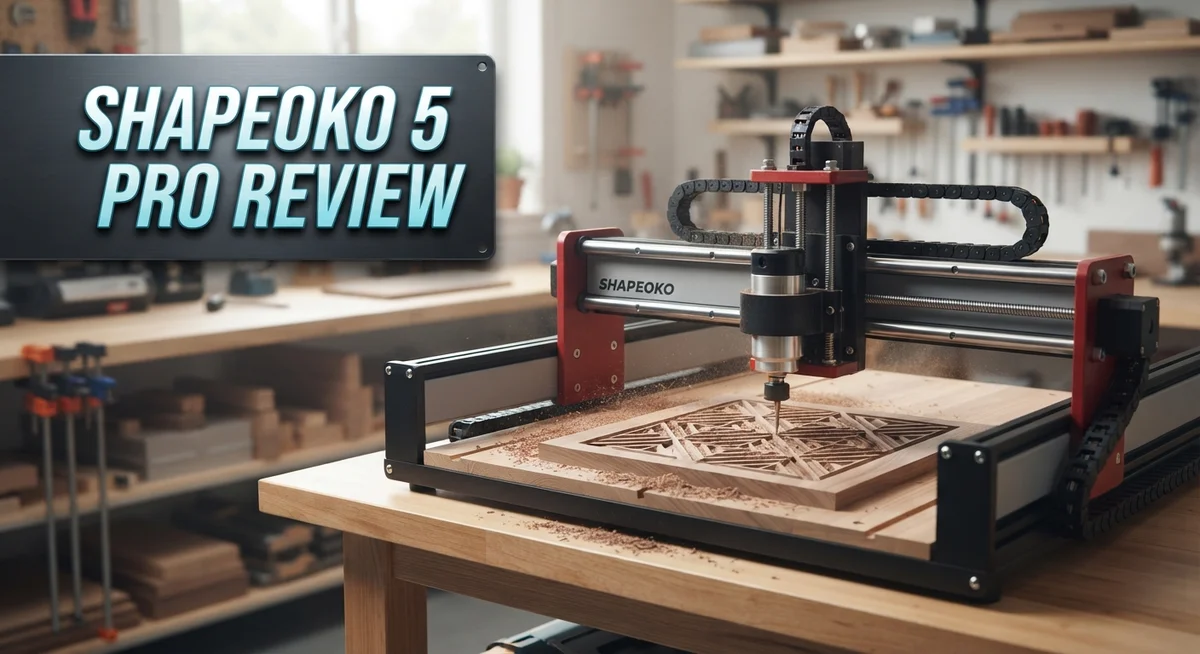
Shapeoko 5 Pro Review: Is It Worth Buying?
Are you searching for a CNC machine that handles real projects without headaches? The Shapeoko 5 Pro might be your answer. This machine builds on years of CNC experience, and it shows.
You get a choice of three work areas. Pick from 2×2, 3×3, or 4×4 feet. Each size fits different shop needs.
The frame uses ball screws and linear rails. This means smooth motion and precise cuts every time. You can shape wood, plastic, and aluminum with confidence.
In a Nutshell
- Complete kit approach: The Shapeoko 5 Pro ships with software and workholding tools included. You skip extra shopping trips for basics.
- Material versatility: This machine cuts wood, plastic, and aluminum with ease. It handles hobby projects and tougher jobs alike.
- Spindle choices: You can pick from different spindle options. This lets you match power to your specific project needs.
- Feed rate ceiling: Top speed caps at 200 ipm. Competitors like the Onefinity Elite Woodworker push 400 ipm, so heavy production runs may feel slower here.
- Motion control gap: This model uses standard stepper control. Rivals with closed loop steppers offer tighter precision feedback during cuts.
- Product maturity concerns: Some users flag this as an established design. They wonder about upcoming refresh cycles compared to newer entrants like the Altmill.
Build Quality and Construction
The Shapeoko 5 Pro stands out for its solid engineering foundation. Every component works together to create a machine that feels stable during operation. The ball screws provide smooth, consistent movement. Linear rails guide the cutting head with precision. This combination keeps your cuts accurate across thousands of hours of use.
The frame design reflects years of user feedback. Craftspeople appreciate how the gantry moves forward past the edge of your work surface. This feature opens up new possibilities for furniture makers. You can cut pieces that extend beyond the table. The machine handles these unconventional setups without sacrificing stability.
Build quality shows in the details. The structural elements resist vibration during heavy cutting passes. Aluminum components stay lightweight while maintaining rigidity. The overall assembly feels professional, not flimsy or cobbled together. Users report that the machine holds tolerances well over time. This means your projects stay consistent from day one to year five.
The construction approach emphasizes reliability over flashy features. You won’t find unnecessary complexity hiding inside. Every part serves a clear purpose. This straightforward design makes maintenance simple. When something needs adjustment or replacement, you can reach it easily.
One consideration stands out for serious makers. The feed rate maxes out at 200 ipm. Competitors push 400 ipm on similar machines. This slower speed means longer cutting times on large projects. For detailed work and intricate designs, the difference matters less. For high volume production, you’ll notice the pace difference.
The machine uses standard stepper motor control. Other options in this category now offer closed loop systems that correct for missed steps automatically. The Shapeoko 5 Pro takes the traditional approach. This works perfectly fine for most applications. It simply means you need to respect the machine’s limits and avoid pushing too hard too fast.
Overall, the construction delivers what beginners and experienced makers need. Durability and ease of use combine effectively here. The machine won’t let you down when you have real work to complete.

- All-Aluminum Structure & Enhanced Stability: Engineered with an all-metal framework and linear rail...
- Upgraded Dust-Proof Controller & User-Friendly Design: Features a compact, dust-resistant controller...
Last update on 2026-10-21 / Affiliate links / Images from Amazon Product Advertising API Some of the links on this website are affiliate links, which means that at no additional cost to you, I earn a commission if you click through and make a purchase. I only recommend products and services that I believe will add value to my readers. Thank you for your support!
Work Area and Material Compatibility
The Shapeoko 5 Pro gives you three work area options to match your project needs. You can choose between 2×2 ft, 3×3 ft, or 4×4 ft configurations. This flexibility means you pick the size that fits your space and ambitions.
Material compatibility spans a wide range of common shop materials. Wood cuts beautifully on this machine, making it ideal for furniture, signs, and decorative pieces. Plastic materials work well too, whether you’re cutting acrylic, POM, or other engineering plastics. Aluminum is also within reach, though you’ll want to dial in your feeds and speeds carefully for best results.
The work area design includes a clever advantage that furniture makers appreciate. The gantry moves forward past the front edge of the table. This means you can flip your stock and cut both sides without repositioning it on the machine. That’s a real time saver for production work.
Stock thickness capacity matters for your project planning. The Z axis clearance accommodates material heights up to around 4 inches in most configurations. This opens doors for thicker blanks and multi-pass operations without repositioning.
The spindle options let you optimize for different materials. A standard spindle handles most wood and plastic work efficiently. Upgrading to a higher horsepower option gives you more cutting power when tackling aluminum or harder materials. You choose based on what you plan to cut most often.
Feed rate performance maxes out at 200 ipm, which is slower than some competitors. Onefinity Elite models reach 400 ipm, for example. However, this doesn’t mean the Shapeoko 5 Pro cuts slowly in practice. The difference shows up mainly in rapid movements between cuts, not in actual material removal speed.
The ball screw and linear rail construction handles repeated passes through all these materials reliably. You won’t experience significant deflection or wear that degrades cut quality over time. This durability matters when you’re running multiple projects month after month.
Cutting Performance and Feed Rates
The Shapeoko 5 Pro delivers consistent cutting results across its three work area configurations. You get options ranging from 2×2 feet up to 4×4 feet, so you can pick the size that matches your typical projects.
Feed rates on this machine max out at 200 inches per minute. This speed works well for most hobby and semi-professional shops. However, competitors like the Onefinity Elite Woodworker push 400 ipm, which means faster production runs on larger batches.
The ball screw and linear rail construction keeps cuts precise across repeated passes. Wood responds beautifully to this setup, producing clean edges and smooth surfaces. Plastic cuts cleanly without excessive melting or chipping when you dial in the right speeds.
Aluminum cutting performance stands as a real strength here. The rigid frame minimizes vibration, which matters tremendously when working with softer metals. You’ll notice less chatter and better surface finishes compared to machines with less stable platforms.
Material thickness handling depends on your spindle choice and bit selection. Standard bits work great for typical stock up to 1 inch thick. Specialty bits and extended flute options open up thicker material possibilities.
The gantry design offers a practical advantage that many users overlook. The forward-moving gantry lets you access material edges more easily than machines where the gantry stops at the frame boundary. Furniture makers particularly appreciate this when working on larger panels.
Motion control uses standard stepper motors rather than closed-loop systems. This means occasional missed steps can happen under extreme load, though most users never encounter this in normal operation. The trade-off keeps the machine accessible for beginners while delivering reliability for everyday cutting tasks.
Real world performance shows this machine handles production work steadily. You won’t set speed records compared to premium industrial options, but you’ll get reliable, repeatable results. The construction quality ensures your cuts stay consistent whether you’re on your first project or your hundredth.
Top 3 Alternatives
Carbide 3D Nomad

- EASY-SWAP BATTERY DESIGN
- PATENTED SMART REG – Patent US20180362129A1
Last update on 2026-10-21 / Affiliate links / Images from Amazon Product Advertising API Some of the links on this website are affiliate links, which means that at no additional cost to you, I earn a commission if you click through and make a purchase. I only recommend products and services that I believe will add value to my readers. Thank you for your support!
Inventables X-Carve

Last update on 2026-10-21 / Affiliate links / Images from Amazon Product Advertising API Some of the links on this website are affiliate links, which means that at no additional cost to you, I earn a commission if you click through and make a purchase. I only recommend products and services that I believe will add value to my readers. Thank you for your support!
Glowforge Pro

- Bring Your Ideas To Life - Glowforge Aura is a compact 6W, 450nm diode beginner friendly laser...
- Big Projects, Small Footprint - More than a wood laser engraver, Aura's spacious 12 x 12 inch...
Last update on 2026-10-14 / Affiliate links / Images from Amazon Product Advertising API Some of the links on this website are affiliate links, which means that at no additional cost to you, I earn a commission if you click through and make a purchase. I only recommend products and services that I believe will add value to my readers. Thank you for your support!
Software, Support, and Included Accessories
Carbide Create software comes included with your Shapeoko 5 Pro purchase. This tool handles design import and toolpath generation without requiring a separate subscription. You can work with DXF, SVG, and other common file formats. The learning curve stays gentle for newcomers while offering enough depth for experienced users.
Motion control software runs on Windows, Mac, or Linux machines. Setup involves connecting your computer to the machine via USB. The interface shows real time feedback during cuts. You can pause, resume, or stop operations at any moment without losing your place.
US based customer support stands as a significant advantage. Questions about setup, software, or mechanical issues get answered by people familiar with your exact machine. Response times typically stay faster than overseas support options. Technical documentation includes video tutorials alongside written guides.
The package includes essential workholding accessories right out of the box. Clamps and hold downs come standard, so you start cutting immediately without extra purchases. This approach removes the frustration of discovering missing pieces after delivery. Many competitors require separate accessory orders before you can begin projects.
Carbide Create integrates smoothly with the motion control software. You design your project, generate toolpaths, and send them to the machine without switching between multiple programs. This workflow keeps everything organized and reduces confusion during setup.
Support extends beyond software into mechanical troubleshooting. Users report helpful guidance on spindle selection, bit recommendations, and material specific settings. The community forum provides peer to peer assistance alongside official channels.
One consideration: this software ecosystem reflects the machine’s maturity as a product. Carbide Create receives regular updates, but users occasionally request additional features found in premium CAM packages. For hobby makers and small shops, included capabilities prove more than sufficient. Professional shops running high volume production might explore advanced CAM alternatives, though many Shapeoko users stick with Carbide Create for its simplicity and reliability.
Setup and Learning Curve for Beginners
Getting started with the Shapeoko 5 Pro is straightforward, even if you’ve never used a CNC machine before. The machine arrives as a complete package with everything you need to begin your first project.
Assembly takes most beginners around 4 to 6 hours. Carbide Precision provides clear video guides that walk you through each step. The instructions focus on mechanical setup first, then software configuration. You’ll mount the gantry, install linear rails, and connect the spindle before powering anything on.
The learning curve flattens quickly once you understand the basic workflow. Carbide Create software handles design and toolpath generation on your computer. The motion control software then sends those instructions to the machine. Both programs run on Windows, Mac, or Linux, so your existing computer works fine.
New users typically spend their first week learning software basics. Carbide Create uses a familiar interface similar to other design tools. You import or draw your design, select your material and bit, then generate toolpaths. The software shows you exactly what the machine will cut before it starts.
Mechanical setup involves understanding your workholding options. The package includes clamps and a spoilboard system that works for most common projects. Wood projects need different holding strategies than aluminum, but the included accessories cover both scenarios well.
Support plays a major role in your learning experience. The US based support team responds to questions about setup, software, and troubleshooting. This matters tremendously when you hit your first snag. Many beginners find that one quick support call accelerates their confidence dramatically.
Your first few projects should be simple. Start with wood. Simple rectangular cuts teach you how the machine moves and sounds. Avoid complex aluminum work until you’ve completed at least three wood projects.
The machine’s maturity as a product means plenty of community content exists online. Forums, YouTube channels, and user groups share beginner tips constantly. This community knowledge base helps you avoid common mistakes that other new users have already solved.
Pros and Cons
Pros
- High build quality with ball screws and linear rails that deliver consistent, precise cuts
- Complete package includes Carbide Create software, motion control, and workholding accessories right out of the box
- US based support team handles both software questions and mechanical troubleshooting
- Gantry moves forward past the edge, giving you a real advantage for furniture making and larger workpieces
- Beginner friendly with a straightforward assembly process and plenty of online community resources
Cons
- Maximum feed rate of 200 ipm falls behind competitors who offer 400 ipm, which means slower cutting speeds on some jobs
- Uses standard stepper motors instead of closed loop motion control, so you don’t get the automatic position correction that newer systems provide
- Established product with questions from users about when the next refresh cycle might arrive
Who Should Buy It
The Shapeoko 5 Pro works best for makers who want a complete, ready-to-go system. You get software, hardware, and support all together from day one.
If you’re a furniture maker or woodworker, this machine shines. The gantry moves forward past the edge of your work surface. This means you can cut larger pieces and create detailed furniture designs without hitting limitations.
Hobbyists and small shop owners find real value here too. You don’t need to hunt for compatible software or figure out workholding solutions separately. Everything arrives ready to use. Assembly takes a few hours, and then you’re actually making things instead of troubleshooting.
The Shapeoko 5 Pro suits people who appreciate US-based support and community resources. When questions come up, you reach a team that speaks your language and understands your machine deeply. The established product means thousands of projects, tutorials, and solutions exist online already.
This machine fits your needs if you work with wood, plastic, and aluminum. You get consistent, precise cuts across these materials thanks to the ball screws and linear rails inside.
However, skip this machine if you need maximum speed above all else. The 200 ipm max feed rate runs slower than some competitors offering 400 ipm. Fast production shops might feel frustrated by this limitation.
Also reconsider if you demand cutting-edge motion control technology. Closed-loop systems exist on competing models. The Shapeoko 5 Pro uses open-loop steppers, which work reliably but lack some advanced features newer machines offer.
Beginners benefit most from this choice. The straightforward assembly process, included accessories, and friendly software remove common obstacles. Your first week focuses on learning software basics rather than wrestling with setup problems.
The Shapeoko 5 Pro becomes the right pick when you value a complete package, solid support, and proven reliability over bleeding-edge specifications. You get a machine that works, community help when needed, and accessories ready to go.
Final Verdict
The Shapeoko 5 Pro earns its place as a trusted name in desktop CNC machines. Carbide 3D built a reputation over many years. That history matters when you invest time into learning a new tool.
Reliability stands out as the biggest reason to choose this machine. You get a system that works as promised, backed by a company that answers your calls.
Competitors like the Onefinity Elite Foreman push harder on raw speed. The Onefinity Elite Woodworker adds closed loop steppers for tighter motion control. The Altmill appeals to buyers willing to wait longer for delivery.
Each option brings something different to the table. Your choice depends on what you value most in a machine.
If speed matters more than anything else, look elsewhere. If you want a proven system with strong backup, the Shapeoko 5 Pro delivers.
Think about your long term goals before deciding. Are you building a hobby shop or scaling toward small business production? This machine handles both scenarios well.
Many owners stick with Carbide 3D for years because the ecosystem keeps growing. Software updates, new accessories, and community tips add value over time.
That kind of ongoing support turns a single purchase into a lasting relationship with your tool. Few competitors match this level of long term backing.
The Shapeoko 5 Pro won’t win every spec comparison. It doesn’t need to. It wins on trust, consistency, and real world usability.
Choose this machine if you want peace of mind alongside solid performance. Choose a competitor only if a specific feature outweighs everything else for your work.
For most makers, the balance this machine strikes feels right. It rewards patience during setup with years of dependable service afterward.
That tradeoff makes sense for anyone serious about CNC work. The Shapeoko 5 Pro remains a smart, dependable choice in a crowded market.
Frequently Asked Questions
What work area sizes does the Shapeoko 5 Pro come in?
The Shapeoko 5 Pro gives you three options: 2×2 ft, 3×3 ft, and 4×4 ft work areas. Pick the size that matches your typical projects. Smaller machines fit tight workshop spaces. Larger models handle bigger stock and furniture pieces without multiple setups.
Can I cut aluminum with this machine?
Yes, absolutely. The Shapeoko 5 Pro handles wood, plastic, and aluminum. You’ll get clean cuts in all three materials. The ball screws and linear rails keep things stable during aluminum work. Just use the right feeds and speeds for metal, and you’re good to go.
How does the feed rate compare to other CNC machines?
The Shapeoko 5 Pro maxes out at 200 ipm. Some competitors hit 400 ipm, which means faster cutting on certain jobs. That said, 200 ipm is plenty for most hobby and small shop work. You trade raw speed for build quality and included software, which many makers prefer.
Does it come with software and workholding?
Yes. The package includes software and workholding accessories. You don’t need to hunt down extras before you start your first project. This makes setup faster and keeps you cutting sooner. US based support helps if questions pop up with either the software or hardware side.
What makes the gantry design special for furniture makers?
The gantry moves forward past the edge of your work surface. This matters when you’re making furniture or handling large panels. You can cut all the way to the edge without stopping. It’s a real advantage over machines where the gantry stops at the table boundary.

Hi, I’m Amelia Thornton, the founder of ElectroPro.blog.
I write about smart devices, gadgets, electronics, and tech essentials from Amazon.
My goal is to help you discover reliable and innovative tech that truly makes life easier.
From home automation to everyday gear, I test and share what’s worth your investment.
Join me as I explore the smartest tech trends—one gadget at a time.