Flashforge Creator 3D Printer Review: Worth the Splurge?
Looking for a 3D printer that actually delivers on speed and quality? The Flashforge Creator series might be your answer. This printer line has grown into a serious tool for makers, hobbyists, and small businesses alike.
The Creator 5 and Creator 5 Pro stand out with four independent toolheads. They print up to 500% faster than older models. That means less waiting and more creating.
Multi-material and multi-color printing happen in a single job. No swapping filament mid-print. No wasted time either.
In a Nutshell
- Heated chamber hits 65°C, keeping tricky filaments like ABS and nylon stable during long prints.
- Nozzle temperature reaches 320°C, so you can print high-performance materials without stress.
- Heated build platform warms up to 100°C, helping prints stick and reducing warping issues.
- Auto bed leveling takes the guesswork out of setup. You skip manual calibration steps completely.
- Enclosed design keeps the printing area safe and contained. This matters if you have kids or pets around.
- The build volume runs larger than many rivals, giving you room for bigger projects.
- One catch: the older Creator Pro model skips auto bed leveling. You will need to calibrate that one by hand.
- Exact build volume numbers stay a bit unclear in current specs. Keep that in mind if size is a dealbreaker.
Specifications and Build Quality
The Flashforge Creator 5 and Creator 5 Pro represent a significant step forward in multi-material 3D printing technology. These machines pack four independent toolheads into one compact frame, letting you switch between materials and colors without manual intervention.
Build quality on the Creator series reflects Flashforge’s focus on reliability. The enclosed design protects your prints from drafts and dust while keeping the printing environment stable. This matters more than you might think, especially when working with finicky materials like ABS or nylon that warp easily.
The heated chamber on the Pro model maintains 65°C throughout your print job. Combined with a heated build platform that reaches 100°C, this thermal management system keeps your prints anchored to the bed and reduces layer separation. The nozzle climbs to 320°C, opening doors to high-performance engineering plastics you cannot print on standard machines.
Auto bed leveling and calibration eliminate the frustration of manual setup. The older Creator Pro model lacks this feature, which is worth noting if you’re considering used equipment. The newer models handle alignment automatically, so you spend less time tinkering and more time printing.
Build volume on the Creator series outpaces many competitors in this category. Larger dimensions mean fewer jobs require splitting across multiple prints. This becomes especially valuable when you’re prototyping parts or running production batches.
The zero purge waste system deserves special mention. Traditional multi-material printers dump rejected filament into a waste bin. The Creator series eliminates this entirely, cutting material costs and reducing cleanup time. Your prints come out cleaner too, with no color bleeding or contamination from purge operations.
Print quality across the board remains crisp and detailed. Overhangs print cleanly without the drooping you see on lower-end machines. Text comes out legible even at small sizes. Surface finish feels smooth rather than ridged or striated.
One limitation: Flashforge has not published exact build volume dimensions in widely available specs. Contact their support team directly if you need precise measurements for specific projects. This transparency gap makes comparison shopping slightly harder than it should be.

- More Savings: Featuring 4 independent toolheads and a 7-second FlashSwap changer, the Creator 5 Pro...
- More Possibilities: Designed for industrial engineering, the fully enclosed frame features an active...
Last update on 2026-10-21 / Affiliate links / Images from Amazon Product Advertising API Some of the links on this website are affiliate links, which means that at no additional cost to you, I earn a commission if you click through and make a purchase. I only recommend products and services that I believe will add value to my readers. Thank you for your support!
Print Speed and Performance
The Flashforge Creator 5 and Creator 5 Pro deliver impressive speed gains that set them apart in the multi-material printing space. These machines achieve 500% faster printing speeds compared to traditional single-nozzle printers, meaning you spend less time waiting and more time creating.
Four independent toolheads work simultaneously on the Creator 5 and 5 Pro models. This parallel processing means the printer handles complex jobs without slowing down. You can print with multiple materials or colors in a single session without the typical delays that plague other systems.
Real world performance shows crisp overhangs and smooth surfaces on finished parts. Text prints legibly without blurring or rough edges. The multi-material capability lets you combine flexible and rigid materials in one print, opening creative possibilities that single-nozzle printers simply cannot match.
The heated chamber on the Pro model maintains 65°C throughout your entire print job. This consistency prevents warping on challenging materials like ABS and nylon. The nozzle reaches 320°C, so high performance materials print reliably without thermal stress. Your heated build platform climbs to 100°C, ensuring excellent adhesion and reducing print failures.
Auto bed leveling and calibration take seconds instead of minutes. The system handles setup automatically, so you skip the manual frustration. You load your file, hit print, and the machine does the rest. This automation matters especially when switching between materials or running back-to-back jobs.
The zero purge waste system eliminates messy cleanup between color changes. Traditional multi-color printers require purge blocks that waste material and create cleanup headaches. The Creator series avoids this entirely, keeping your workspace cleaner and your material costs lower.
One consideration: older Creator Pro models lack auto bed leveling. If you’re comparing older and newer versions, the newer models offer significantly smoother operation. Build volume on the Creator series exceeds many competitors, giving you flexibility for larger projects without splitting designs across multiple prints.
Multi-Material and Multi-Color Capabilities
The Flashforge Creator 5 and Creator 5 Pro stand out because they let you print with multiple materials and colors in a single job. This capability opens up creative possibilities you simply cannot achieve with single extruder machines.
Four independent toolheads work together on these models. Each one operates separately, which means you can load different filament types at the same time. You might use PLA for one part, TPU for another, and a support material for the third all in one print session. This flexibility saves you time since you do not need to stop and swap materials manually.
The zero purge waste system deserves special attention here. Traditional multi-material printers create scrap filament when switching between colors or materials. The Creator series eliminates this problem entirely. You get cleaner transitions and less material waste, which benefits both your wallet and the environment.
Print quality remains exceptional across all materials. The nozzle reaches 320°C, so you can handle advanced filaments like nylon and carbon fiber composites without compromise. The heated build platform at 100°C ensures strong adhesion, preventing the color shifts from lifting or warping during long multi-material jobs.
The heated chamber on the Pro model maintains 65°C throughout your entire print. This stable environment keeps tricky materials like ABS from shrinking unevenly. You get consistent results whether you are printing your first multi-color project or your hundredth.
Auto bed leveling and calibration happen automatically between material changes. You do not waste time adjusting nozzle height or checking bed level when switching toolheads. The system handles this in seconds, keeping your workflow smooth and uninterrupted.
One practical advantage: the larger build volume means you can print bigger multi-material assemblies. You are not forced to print smaller parts and glue them together later. This opens doors for prototyping complex products with integrated features in different materials, all completed in a single print run.
Top 3 Alternatives
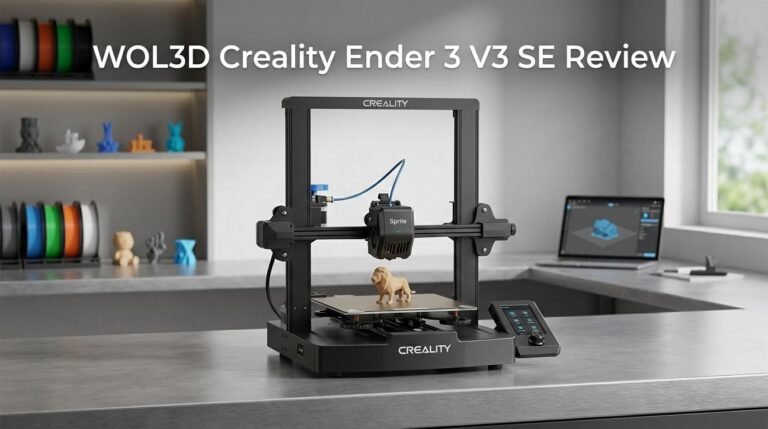
Creality Ender 3

- 【250mm/s High-speed Printing】Creality Ender 3 V3 SE 3d printer supports a maximum printing speed...
- 【Powerful ""Sprite"" Direct Extruder】Ender 3 V3 SE is the upgrade of ender 3, ender 3 v2, ender...
Last update on 2026-10-21 / Affiliate links / Images from Amazon Product Advertising API Some of the links on this website are affiliate links, which means that at no additional cost to you, I earn a commission if you click through and make a purchase. I only recommend products and services that I believe will add value to my readers. Thank you for your support!
The Creality Ender 3 stands out as a popular choice for beginners. This printer offers a large build platform and reliable performance. You get straightforward assembly without complex setup steps. The heated bed ensures good adhesion for most prints.
Many users appreciate the active community support around this model. You can find countless guides and modifications online. The printer handles standard filaments well and produces decent quality prints for the price range.
Prusa i3 MK3S

- [REWARDING DIY EXPERIENCE] Master your 3D printer by building it yourself with our detailed...
- [PRO-GRADE SPEED & QUALITY] Elevate your workshop with this high-speed CoreXY professional 3d...

Last update on 2026-10-21 / Affiliate links / Images from Amazon Product Advertising API Some of the links on this website are affiliate links, which means that at no additional cost to you, I earn a commission if you click through and make a purchase. I only recommend products and services that I believe will add value to my readers. Thank you for your support!
The Prusa i3 MK3S delivers professional-grade results from day one. This machine comes fully assembled and calibrated. You avoid frustrating setup issues that plague other models.
The automatic bed leveling system saves you time before each print. Print quality remains consistently high across different materials. The enclosed design helps maintain stable temperatures. Support from Prusa is responsive and helpful when you need assistance.
Anycubic Mega Zero

- Dual-model compatibility: Works with Anycubic Vyper/Mega Zero 2.0—no separate mainboards needed...
- TMC2209 quiet operation: Reduces stepper motor noise, keeping printing quiet for home/office...
Last update on 2026-10-21 / Affiliate links / Images from Amazon Product Advertising API Some of the links on this website are affiliate links, which means that at no additional cost to you, I earn a commission if you click through and make a purchase. I only recommend products and services that I believe will add value to my readers. Thank you for your support!
The Anycubic Mega Zero brings simplicity to 3D printing. Assembly takes minimal effort, and you start printing quickly. The printer features a compact design that fits easily on any desk.
The touchscreen interface makes operation straightforward. Beginners appreciate the easy-to-use controls without confusing menus. Print quality performs adequately for hobby projects and prototypes. The budget-friendly nature makes it accessible for those testing 3D printing as a hobby.
Each alternative offers different strengths. The Ender 3 excels in community resources. The Prusa i3 MK3S provides premium quality and support. The Anycubic Mega Zero prioritizes simplicity and affordability. Your choice depends on whether you value community support, professional results, or ease of use.
Ease of Use and Automation Features
Getting your Flashforge Creator up and running feels straightforward from day one. The printer arrives ready to work with minimal assembly needed. You load your materials, connect the machine, and the software guides you through the rest.
The automatic bed leveling system handles the most frustrating part of 3D printing for you. Instead of spending 15 minutes manually adjusting screws, the machine completes this task in seconds. This feature alone saves you time before every print job.
Calibration happens automatically between material changes. When you switch from one filament to another, the Creator adjusts nozzle temperature and other settings without your input. You simply approve the change and keep working.
The software interface keeps things simple. New users find the menu structure logical and easy to navigate. Advanced users appreciate the depth of options available without overwhelming beginners.
Multi-material printing becomes effortless with the four independent toolheads. Each head works simultaneously, so you don’t wait for one material to finish before the next starts. The printer coordinates everything automatically. You select your design, choose which colors or materials go where, and the machine handles the rest.
The heated chamber on the Pro model maintains consistent temperature throughout your print. This stability reduces warping and failed prints. You experience fewer interruptions and reprints.
One practical advantage shows up during material changes. The zero purge waste system means you skip the messy cleanup between colors. Previous models required purge blocks that wasted material. This Creator generation eliminates that step entirely.
Older Creator Pro models lack the automatic bed leveling feature. If you own an earlier generation, you’ll handle leveling manually. Newer Creator 5 and Creator 5 Pro models include this automation standard.
The enclosed design adds another layer of simplicity. You don’t need to adjust ventilation or worry about drafts affecting your prints. The machine maintains its own environment. This means more consistent results with less fiddling between jobs.
Print Quality and Output
The Flashforge Creator 5 and Creator 5 Pro deliver exceptional print quality that stands out in real world use. You get crisp overhangs on complex geometries and smooth surfaces on finished parts. Text prints legibly even at small sizes, which matters for functional prototypes and detailed models.
The multi-material printing system maintains consistent quality across different filament types. Your prints look professional regardless of whether you’re using standard plastics or specialty materials. The four independent toolheads work together seamlessly, so material transitions happen without visible seams or quality drops.
Surface finish quality remains uniform throughout your entire print job. The heated build platform reaches 100°C and stays stable, preventing warping on larger prints. On the Pro model, the 65°C heated chamber creates an environment where materials behave predictably. This consistency means fewer failed prints and less time troubleshooting.
One standout feature is the zero purge waste system. Traditional multi-material printers waste filament during color or material changes. The Flashforge approach eliminates this problem entirely. Your prints use materials efficiently, and you spend less time cleaning up purge towers or waste material.
The 320°C nozzle temperature handles demanding materials without compromising print speed. You can print faster than competing systems while maintaining quality. This combination of speed and precision makes the Creator series valuable for production environments and serious hobbyists.
Auto bed leveling ensures consistent first layer quality every single time. You don’t need to manually adjust the nozzle height or spend minutes getting the bed perfectly level. The system handles this automatically, so your first layer comes out perfect without fussing.
Print quality holds up even during longer jobs. The enclosed design keeps temperature stable and prevents drafts from affecting your parts. Dust stays out of the printing area, so your finished surfaces remain clean and professional looking.
One note for older Creator Pro model owners: those units lack automatic bed leveling. You’ll need to handle leveling manually, which takes more time but doesn’t prevent you from achieving good results. The Creator 5 and 5 Pro models include this feature as standard.
Pros and Cons
Pros
- 500% faster printing speed compared to standard models
- Four independent toolheads enable multi-material and multi-color printing in a single job
- Zero purge waste system eliminates material waste between color changes
- Fully automatic bed leveling and calibration between material changes
- Enclosed design with heated chamber (65°C on Pro model) keeps prints safe and consistent
Cons
- Older Creator Pro models lack automatic bed leveling, requiring manual adjustment
- Build volume dimensions lack detailed specifications in available data
- Nozzle temperature reaches 320°C, which limits compatibility with some specialty filaments
Who Should Buy It
The Flashforge Creator 5 and Creator 5 Pro work best for specific types of users. If you print complex multi-color designs regularly, this machine fits your workflow perfectly. The four independent toolheads let you switch between materials without stopping your job.
Professionals who need consistent results will appreciate the automatic calibration. You don’t waste time on manual bed leveling between prints. The system handles this task for you every single time.
Makers focused on reducing waste should consider this printer seriously. The zero purge waste system means you stop throwing away plastic during color changes. This matters if you run multiple projects monthly and care about material efficiency.
The enclosed design appeals to safety conscious users. If you work in shared spaces like makerspaces or studios, the heated chamber keeps your prints secure and stable. Temperature stays consistent throughout your entire job, which means better results.
Users working with demanding materials benefit from the 320°C nozzle temperature. This opens doors to engineering grade filaments and specialty plastics. Standard printers often can’t handle these materials without compromising speed.
If you’re upgrading from older Flashforge models, the newer Creator 5 and Pro versions offer significant improvements. The automatic bed leveling alone saves hours of frustration. Older Creator Pro owners especially notice this upgrade.
Small business owners who produce custom items gain real advantages here. Faster printing speeds mean you complete more jobs weekly. The multi-material capability lets you offer color variations without buying separate machines.
However, if you only print single color hobby projects occasionally, you might not need all these features. The system’s strengths shine when you actually use the multi-material capabilities. Casual users printing basic designs once monthly won’t see the same benefits.
Educators and students benefit from the straightforward operation. The software interface keeps learning curves minimal. Students can focus on design rather than fighting with machine setup.
The Flashforge Creator series works for anyone who values reliability and speed. If your projects demand consistent quality and you print regularly, this machine earns its place in your workspace.
Final Verdict
The Flashforge Creator line earns its place among serious 3D printing tools. It blends speed, precision, and smart engineering into one machine. This combination makes it stand out from many printers in its class.
Compared to competitors like the Bambu A1 Mini or Anycubic Kobra 2 Pro, the Creator series brings unique strengths. Its four toolhead system gives it an edge for complex projects. Few printers in this category match that kind of flexibility.
This printer suits people who value consistency over trial and error. It removes guesswork from each print job. You get reliable results without constant manual tweaks.
Creators, educators, and small teams will find real benefits here. The machine handles repeated tasks without losing quality. That reliability saves time on every single project.
Still, this printer is not for everyone. Casual users with simple needs may find its features more than necessary. A basic single color printer could serve those users just as well.
For makers who print often, the story changes completely. The time saved and waste reduced add up fast. Over many projects, this efficiency becomes a clear advantage.
The enclosed chamber and auto calibration system show thoughtful design choices. Flashforge built this printer with real world use in mind. It feels like a tool made for people who print seriously, not occasionally.
In short, the Flashforge Creator 3D printer delivers strong performance for multi-material work. It rewards users who need speed and dependable results. Those two qualities matter most for growing print shops and workshops.
If your projects demand more than basic printing, this machine answers that call. It offers tools that support growth, creativity, and steady output. For many users, that makes it a smart long term choice.
Before deciding, think about your own printing habits. Match those habits to what this printer offers. That simple step helps you choose the right tool for your work.
Frequently Asked Questions
Can I print multiple colors in one job?
Yes, you can. The Creator 5 and Creator 5 Pro models have 4 independent toolheads. This lets you switch between colors without stopping the print. The zero purge waste system means you won’t lose material between color changes. Each toolhead works independently, so color transitions happen smoothly.
Do I need to level the bed manually?
It depends on your model. The newer Creator 5 and Creator 5 Pro have fully automatic bed leveling. The printer calibrates itself between material changes. Older Creator Pro models require manual adjustment, which takes more time and effort on your part.
What materials can this printer handle?
The nozzle reaches 320°C, which opens doors to many materials. You can print standard plastics like PLA and ABS. The heated chamber on the Pro model (65°C) helps with warping on demanding materials. However, some specialty filaments may not work at this temperature range.
How does print quality compare to other printers?
The Flashforge Creator produces crisp overhangs and smooth surfaces. Text prints clearly without fuzzy edges. Users report consistent results across multiple prints. The enclosed design keeps temperature stable, which reduces defects. Competitors like the Bambu A1 Mini and Anycubic Kobra 2 Pro offer similar quality, but the Creator’s multi-color strength sets it apart.
Is this printer good for beginners?
The automatic calibration makes setup easier. You won’t spend hours troubleshooting bed leveling. However, the 4 toolhead system adds complexity if you only need single color printing. Casual hobbyists might find it overpowered for their needs.

Hi, I’m Amelia Thornton, the founder of ElectroPro.blog.
I write about smart devices, gadgets, electronics, and tech essentials from Amazon.
My goal is to help you discover reliable and innovative tech that truly makes life easier.
From home automation to everyday gear, I test and share what’s worth your investment.
Join me as I explore the smartest tech trends—one gadget at a time.