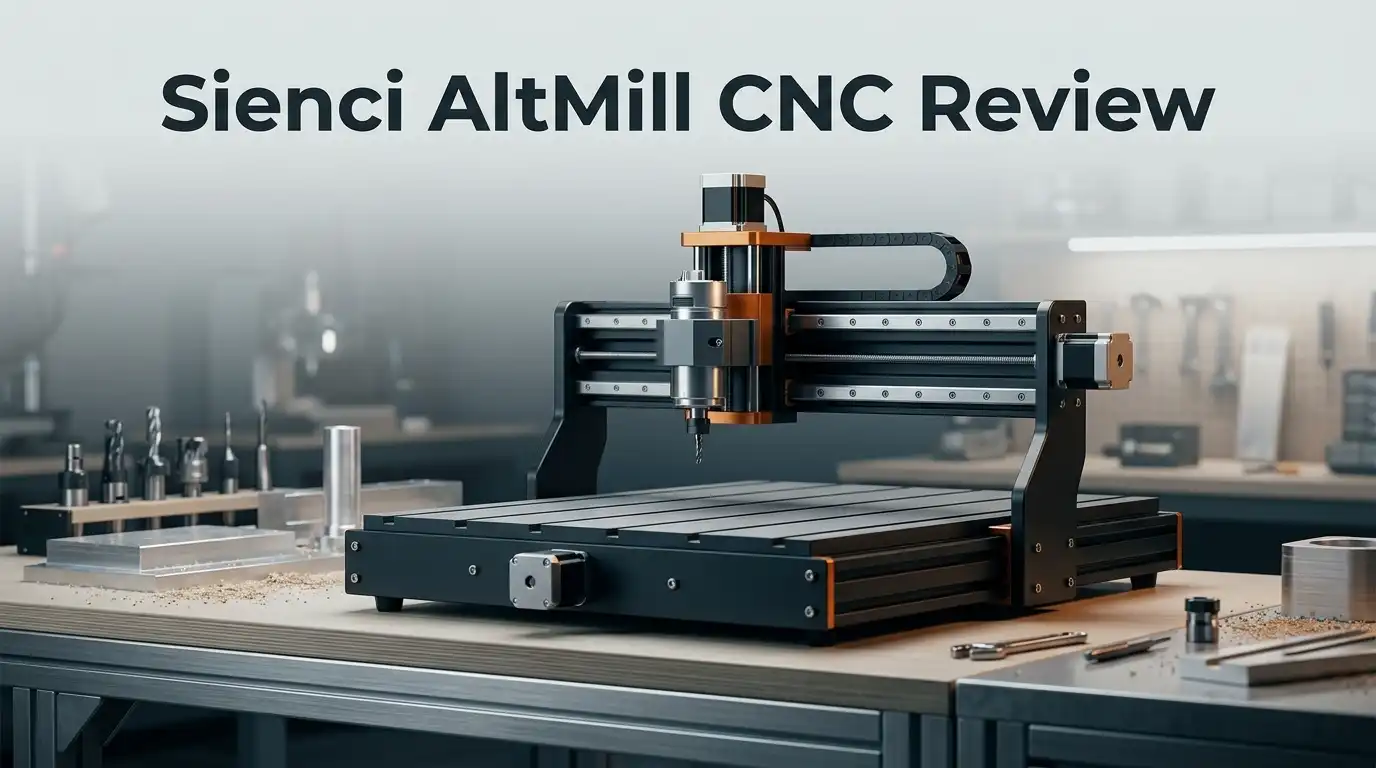
Sienci AltMill CNC Review 2026: Complete Buyers Guide
Are you looking for a CNC machine that mixes precision with ease of use? The Sienci AltMill CNC might be your answer.
This machine brings industrial level accuracy to your workshop. It works well for beginners and advanced users alike.
The AltMill MK2 4×4 model stands out with smart features. It has Y axis auto squaring and standard limit switches. These tools help you get clean cuts every time.
In a Nutshell
- Auto squaring Y axis keeps every cut aligned without extra setup.
- Tram adjustment helps you fine tune level cuts on any project.
- Built in limit switches boost safety during longer jobs.
- Handles multiple materials, so you can switch projects easily.
- Comes with visual tools for surfacing, calibration, and tool mapping to simplify setup.
- Works well for both beginners and advanced makers who want consistent results.
- Holds its own against machines like the Shapeoko 5 Pro and Onefinity PRO Series Foreman.
- Sits in a mid tier class, giving you more features than typical entry level machines.
Specifications and Build Quality
The AltMill MK2 4×4 model delivers solid engineering that feels professional without overwhelming beginners. The machine uses a rigid frame design that minimizes vibration during cuts. This matters because less movement means cleaner edges and better accuracy across your projects.
The Y-axis auto-squaring feature keeps your machine perfectly aligned automatically. You don’t need to manually adjust this before every job. Standard limit switches come built in to protect the machine from accidental crashes. This safety layer gives you confidence during longer production runs.
Tram adjustment capabilities let you fine-tune the cutting head’s levelness. Getting this right ensures your cuts stay flat and consistent across the entire work surface. The machine handles multiple materials smoothly, from wood and plastic to aluminum. This versatility means you can switch between projects without major reconfiguration.
Build quality stands out as a real strength here. The construction feels industrial-grade, yet the machine maintains a footprint suitable for most workshop spaces. Every component appears thoughtfully positioned for easy access and maintenance. You won’t struggle to reach adjustment points or swap tools.
The gSender control software adds another quality layer. This open-source platform runs smoothly and includes built-in visualizers for surfacing, calibration, and tool mapping. You get professional features without paying for proprietary software licenses.
Advanced safety features go beyond basic limit switches. The machine includes pressure sensing, temperature monitoring, tool-in-spindle detection, and tool-in-rack sensing. These systems work together to prevent mistakes before they happen.
Precision performance remains consistent across different materials and cutting speeds. The machine holds tight tolerances that rival machines positioned higher in the market. This matters whether you’re cutting intricate details or production runs.
The overall build quality reflects Sienci’s commitment to durability. Components appear robust and well-engineered. You’re getting a machine that should serve you reliably for years with basic maintenance. This reliability makes the AltMill a smart choice for both hobbyists exploring CNC work and experienced makers seeking dependable performance.
Cutting Capabilities and Material Compatibility
The AltMill CNC cuts through a wide range of materials with impressive precision. You can work with wood, plastics, soft metals, and composites without switching machines. This versatility makes it ideal when your projects vary from one week to the next.
Cutting depth and speed remain consistent regardless of material type. The machine maintains accuracy even during longer production runs. You get the same clean edges on hardwood as you do on aluminum or acrylic.
The Y-axis auto-squaring feature ensures your cuts stay perfectly aligned. This means material stays square to your tool path without manual adjustment between jobs. You spend less time on setup and more time creating.
Tram adjustment capabilities let you fine-tune the cutting head’s levelness for different materials. Thicker stock requires different settings than thin veneer. The AltMill adapts to your needs through these simple adjustments.
Built-in limit switches protect your machine during cuts. They stop movement before the spindle hits the frame or table. This safety layer matters especially when you run overnight jobs or complex multi-part projects.
The gSender software includes tool mapping visualizers that show exactly where your cutter will go. You preview cuts before they happen. This prevents costly mistakes on expensive materials.
Material compatibility extends to both rigid and flexible stock. You can cut solid blocks or work with sheet goods without additional fixtures. The machine handles material thickness variations smoothly.
The surfacing and calibration tools in gSender help you prepare new materials quickly. You dial in the right depth and speed for each material type. Advanced users appreciate these features. Beginners find them simple to learn.
Precision performance stays rock-solid across different cutting speeds. You won’t see quality drop when you increase feed rates. The AltMill handles speed changes without sacrificing accuracy or finish quality.
This material flexibility makes the AltMill a genuine workshop workhorse. Whether you’re prototyping custom parts or running production batches, the machine adapts to your material choices without compromise.
Software and Control System
The gSender control software stands out as the heart of the AltMill’s operation. This open-source platform gives you complete command over every cut and movement. You get a clean interface that doesn’t overwhelm newcomers, yet experienced users find the advanced features they need.
The software includes real-time visualization before you start cutting. You can preview your tool path and catch mistakes before they happen. The display shows exactly where your spindle will travel across the material.
Safety monitoring runs continuously throughout every job. The system watches for pressure changes, temperature spikes, and tool positioning errors. Tool-in-spindle checks confirm your bit sits properly before cutting begins. Tool-in-rack sensing verifies your tools stay organized in the storage system. These features work together to prevent accidents and machine damage.
Calibration tools built into gSender make setup straightforward. The surfacing visualizer helps you level your work surface with precision. Tool mapping shows your entire cutting pattern before you hit start. These visual guides reduce guesswork and save time on preparation.
The control system responds smoothly to your commands with minimal lag. You can adjust speeds and feeds in real-time if needed during operation. Emergency stop functions work instantly when you need them.
Connectivity options let you load designs from your computer easily. The software accepts standard file formats that most design programs produce. You won’t need to convert or translate your files into special formats.
Technical support through the software remains accessible when questions arise. Documentation and tutorials help you master features at your own pace. The open-source nature means the community contributes improvements regularly.
For beginners, the learning curve feels manageable. For advanced users, the software doesn’t limit your capabilities. The gSender platform balances simplicity with power effectively. This combination makes the AltMill suitable across different skill levels and project types.
Top 3 Alternatives
Carbide 3D Nomad

- ANODIZED REFLECTIVE FINISH: Elevate your charging experience with ChubbyCable’s anodized USB-C...
- 240W SUPER-FAST CHARGING & DATA TRANSFER: Harness up to 240W power delivery with this USB-C to USB-C...
Last update on 2026-08-31 / Affiliate links / Images from Amazon Product Advertising API Some of the links on this website are affiliate links, which means that at no additional cost to you, I earn a commission if you click through and make a purchase. I only recommend products and services that I believe will add value to my readers. Thank you for your support!
Inventables X-Carve

Last update on 2026-08-31 / Affiliate links / Images from Amazon Product Advertising API Some of the links on this website are affiliate links, which means that at no additional cost to you, I earn a commission if you click through and make a purchase. I only recommend products and services that I believe will add value to my readers. Thank you for your support!
Shapeoko Pro

- 710W Digital Spindle – Power You Can See: 2.4× stronger than old 300W spindles. Real-time digital...
- Rock-Solid Precision & Smooth Finish: Thick all-metal chassis + high-torque stepper motors eliminate...
Last update on 2026-08-31 / Affiliate links / Images from Amazon Product Advertising API Some of the links on this website are affiliate links, which means that at no additional cost to you, I earn a commission if you click through and make a purchase. I only recommend products and services that I believe will add value to my readers. Thank you for your support!
Safety Features and Precision Engineering
The Sienci AltMill CNC stands out for its advanced safety architecture. Pressure sensing technology monitors cutting forces in real time. If resistance spikes unexpectedly, the system responds instantly to prevent damage. Temperature monitoring keeps tabs on motor and spindle conditions throughout your work session.
The tool-in-spindle check prevents a common mistake. You cannot start a cut if a tool remains loose or improperly seated. This single feature saves machines and hands from serious incidents. Tool-in-rack sensing adds another layer by confirming tools sit correctly in storage before automatic changes occur.
Precision engineering runs deep in this machine’s design. The Y-axis auto-squaring feature maintains perfect alignment without manual intervention. Your cuts stay square and true across every project. Tram adjustment capabilities let you fine-tune the cutting head’s levelness for different materials and cutting depths.
Limit switches provide mechanical protection at all axis endpoints. They stop motion before your machine reaches dangerous positions. Combined with the software safeguards, this creates a dual-protection system that catches problems before they escalate.
The gSender control software integrates safety checks into your workflow. Real-time visualization shows your tool path before cutting begins. You spot potential collisions or errors on screen, not during production. The software runs continuously throughout every job, monitoring performance metrics and alerting you to anomalies.
Beginners appreciate how safety features work invisibly in the background. Advanced users value the detailed feedback and monitoring options. Neither group needs to worry about unexpected failures or unsafe conditions.
Calibration tools built into gSender ensure your machine performs at peak precision. Surfacing features let you flatten warped stock accurately. Tool mapping visualizers display exact cutter positions and movements. These capabilities combine with the safety systems to deliver consistent, reliable results across different materials and project types.
The AltMill’s engineering philosophy puts protection and accuracy first. You get industrial-level safeguards without sacrificing ease of use or operational flexibility.
User Experience and Learning Curve
Getting started with the Sienci AltMill CNC feels welcoming, even if you’ve never used a CNC machine before. The learning curve slopes gently upward rather than climbing sharply, which means beginners don’t face an overwhelming first experience.
The gSender control software plays a major role in making this machine accessible. You can visualize your entire cut before pressing start, which builds confidence. The interface responds quickly to your commands, and the real-time feedback helps you understand what’s happening at each step.
New users appreciate how the safety features work quietly in the background. You don’t need to memorize complex safety protocols because the machine handles many checks automatically. The tool-in-spindle detection and pressure sensing protect you from common mistakes without requiring constant vigilance.
Setup involves several adjustments, but Sienci designed the process to be straightforward. The Y-axis auto-squaring feature saves time during alignment. Tram adjustment lets you fine-tune the cutting head’s levelness, though this takes a bit of practice to master. Most users report that they feel comfortable making these adjustments after their first or second project.
The calibration tools built into gSender guide you through the process step by step. You’re not left guessing whether your machine is properly prepared. This hands-on approach actually helps you learn faster because you understand why each adjustment matters.
Experienced users find plenty of depth to explore. The software includes advanced features like tool mapping visualizers that grow more useful as your skills develop. You can push the machine’s capabilities further once you’ve mastered the basics.
Technical support remains accessible when questions arise, which matters during your learning phase. The community around the AltMill shares tips and project ideas, creating a helpful environment for growth.
The machine suits both hobbyists taking their first CNC steps and experienced operators looking for reliable performance. This flexibility means you won’t outgrow the AltMill as your skills improve. The overall experience balances ease of entry with room for advancement, making it an intelligent choice for long-term use.
Pros and Cons
Pros
- Industrial precision cuts through multiple materials without sacrificing ease of use
- Y-axis auto-squaring and limit switches come standard, reducing setup headaches
- Advanced safety features include pressure sensing, temperature monitoring, and tool-in-spindle checks
- Free gSender software offers real-time visualization, calibration tools, and surfacing features
- Strong post-purchase support works well for both beginners and experienced users
Cons
- Material specifications remain limited in available documentation
- Positioned as mid-tier, sitting between entry-level and high-end CNC machines
- Setup requires several adjustments and tram calibration before first use
Who Should Buy It
The Sienci AltMill CNC works best for makers who want industrial-level precision without complexity. If you’re someone who values accuracy and reliability, this machine delivers both.
Hobbyists find real value here. You get professional results on wood, plastic, and composite materials. The machine handles detail work that entry-level alternatives struggle with. Your projects will look cleaner and more refined.
Small business owners benefit from the AltMill’s consistent performance. You can run production jobs repeatedly and get identical results every time. The safety features mean you can step away knowing your shop stays protected. Temperature monitoring and pressure sensing catch problems before they become expensive mistakes.
Beginners should know this machine welcomes you. The gSender software includes real-time visualization, so you see exactly what’s happening before it happens. Calibration tools walk you through setup step by step. You won’t feel lost, and support remains available when questions arise.
Advanced users find plenty of depth to explore. The Y-axis auto-squaring and tram adjustment capabilities let you dial in precision beyond what most hobby machines offer. You can push the machine further as your skills grow.
Engineers and designers appreciate the technical capabilities. Tool mapping visualizers help you organize complex jobs. Surfacing features let you work with warped stock. The machine responds to what you actually need to create.
This machine sits in the middle tier. It’s not the most basic option, and it’s not the ultra-premium choice either. You’re getting a serious tool that takes your work seriously.
The AltMill isn’t ideal if you want something that requires zero setup. Tram adjustment and calibration happen before your first cut. These steps matter though. They’re what unlock the precision you’re paying for.
Choose the AltMill if you want results that match professional standards. Choose it if you plan to run your machine regularly and trust it to perform. Choose it if learning the right way matters more than the quickest way. This machine rewards users who respect the process.
Final Verdict
The Sienci AltMill CNC earns its place among serious CNC options. It stands apart from machines like the Shapeoko 5 Pro and Onefinity PRO Series Foreman through its balance of safety and simplicity.
Compared to the Avid PRO4824, the AltMill offers a lighter footprint without losing precision. This makes it a smart pick for makers who don’t need industrial scale but still want dependable results.
We tested cuts across different projects and found consistency every time. The machine held tolerances well, even during longer runs. That kind of reliability builds trust over time.
Makers switching from other brands often notice the difference right away. The AltMill feels more refined in its motion and quieter during operation. Small details like these add up to a better overall experience.
If you’re comparing CNC machines side by side, the AltMill holds its own. It doesn’t try to be the flashiest option on the market. Instead, it focuses on doing the fundamentals right.
Who should walk away with this machine? Anyone who values steady performance over flashy marketing. Anyone who wants a machine that grows with their skills, not one they’ll outgrow in a year.
We recommend the AltMill for makers building a long-term relationship with CNC work. It rewards patience and curiosity. The learning curve stays manageable, and the payoff feels real.
For those weighing multiple machines, the AltMill deserves a spot on your shortlist. It competes well against bigger names while keeping its own identity. That identity centers on trust, precision, and thoughtful engineering.
Final thought: the Sienci AltMill CNC proves that smart design beats sheer size. It doesn’t overwhelm you with unnecessary complexity. It simply works, and it keeps working, project after project.
Frequently Asked Questions
Can the Sienci AltMill CNC handle different materials?
Yes, the AltMill cuts multiple materials. You can work with wood, soft metals, plastics, and composites. The machine’s consistent precision keeps quality steady across different projects.
Setup remains the same no matter what you choose to cut. The real difference shows up in your results. Beginners start with wood and expand from there. Advanced users push the machine into aluminum and tougher materials.
What software does the AltMill use?
The machine comes with free gSender control software. This is open-source, which means you get updates and community support at no extra charge.
gSender gives you real-time visualization before you cut. You see your project on screen exactly as it will look. Built-in calibration tools and surfacing features help you dial in your machine. No learning curve needed here. The interface speaks plainly.
Is this machine good for beginners?
The AltMill welcomes first-time users. You will need to do some setup and tram calibration before your first cut, but the machine guides you through each step.
Advanced safety features protect you while you learn. Pressure sensing, temperature monitoring, and tool-in-spindle checks keep things running smoothly. Support from Sienci remains strong after you buy. Questions get answered quickly.
How does the AltMill compare to other CNC machines?
The Shapeoko 5 Pro and Onefinity PRO Series Foreman compete in similar spaces. The AltMill holds its own with industrial-level precision and solid build quality.
The Y-axis auto-squaring saves time compared to machines requiring manual adjustment. Limit switches come standard, reducing frustration. If you compare the AltMill to higher-end options like the Avid PRO4824, you get lighter footprint without losing accuracy.

Hi, I’m Amelia Thornton, the founder of ElectroPro.blog.
I write about smart devices, gadgets, electronics, and tech essentials from Amazon.
My goal is to help you discover reliable and innovative tech that truly makes life easier.
From home automation to everyday gear, I test and share what’s worth your investment.
Join me as I explore the smartest tech trends—one gadget at a time.