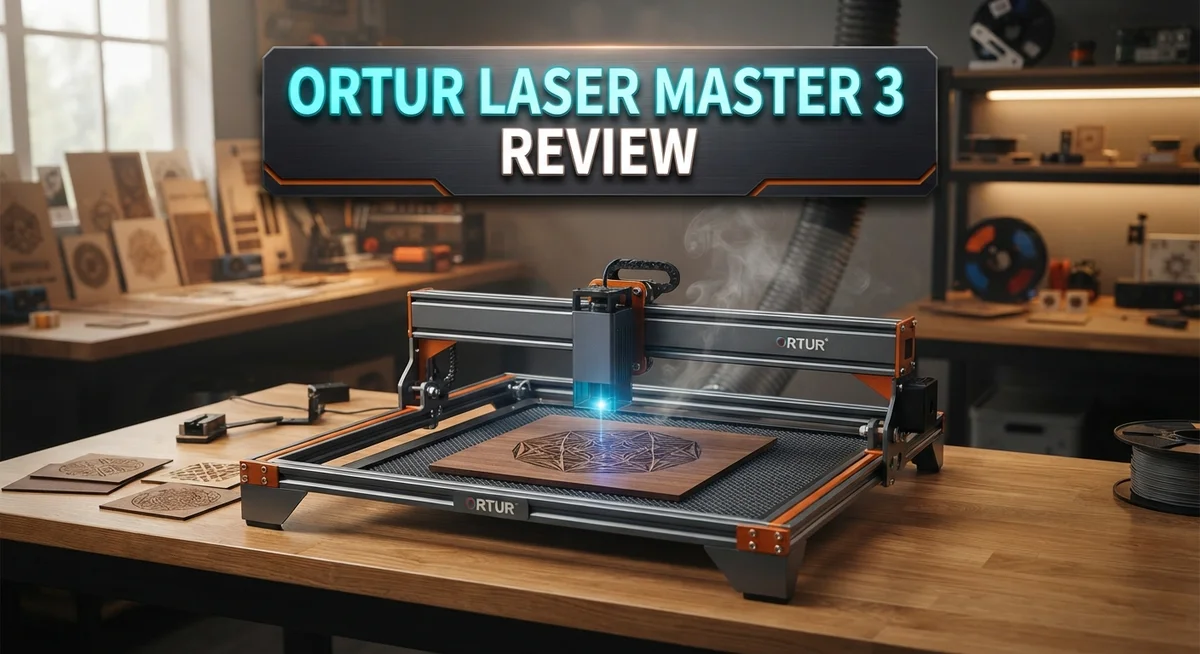
Ortur Laser Master 3 Review: Is It Worth Buying?
Are you searching for a laser engraver that actually delivers on its promises? The Ortur Laser Master 3 might be the answer you need.
This machine comes packed with features that make engraving simple and precise. It works well for hobbyists and small business owners alike.
The Laser Master 3 offers three power options. You can choose 5W, 10W, or 20W based on your project needs.
In a Nutshell
- Easy assembly gets you started fast. Most users finish setup in under an hour without extra tools.
- User adjustable GRBL settings let you fine tune every project. This gives hobbyists and pros more control over their work.
- WiFi functionality adds convenience. You can send designs to the machine without cables getting in the way.
- The machine includes two unused connectors for future upgrades. This means you can grow your setup later without buying a new machine.
- Premium build quality shows in every panel and joint. The frame feels sturdy and holds up well over time.
- On the downside, some users report calibration issues after long use. Bare reflective metal also gives this machine trouble.
- Customer support responses vary in speed and helpfulness. Some users also mention minor build issues out of the box.
- Compared to the xTool D1 Pro, Laser Tree, and IKIER, the Ortur Laser Master 3 holds its own with solid features and room to expand.
Laser Power and Engraving Precision
The Ortur Laser Master 3 delivers impressive laser power across its three configurations. You get options ranging from 5W up to 20W, which means you can match the machine to your specific project needs. Higher wattage translates to faster cutting speeds and deeper engraving marks on tougher materials.
Precision matters when you’re working on detailed designs. This machine achieves 0.01mm accuracy, which is exceptionally tight for a desktop laser engraver. That level of precision lets you create intricate patterns without visible stepping or jagged edges. Your designs come out clean and professional every single time.
The speed capability reaches up to 20,000mm per minute. Fast processing means you spend less time waiting and more time creating. You can engrave wood, metal, acrylic, and tile without swapping machines. The versatility here is genuinely useful for makers who work across different materials.
One thing to note: the machine performs best on non reflective surfaces. Bare reflective metals can cause issues because the laser beam bounces unpredictably. You’ll want to anodize or paint metal surfaces first for reliable results.
The TMC2209 silent motor uses 256x subdivision technology. This keeps vibration minimal during operation, which directly supports that 0.01mm accuracy. Less vibration means steadier movement and sharper final output.
User adjustable GRBL settings give you real control. Instead of being locked into factory defaults, you can tweak power levels, speed, and acceleration for each material. This flexibility helps you optimize results and push the machine’s capabilities further.
Some users report calibration drift after extended use. Regular maintenance and recalibration keep performance consistent. The eight safety features built into the system include USB monitoring, current voltage control, and exposure detection. These protections work quietly in the background while you focus on your projects.
The combination of power options, tight accuracy, and high speed makes this machine genuinely capable for serious engraving work. You get professional results without professional complexity.

- Faster Speed with a Powerful Laser Module: The Ortur Laser Master 3 laser engraver delivers 10,000mW...
- Advanced Spot Compression & Eye Protection: Equipped with advanced spot compression laser...
Last update on 2026-10-13 / Affiliate links / Images from Amazon Product Advertising API Some of the links on this website are affiliate links, which means that at no additional cost to you, I earn a commission if you click through and make a purchase. I only recommend products and services that I believe will add value to my readers. Thank you for your support!
Build Quality and Safety Features
The Ortur Laser Master 3 builds a solid machine from quality materials. The aluminum frame construction resists warping and keeps everything stable during long engraving sessions. You’ll notice the attention to detail in how panels fit together without gaps or loose parts.
Safety features are genuinely comprehensive here. The machine includes eight distinct safety mechanisms working together. USB monitoring lets you watch power levels in real time. Current and voltage controls protect your equipment from electrical spikes. A physical safety lock prevents accidental operation when you’re loading materials.
Exposure detection automatically stops the laser if something blocks the beam path unexpectedly. This matters because it protects both you and your work. The machine won’t fire the laser without proper conditions met. These aren’t just checkboxes on a spec sheet. They actually function during everyday use.
The TMC2209 motor runs quietly thanks to its 256x subdivision technology. You get smooth movement without the annoying hum of cheaper machines. This also means fewer vibrations transferring to your engraving, which keeps precision sharp.
One real world consideration: the machine performs best on non reflective surfaces. Bare metal can bounce the laser beam unpredictably, causing inconsistent results. Wood, acrylic, and coated metals work beautifully. This isn’t a flaw so much as a realistic limitation you should know before buying.
Some users report calibration drift appearing after several months of heavy use. The machine may need recalibration to maintain that 0.01mm accuracy. This seems to happen more often with intensive daily operation rather than casual weekend projects. Regular users should budget time for maintenance checks.
The build quality feels premium throughout. Joints stay tight. Connectors don’t wiggle loose. The overall construction suggests this machine will keep working reliably for years. The two unused connectors hint at future expansion possibilities, showing the designers thought beyond the current model.
Build quality and safety work together here. A well constructed machine naturally handles safety features better. Everything feels intentional rather than rushed.
Speed, Connectivity, and Ease of Use
The Ortur Laser Master 3 moves fast and connects easily to your workspace. Speed reaches up to 20,000mm per minute, which means your projects finish quickly without sacrificing detail.
Connectivity options give you flexibility. The machine supports WiFi functionality, so you can send designs from across the room or even from your computer without cables. USB monitoring lets you track operations in real time. You stay in control of every aspect of your engraving session.
Getting started is straightforward. Assembly takes minimal time, and most users have the machine running within an hour. The interface responds well to commands, and you don’t need advanced technical skills to begin your first project.
The TMC2209 silent motor deserves special mention here. This motor uses 256x subdivision technology, which means the machine operates quietly compared to older laser engravers. You can work in shared spaces without excessive noise disrupting your environment.
One practical advantage: user adjustable GRBL settings let you customize how the machine behaves. You tweak acceleration, speed, and other parameters to match your specific materials and design requirements. This flexibility separates the Ortur from simpler competitors that lock you into fixed settings.
The machine includes two unused connectors for future upgrades. This forward thinking means your investment stays relevant as you expand your capabilities down the road.
A real world note: some users report that the machine performs best on non reflective surfaces. Dark wood, acrylic, and tile work beautifully, but bare reflective metal requires careful handling. This limitation matters if metal engraving is your primary focus.
Calibration can drift after extended heavy use. A few users mentioned needing recalibration after several months of continuous operation. Regular maintenance helps prevent this issue from affecting your work quality.
The combination of speed, wireless connectivity, and quiet operation makes this machine genuinely practical for both hobbyists and small business owners. You get professional results without the professional level complexity.
Top 3 Alternatives
xTool M1 Laser

- NOTE: CMYK Inkjet module and RA3 Lite Rotary are not included in this M2 standalone, available...
- Ultimate Versatility in One Machine: Innovative dual-mode architecture lets the M2 laser engraver...
Last update on 2026-10-21 / Affiliate links / Images from Amazon Product Advertising API Some of the links on this website are affiliate links, which means that at no additional cost to you, I earn a commission if you click through and make a purchase. I only recommend products and services that I believe will add value to my readers. Thank you for your support!
LaserPecker 4 Pro

- Unrivaled 8K Precision & Cutting Power: LaserPecker delivers groundbreaking engraving precision at...
- Unmatched Compatibility with 300+ Materials: Engrave virtually anything you can imagine thanks to...
Last update on 2026-10-21 / Affiliate links / Images from Amazon Product Advertising API Some of the links on this website are affiliate links, which means that at no additional cost to you, I earn a commission if you click through and make a purchase. I only recommend products and services that I believe will add value to my readers. Thank you for your support!
Glowforge Plus

- Bring Your Ideas To Life - Glowforge Aura is a compact 6W, 450nm diode beginner friendly laser...
- Big Projects, Small Footprint - More than a wood laser engraver, Aura's spacious 12 x 12 inch...
Last update on 2026-10-14 / Affiliate links / Images from Amazon Product Advertising API Some of the links on this website are affiliate links, which means that at no additional cost to you, I earn a commission if you click through and make a purchase. I only recommend products and services that I believe will add value to my readers. Thank you for your support!
Material Compatibility and Versatility
The Ortur Laser Master 3 handles a wide range of materials, making it genuinely versatile for different projects. You can engrave wood, acrylic, tile, and certain metals effectively. This flexibility means you’re not locked into one type of work.
Wood is where this machine shines. Whether you’re working with hardwood or plywood, the laser cuts clean lines and produces detailed engravings. The 0.01mm precision ensures your designs come out exactly as planned.
Acrylic works beautifully too. The laser cuts through acrylic sheets smoothly, leaving edges that need minimal finishing. Engraving on acrylic surface creates a frosted appearance that looks professional.
Tile and stone present different challenges. The Ortur Laser Master 3 can mark these materials, though results depend on surface texture. Matte finishes work better than glossy ones for consistent marking.
Here’s where you need to pay attention: bare reflective metal performs poorly. The laser struggles with shiny metal surfaces because they bounce the beam away. Anodized or painted metal works much better. If you need metal engraving, choose treated surfaces or pre coat your material.
The three power options (5W, 10W, 20W) give you flexibility across materials. Higher wattage handles thicker materials and cuts faster. Lower wattage works well for detailed engraving on delicate surfaces.
One practical advantage is the user adjustable GRBL settings. You can fine tune the laser’s behavior for specific materials. This means you’re not stuck with factory defaults. You can optimize speed and power for each material type.
The machine’s speed reaches up to 20,000mm per minute, which helps when working on larger projects. You complete jobs faster without sacrificing detail quality.
For best results, test your specific material first. Different wood types, acrylic thicknesses, and tile finishes respond differently. Start with lower power settings and increase gradually. This approach prevents material damage and helps you find the sweet spot for each project.
The versatility here is real, but success depends on choosing appropriate materials and adjusting settings correctly.
Calibration, Support, and Upgrade Potential
Calibration on the Ortur Laser Master 3 requires attention upfront. The machine arrives with factory settings, but you’ll want to verify alignment before your first project. The good news is that user adjustable GRBL settings give you real control over how the laser behaves. You can tweak power levels, speed, and acceleration directly through the software.
Some users report calibration drift after several months of heavy use. This isn’t unusual for laser machines, but it means checking your focus and beam alignment every few weeks keeps your engraving sharp. The 0.01mm precision stays consistent when you maintain these basic checks.
Customer support from Ortur shows mixed results in real world feedback. Response times vary, and some users experience delays when troubleshooting issues. Before you buy, know that you may need to rely on community forums and YouTube guides as much as official support channels. The active user community does help fill some gaps here.
The upgrade potential is genuinely exciting. The machine includes two unused connectors waiting for future expansion. Ortur has hinted at accessories and enhanced modules, though specific timelines remain unclear. This forward thinking design means your investment won’t feel outdated quickly.
WiFi connectivity adds practical value to upgrades and daily use. You can monitor jobs remotely and adjust settings without standing at the machine. This flexibility matters when you’re running longer projects or managing multiple machines.
One real consideration: the upgrade path depends on Ortur releasing compatible modules. Currently, the connectors sit empty, so you’re not missing features today. But having that infrastructure ready suggests the company plans to expand the ecosystem.
For long term ownership, think about parts availability too. The TMC2209 motor and standard optical components are relatively common in the laser engraving world. This means replacement parts should remain accessible even if Ortur discontinues this specific model eventually.
Start with calibration confidence by running test cuts on scrap material. Document your settings. This baseline helps you spot drift early and keeps your precision where it needs to be.
Pros and Cons
Pros
- Exceptional precision at 0.01mm accuracy makes detailed engravings and cuts possible on intricate designs
- Eight safety features including USB monitoring and exposure detection protect you during operation
- WiFi functionality lets you control projects remotely and monitor progress from your workspace
- Two unused connectors built in mean you can add future upgrades without replacing the machine
- High speed performance at 20,000mm per minute saves time on larger projects
Cons
- Bare reflective metal surfaces produce poor results, limiting your material options for certain projects
- Calibration drift occurs after heavy use, requiring periodic recalibration to maintain accuracy
- Customer support responses vary in quality and speed, which can frustrate you when issues arise
Who Should Buy It
The Ortur Laser Master 3 works best for makers who need precision and reliability. If you engrave wood regularly, this machine delivers excellent results. The 0.01mm accuracy handles intricate designs without frustration.
Small business owners benefit from this laser. You can create custom products quickly with speeds up to 20,000mm per minute. The WiFi connectivity lets you monitor jobs remotely, which saves time when running multiple projects.
Hobbyists who want room to grow should consider this model. The two unused connectors mean you can add upgrades later without buying a new machine. This matters if you plan to expand your capabilities over the next few years.
Artists working with acrylic and wood find great value here. The machine handles both materials beautifully. You get consistent, repeatable results across batches, which is crucial for selling finished pieces.
You should skip this machine if your main focus is bare reflective metal. The laser performs poorly on shiny metal surfaces. If that’s your primary material, look elsewhere first.
This laser suits people who are willing to learn. The user adjustable GRBL settings let you fine tune performance for specific projects. This flexibility rewards experimentation and customization.
Professionals who can’t afford downtime should know about calibration drift. Heavy users report needing recalibration after several months. Plan maintenance into your workflow if you’re running this machine daily.
The Ortur Laser Master 3 appeals to anyone seeking eight built in safety features. USB monitoring and exposure detection protect you during operation. This matters if safety is your top concern.
Team environments work well with this laser too. Multiple users can learn the interface quickly since assembly is straightforward. The machine doesn’t require extensive technical knowledge to operate.
Consider this model if you value upgrade potential and long term ownership. Parts availability and future module compatibility matter here. Check with Ortur about their roadmap before committing.
Skip it if you need immediate, flawless support. Customer service feedback shows inconsistency. You may need to troubleshoot issues independently or wait for responses.
Final Verdict
The Ortur Laser Master 3 stands out as a strong choice for anyone serious about laser engraving. Its silent TMC2209 motor drive keeps noise low during long sessions. This makes it a good fit for home workshops or shared spaces.
The machine also offers user adjustable GRBL settings. Advanced users can fine tune power and speed for specific materials. This flexibility sets it apart from simpler laser engravers on the market.
Compared to the xTool D1 Pro, the Ortur Laser Master 3 holds its own. Both machines target similar users, but Ortur’s upgrade path and safety features give it a slight edge for future proofing.
Build quality feels solid right out of the box. Parts fit together well and the frame stays stable during operation. This attention to detail shows in every cut and engrave.
Overall, this laser cutter earns its reputation. It combines precision, safety, and smart design into one package. Few machines at this level offer the same balance of features.
Should you buy it? If you want a laser that grows with your skills, the answer is yes. The combination of GRBL customization and quiet operation makes daily use enjoyable rather than stressful.
Keep in mind the calibration quirks and reflective metal limits mentioned earlier. These are real considerations, not dealbreakers. Most users find simple workarounds through practice and community support.
The Ortur Laser Master 3 rewards patience and learning. It is not the simplest machine to master, but it delivers results that justify the effort. Makers who invest time into understanding its settings will see the best outcomes.
In short, this laser cutter earns a strong recommendation. It suits hobbyists ready to learn and professionals who want dependable results. Choose it if you value long term growth over instant simplicity.
Frequently Asked Questions
Can I engrave on metal with the Ortur Laser Master 3?
Yes, you can engrave on metal. The machine handles anodized aluminum, steel, and coated metals very well. However, bare reflective metal surfaces produce poor results. The laser light bounces off shiny, untreated metal instead of cutting into it. If metal engraving is your main focus, consider anodizing your materials first or choosing coated metal options.
What materials work best with this laser?
Wood, acrylic, tile, and leather are your best choices. These materials respond beautifully to the laser and produce clean, precise cuts and engravings. The machine excels on natural materials and engineered products. You can also work with rubber stamps, mylar, and fabric. Avoid PVC and vinyl since they release harmful fumes when heated.
How often do I need to recalibrate the machine?
Calibration drift happens after heavy use sessions. Most users report needing recalibration every few weeks of regular operation. The good news is that recalibration takes just minutes once you learn the process. Keep your focus lens clean and check your bed level regularly to extend time between calibrations. Proper maintenance reduces how often you’ll need to recalibrate.
Does the WiFi feature actually work well?
WiFi connectivity lets you send projects from your computer without USB cables. Remote monitoring works smoothly from your workspace. You can track job progress and pause operations if needed. The feature is reliable and adds genuine convenience to your workflow. USB connection remains available as a backup option.
Is this laser suitable for beginners?
Absolutely. Assembly is straightforward, and the software is beginner friendly. You’ll spend time learning, but the machine rewards that effort. User adjustable GRBL settings let you grow your skills over time. The learning curve is manageable for anyone willing to invest a few hours upfront.

Hi, I’m Amelia Thornton, the founder of ElectroPro.blog.
I write about smart devices, gadgets, electronics, and tech essentials from Amazon.
My goal is to help you discover reliable and innovative tech that truly makes life easier.
From home automation to everyday gear, I test and share what’s worth your investment.
Join me as I explore the smartest tech trends—one gadget at a time.