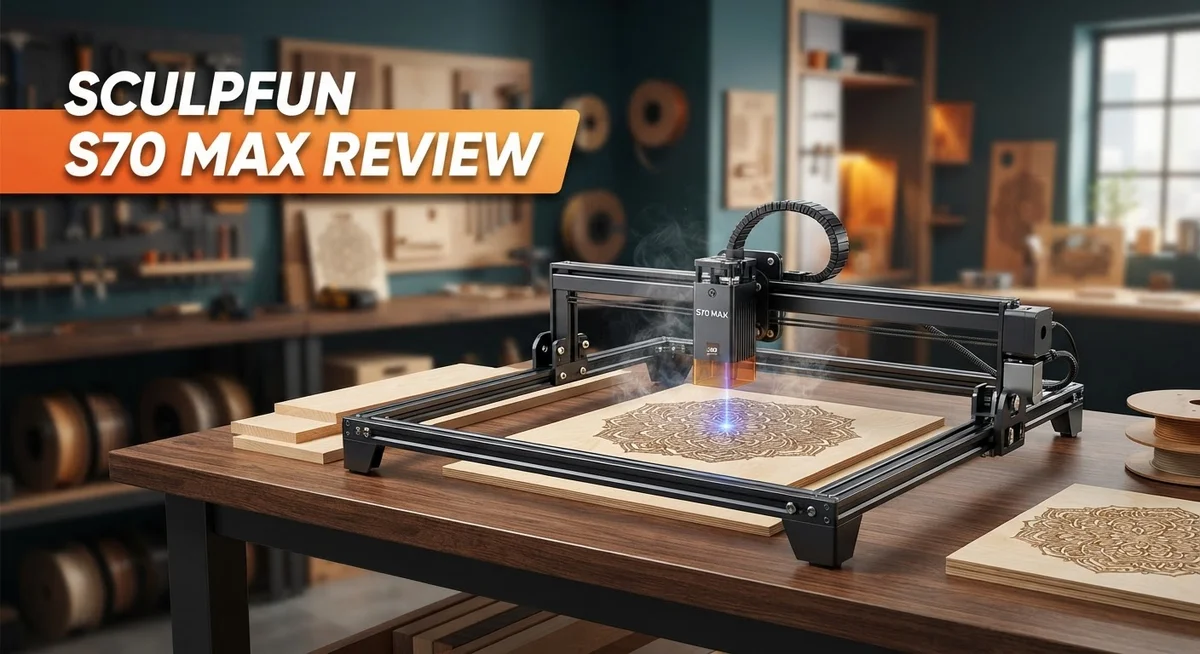
Sculpfun S70 Max Review: 70W Diode Laser Engraver and Cutter
Big projects need big machines. The Sculpfun S70 Max brings a massive 70W diode laser to your workspace. It promises power and precision for makers who dream bigger.
This laser cutter offers a huge working area of 980×1000mm. That means 4.15 times more space than earlier Sculpfun models. You can finally tackle large panels without flipping or repositioning your material.
With 12 diode chips combining for up to 72W, this machine cuts through 20mm plywood with ease. It also handles 30mm paulownia wood and 10mm black acrylic. Your creative options grow instantly.
In a Nutshell
- Speed matters here. This machine marks materials at speeds up to 36,000mm/min, making quick work of detailed designs.
- Wireless and offline control let you run projects without tying up your computer. This adds convenience for busy makers.
- The laser struggles with transparent and white acrylic. This is a common limitation for diode lasers, not just this model.
- Some users report autofocus reliability issues. Double check your focus before starting long projects.
- Early units showed error code 15 failures. Sculpfun has worked to address these reliability concerns.
- Beam divergence increases as material gets thicker. Keep this in mind when cutting dense or layered materials.
- Compared to competitors like the Sculpfun S30 and SF-A9, this machine offers significantly more working space and power for larger builds.
- High contrast engravings make this laser a strong pick for detailed artwork and signage projects.
Laser Power and Cutting Capabilities
The 70W diode laser in the S70 Max represents a significant jump in cutting power for home and small business users. This machine uses 12 individual diode chips working together to deliver consistent performance across your entire project.
Cutting depth varies by material type. You can cut through 20mm plywood cleanly, which opens doors for serious woodworking projects. Paulownia wood cuts up to 30mm thick, making it ideal if you work with softer materials. Black acrylic reaches 10mm depth, perfect for signage and decorative pieces.
The marking speed of 36,000mm/min keeps your production moving fast. This means detailed engravings complete in minutes rather than hours. You spend less time waiting and more time creating.
Air assist technology plays a crucial role here. The system blows compressed air across the cutting path. This reduces burn marks on edges and clears away debris instantly. Your finished pieces look cleaner and require less post processing.
One important limitation exists with material choice. Transparent and white acrylic cannot be cut effectively due to how diode lasers interact with light colors. The laser passes through these materials instead of cutting them. Dark acrylics and opaque materials work perfectly, but keep this constraint in mind when planning projects.
Beam divergence increases as material thickness grows. Thicker materials receive less focused laser energy at the bottom surface. This affects cut quality on the deepest portions of thick materials. Plan your projects with this physics reality in mind.
Some early users experienced autofocus reliability issues. The autofocus system sometimes struggles to find the correct focal distance consistently. Manual focus adjustment can serve as a backup when automation falters.
The working area of 980×1000mm gives you room to think big. You fit larger designs without splitting them across multiple cuts. This workspace advantage matters more than raw power for many creators.
The S70 Max handles both marking and cutting tasks smoothly. Whether you engrave details or cut shapes, this machine delivers results that satisfy beginners and experienced users alike.

- Massive Engraving Bed Size - Boasting a massive 32.7" × 31.5" engraving bed! The S70 Max laser...
- 0.01mm Ultra-Fine Compression Fixed Focus - Adopted advanced spot compression technology to form an...
Last update on 2026-10-21 / Affiliate links / Images from Amazon Product Advertising API Some of the links on this website are affiliate links, which means that at no additional cost to you, I earn a commission if you click through and make a purchase. I only recommend products and services that I believe will add value to my readers. Thank you for your support!
Working Area and Speed Performance
The working area on the S70 Max sets this machine apart from smaller competitors. You get 980×1000mm of usable space, which translates to real freedom for larger projects. That’s roughly 4 times more room than earlier Sculpfun models.
This extra space matters for production work. You can nest multiple designs on one sheet without constant repositioning. Small businesses running batch jobs see the biggest benefit here. The 830×800mm effective cutting area still gives you plenty of room for serious work.
Speed performance directly impacts your workflow efficiency. The S70 Max reaches 36,000mm/min marking speed, which means your laser moves across materials incredibly fast. This speed applies to engraving work especially. You’ll notice the difference when processing detailed designs with lots of lines or patterns.
The 12 diode chips working together deliver this speed without sacrificing quality. Each chip contributes power evenly across the beam, creating consistent results from edge to edge. This matters when you’re working on large pieces where uniform output matters.
Real world cutting speeds vary by material and depth. Plywood at 20mm thickness cuts cleanly, but thinner materials obviously process faster. Paulownia wood at 30mm shows the machine’s capability, though it requires multiple passes for full penetration.
Air assist technology plays a supporting role here. The compressed air stream reduces burn marks and clears debris from the cutting path. This keeps your speed consistent because the laser doesn’t slow down fighting smoke and residue.
One practical consideration: beam divergence increases as material thickness grows. Thicker materials mean the beam spreads more, affecting edge quality. This is a physics limitation of diode lasers, not a design flaw.
Wireless and offline control keep your workflow smooth. You don’t need to tether the machine to your computer for every job. Load your design, start the cut, and your computer is free for other tasks. This flexibility matters when you’re managing multiple projects simultaneously.
Autofocus and Control Features
The autofocus system on the S70 Max aims to simplify your workflow. You don’t need to manually adjust the laser head height for different materials. The machine detects material thickness and adjusts automatically, which saves time during setup.
However, some users have reported autofocus reliability issues. The system occasionally fails to lock onto materials correctly, especially with darker surfaces. This means you may need to manually verify focus before running important projects. Testing your focus on scrap material first is a smart habit.
Wireless control gives you flexibility that desktop machines don’t offer. You can send designs to the laser from your computer or phone without physical cables. This feature works well for small workshops where space matters. Offline control lets you store multiple projects on the machine itself, so you can run jobs without keeping your computer connected.
The control interface responds quickly to commands. Speed adjustments happen instantly when you modify settings mid project. This responsiveness matters when you’re fine tuning engravings or managing different material types in one session.
Beam divergence presents a practical challenge here. As your material gets thicker, the laser beam spreads slightly. This affects cutting precision on materials thicker than 15mm. You’ll notice cleaner cuts on thin materials compared to thick ones. Understanding this limitation helps you plan projects appropriately.
Air assist technology works alongside your autofocus system. The compressed air blows debris away from the cut line while the laser fires. This combination reduces burn marks and keeps your focus point clean. The system operates automatically once you enable it in settings.
Error code 15 failures appeared in some early units. This error typically indicates autofocus sensor problems. Sculpfun addressed these issues in newer batches, but it’s worth asking about your specific serial number before purchase. Checking with the seller about hardware revisions protects your investment.
The control software supports both Windows and Mac computers. USB and WiFi connections both work reliably. This flexibility means you can integrate the S70 Max into different workshop setups without major complications.
Top 3 Alternatives
xTool M1

- 3-in-1 Versatility: Laser Engraving, Laser Cutting, Blade Cutting: Meet the world's first desktop...
- Powerful Performance with High Precision: Equipped with dual laser head technology, the xTool M...
Last update on 2026-10-21 / Affiliate links / Images from Amazon Product Advertising API Some of the links on this website are affiliate links, which means that at no additional cost to you, I earn a commission if you click through and make a purchase. I only recommend products and services that I believe will add value to my readers. Thank you for your support!
LaserPecker Pro

- Unrivaled 8K Precision & Cutting Power: LaserPecker delivers groundbreaking engraving precision at...
- Unmatched Compatibility with 300+ Materials: Engrave virtually anything you can imagine thanks to...
Last update on 2026-10-21 / Affiliate links / Images from Amazon Product Advertising API Some of the links on this website are affiliate links, which means that at no additional cost to you, I earn a commission if you click through and make a purchase. I only recommend products and services that I believe will add value to my readers. Thank you for your support!
Ortur Laser Master

- [Powerful Cutting with 10000mW Laser Module] Ortur Laser Master 2 Pro S2 equipped with true 10000mW...
- [Precision Engraving with High Efficiency] Ortur Laser Master 2 Pro S2 LU2-10A laser engraving...
Last update on 2026-10-21 / Affiliate links / Images from Amazon Product Advertising API Some of the links on this website are affiliate links, which means that at no additional cost to you, I earn a commission if you click through and make a purchase. I only recommend products and services that I believe will add value to my readers. Thank you for your support!
Engraving Quality and Material Compatibility
The Sculpfun S70 Max excels at creating high-contrast engravings across a wide range of materials. The 12-diode laser module produces clean, detailed marks on wood, leather, fabric, and acrylic surfaces. You’ll notice crisp lines and smooth gradients, especially when working with darker materials that absorb laser energy efficiently.
Material compatibility is where this machine shows real versatility. The S70 Max handles wood beautifully, from thin veneer to thick plywood. It engraves leather with precision, creating detailed designs without scorching. Fabric marking works well for custom apparel and home goods. Acrylic presents an interesting situation here. You can engrave opaque acrylic surfaces with excellent results, but transparent or white acrylic won’t work with diode lasers due to how they interact with light.
The air assist system significantly improves engraving quality on all materials. Compressed air clears debris and reduces burn marks around your design edges. This keeps your engravings looking professional and clean. The system works automatically during your cuts and marks, requiring minimal setup.
One consideration affects deeper engravings: beam divergence increases with material thickness. As you engrave thicker materials, the laser beam spreads slightly, which can soften fine details. This is a natural characteristic of diode lasers and affects the sharpness of very detailed work on dense materials.
The autofocus feature helps maintain consistent engraving depth across uneven surfaces. You simply place your material and let the system adjust. However, some users have reported occasional reliability issues with autofocus, so manual focus remains a useful backup option.
For production work, the large 980×1000mm working area means fewer material repositioning steps. You can engrave multiple items or larger designs in one session. The 36,000mm/min marking speed keeps your workflow moving without sacrificing quality. This combination of speed and working space makes the S70 Max practical for serious engravers who need both precision and efficiency.
Ease of Use for Beginners and Professionals
The Sculpfun S70 Max works well for both newcomers and seasoned operators. The software interface feels intuitive. You don’t need laser experience to start your first project.
Beginners appreciate the straightforward setup process. The machine comes with clear instructions. The wireless control feature lets you operate from a distance, which reduces the learning curve. You can test settings without standing directly at the laser head.
The offline control option adds another layer of simplicity. You prepare your design files on your computer, transfer them, and the machine runs independently. This approach removes complexity from your workflow.
Professional users benefit from the speed and precision. The 36,000mm/min marking speed handles production jobs efficiently. The 12 diode chips work together to deliver consistent results across large projects. Your productivity increases without sacrificing output quality.
The autofocus system simplifies depth adjustments. It reads your material height automatically. You spend less time on manual calibration and more time creating. However, keep in mind that some early users reported occasional autofocus hiccups. This remains something to monitor with your specific unit.
The large 980×1000mm working area reduces repositioning tasks. Professionals handling batch work appreciate this. You fit more designs per session, which streamlines production schedules.
One practical note for both groups: the air assist system requires basic maintenance. You’ll clean filters and check airflow periodically. This upkeep takes minutes and keeps your engraving quality sharp.
The control software supports both Windows and Mac systems. You work on your preferred platform without compatibility headaches.
Material handling feels smooth for everyone. The machine accepts wood, leather, fabric, and certain plastics. Your learning curve shortens because material prep stays simple and consistent.
The beam divergence factor matters more for professionals. Thicker materials show slight beam spread. Experienced users adjust their approach accordingly. Beginners typically work with standard thicknesses where this becomes less noticeable.
Overall, the S70 Max bridges the gap between accessibility and capability. New users get up and running quickly. Professionals gain a machine that keeps pace with their ambitions.
Pros and Cons
Pros
- Largest working area among diode lasers at 980×1000mm, cutting repositioning time significantly
- Creates high-contrast engravings on diverse materials with sharp, clean results
- Air assist system reduces burn marks and debris for cleaner finished pieces
- Marking speed reaches 36,000mm/min, handling production jobs efficiently
- Works smoothly for both beginners and advanced users without steep learning curves
Cons
- Cannot cut or engrave transparent or white acrylic due to diode laser limitations
- Autofocus reliability issues reported by some users in early units
- Beam divergence increases as material thickness grows, affecting deeper engraving precision
- Early production units experienced error code 15 failures requiring replacement or repair
Who Should Buy It
The Sculpfun S70 Max fits several user profiles well.
Small business owners and makers benefit most from this laser. You run a custom engraving or cutting shop? The 980×1000mm working area means you handle larger projects without constant repositioning. Your production speed matters. The 36,000mm/min marking speed keeps jobs moving fast. You’ll finish orders quicker and serve more customers.
Hobbyists who want serious results should consider this machine. You engrave wood, leather, and various materials for personal projects? The high contrast engravings look professional. The air assist system keeps your finished pieces clean without burn marks. Setup is straightforward, so you spend time creating instead of troubleshooting.
Professionals upgrading from smaller lasers find real value here. You currently own a 10W or 20W diode laser? The S70 Max gives you 4.15 times more working space. Your workflow becomes faster. Complex designs that required multiple passes now fit in one go. The autofocus helps maintain consistent depth across your work.
Artists exploring laser work appreciate the versatility. You want to engrave wood, acrylic, fabric, and stone? This machine handles that range. The offline control option lets you work without constant computer connection. Beginners find the process intuitive.
However, skip this if you primarily work with transparent or white acrylic. Diode lasers cannot engrave these materials effectively. You need a CO2 laser instead.
Also reconsider if you require absolute precision on thick materials. Beam divergence increases as material thickness grows, which affects engraving depth accuracy on items over 10mm.
Early reliability concerns exist. Some users reported error code 15 failures. Autofocus reliability varies in early units. Research current user feedback before purchasing.
The Sculpfun S70 Max works best for users who need large working space, consistent production speed, and material versatility. You get a machine that grows with your business or creative practice.
Final Verdict
The Sculpfun S70 Max stands out as a strong choice in the diode laser market. Its size and power set it apart from smaller machines like the S30 or SF-A9.
This laser delivers real results for people who cut and engrave often. The build quality feels solid and the output stays consistent across sessions.
Makers who need one machine for many jobs will find this laser fits the bill. It handles wood, leather, and dark acrylic without trouble.
Some early units showed hiccups with autofocus and error codes. These issues seem tied to first batches rather than the whole product line.
Sculpfun has a track record of fixing bugs through firmware updates. Buyers can expect ongoing support as the product matures.
The learning curve stays low even though this machine packs serious power. New users can start projects within their first session.
Compared to older Sculpfun models, this laser feels like a real step forward. The jump in working area alone makes upgrading worth thinking about.
This machine rewards patience during setup but pays off with strong results. Taking time to test settings on scrap material helps avoid mistakes.
Overall, the S70 Max suits people who plan to grow their laser projects over time. It offers room to experiment with larger designs and thicker materials.
Buyers should weigh the pros and cons based on their own project needs. No laser fits every use case perfectly, and this one has clear strengths and limits.
For most hobbyists and small studios, the pros outweigh the drawbacks by a wide margin. The working area and speed alone justify serious consideration.
If a project calls for engraving clear or white acrylic, this laser will disappoint. Everyone else stands to gain a lot from what the S70 Max offers.
In short, this laser earns its place among top diode options today. It balances power, size, and ease of use in a way few competitors match right now.
Frequently Asked Questions
What materials can the Sculpfun S70 Max cut and engrave?
This laser cuts through wood, plywood, leather, fabric, and rubber with ease. It handles up to 20mm plywood and 30mm paulownia wood. For acrylic, it works on black and colored varieties but cannot cut transparent or white acrylic due to diode laser physics.
Engraving works on anodized aluminum, stainless steel, marble, and stone. You can also mark plastics, cork, and coated metals. The air assist system reduces burn marks on organic materials, giving you cleaner results.
Does the autofocus feature work reliably?
The autofocus system exists on the S70 Max, but early units showed some reliability issues. Some users reported inconsistent focusing, especially on uneven surfaces.
Sculpfun has addressed many of these problems through firmware updates. If you get a recent model, the autofocus performs better than initial batches. For thick materials, manually checking focus before each job gives you more control and precision.
How does beam divergence affect cutting depth?
Diode lasers spread their beam as they travel through thicker materials. This means your cuts become less precise the deeper you go into material.
For shallow engravings (under 5mm), beam divergence barely matters. On thicker jobs, expect some widening of your cut lines. This is a physics limitation of diode technology, not a design flaw. Plan your projects with this in mind, and you’ll get great results.
Can I use this laser offline or with wireless control?
Yes. The S70 Max supports both offline and wireless operation. You can load files directly onto the machine and run jobs without a computer connection.
Wireless control lets you manage the laser from your phone or tablet for convenience. This flexibility works well for small shops and home studios where space is tight.

Hi, I’m Amelia Thornton, the founder of ElectroPro.blog.
I write about smart devices, gadgets, electronics, and tech essentials from Amazon.
My goal is to help you discover reliable and innovative tech that truly makes life easier.
From home automation to everyday gear, I test and share what’s worth your investment.
Join me as I explore the smartest tech trends—one gadget at a time.