xTool S1 Laser Engraver Review: Performance and Comparison
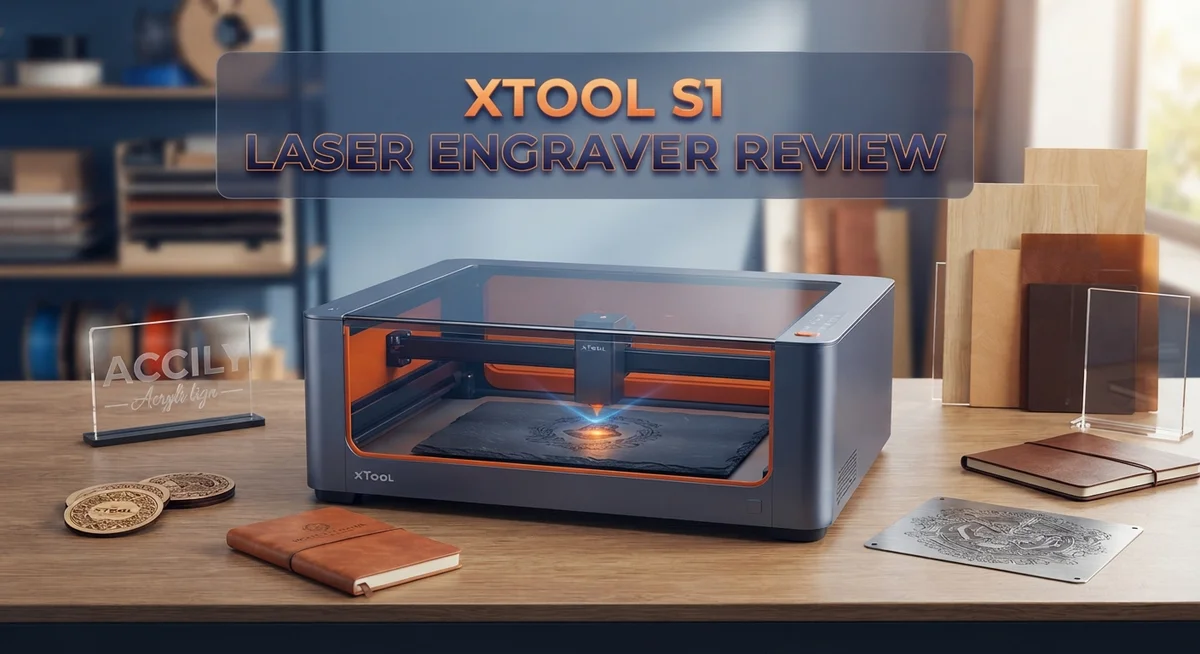
Looking for a laser engraver that keeps you safe and still packs a punch? The xTool S1 might be your answer.
This machine brings a 40W diode laser into a fully enclosed design. You get power and safety in one neat package.
Many diode lasers leave your workspace open and exposed. The S1 changes that game completely. It fits a 385x385mm bed, so you can handle bigger projects with ease. Cutting speeds hit up to 24000mm per minute, which means less waiting and more creating.
In a Nutshell
- Pin-point positioning makes this laser ten times more accurate than single-camera systems. Your designs land exactly where you want them.
- The laser reaches speeds up to 24,000mm/min. This means faster projects without sacrificing quality.
- Autofocus technology adjusts the laser height automatically. You skip manual calibration every time.
- Air assist blows debris away while cutting. This keeps your material clean and your cuts crisp.
- The 3.5 inch touchscreen gives you full control right at the machine. No laptop tether required.
- It handles material up to 30mm thick acrylic, but it cannot cut clear acrylic. Keep this in mind for glass-look projects.
- There’s no built-in camera, unlike some competitors. You will need to align designs manually.
- Compared to CO2 laser cutters, material compatibility is more limited. Still, this diode laser covers most hobbyist and small business needs.
Key Specifications and Laser Power
The xTool S1 packs serious power into a compact diode laser system. Its 40W enclosed diode laser stands as the most powerful option in its class, giving you cutting performance that rivals machines twice its size.
The cutting bed measures 385×385mm, which opens up possibilities for medium to large projects. You can engrave wood, leather, fabric, acrylic, and many other materials without worrying about workspace limitations.
Speed matters when you’re running production jobs or batch orders. This machine reaches 24,000mm/min, meaning your projects finish faster and your workflow stays efficient. The laser moves quickly without sacrificing precision or quality.
One standout feature is the switchable laser module system. You can swap out laser heads depending on what you’re making. This flexibility means one machine handles multiple project types without forcing you to buy separate equipment.
The autofocus technology adjusts laser height automatically as you work. This removes guesswork from the setup process. You spend less time calibrating and more time creating.
Air assist works alongside your cuts. It blows debris away from the cutting line, which improves cut quality and reduces charring on edges. Cleaner cuts mean less finishing work afterward.
Positioning accuracy reaches 10 times better than single-camera systems. The dual camera setup pinpoints exactly where your laser fires. This precision matters most when you’re engraving fine details or working with tight tolerances.
The 3.5 inch touchscreen gives you direct control at the machine. You navigate settings, adjust power levels, and monitor progress without needing a connected computer.
One important limitation: the S1 cannot cut clear acrylic. Diode lasers struggle with transparent materials because the light passes through instead of being absorbed. You’ll need to work with colored or opaque acrylic instead.
Material thickness capacity reaches 30mm for acrylic, giving you substantial cutting depth for dimensional projects. However, diode lasers have narrower material compatibility compared to CO2 alternatives, so always verify your specific material before starting.

- [Unbeatable Power & Productivity] With a powerful 40W (40,000mW) laser, this advanced laser cutter...
- [Exclusive xTool Patented Technologies] Achieve next-level precision on your precious items with the...
Last update on 2026-10-21 / Affiliate links / Images from Amazon Product Advertising API Some of the links on this website are affiliate links, which means that at no additional cost to you, I earn a commission if you click through and make a purchase. I only recommend products and services that I believe will add value to my readers. Thank you for your support!
Cutting Bed Size and Material Compatibility
The 385×385mm cutting bed gives you room to work on projects that need breathing space. You can fit medium to large designs without constantly repositioning your material. This size sits right in the sweet spot for small businesses and hobbyists who want flexibility.
Material compatibility is where the xTool S1 shows both strength and limits. The machine handles wood, acrylic up to 30mm thick, leather, fabric, rubber, and anodized aluminum with solid results. You can engrave on stone, glass, and coated metals too. The diode laser excels at materials with darker surfaces or lower melting points.
Here’s what you need to know: the S1 cannot cut clear acrylic. This is a real limitation if transparent materials are central to your work. The diode laser simply doesn’t have the wavelength to interact with clear acrylic the way CO2 lasers do. You’ll need to stick with colored or opaque acrylic instead.
The switchable laser module system adds flexibility to your material options. You can swap modules based on your project, which means you’re not locked into one laser type. This approach lets you adapt your machine without buying separate equipment.
Compared to CO2 laser cutters, diode lasers have narrower material compatibility overall. CO2 machines cut through more materials with ease. However, the xTool S1 covers the most common materials people actually use for engraving and cutting work.
The autofocus technology helps you work with uneven or textured materials. The laser automatically adjusts its height, so you get consistent results across bumpy surfaces. This feature makes material handling easier and reduces failed cuts.
Air assist improves your results on every material. It blows away debris and smoke during cutting, which means cleaner edges and better visibility. The combination of autofocus and air assist means you spend less time troubleshooting and more time creating.
If your projects focus on wood, colored acrylic, leather, or fabric, the S1 handles them all capably. The material range covers 90 percent of what most makers actually need.
Safety Features and Enclosed Design
The xTool S1 puts safety at the front and center of its design. The fully enclosed structure keeps your hands and eyes away from the laser beam while it operates. This is a major advantage over open frame systems that expose the laser path during cutting.
The enclosed cabinet acts as your first line of defense. It prevents accidental contact with the active laser. You get peace of mind knowing the beam stays contained throughout every job.
Fume extraction happens inside the sealed chamber. Smoke and vapors get pulled away from your workspace before they can escape. This means cleaner air around your machine and less odor in your shop.
The quiet operation is another safety benefit you’ll notice immediately. Diode lasers run much quieter than CO2 systems. You can work for hours without hearing protection, which reduces fatigue and lets you focus on your projects.
The 3.5 inch touchscreen keeps you in control from a safe distance. You monitor your cuts and adjust settings without leaning over the machine. Real time feedback helps you catch issues before they become problems.
Autofocus technology adds another safety layer. The system automatically adjusts the laser height to match your material. This prevents the laser from sitting too close to your work, which could cause unexpected burns or fires.
Air assist continuously blows away debris during cutting. This keeps the cutting area clean and reduces the risk of material catching fire from heat buildup. Cleaner cuts also mean fewer sparks and safer operation overall.
The enclosed design also protects your machine from dust and debris. Your laser components stay cleaner longer. This means better performance and fewer maintenance issues down the road.
The interlock safety system stops the laser if you open the enclosure during operation. You cannot accidentally expose yourself to the beam. This automatic shutdown is a critical safety feature that works every single time.
All these elements combine to make the xTool S1 one of the safest diode laser systems available today. The enclosed design philosophy runs through every part of this machine.
Top 3 Alternatives
Glowforge Pro Laser

- Bring Your Ideas To Life - Glowforge Aura is a compact 6W, 450nm diode beginner friendly laser...
- Big Projects, Small Footprint - More than a wood laser engraver, Aura's spacious 12 x 12 inch...
Last update on 2026-10-14 / Affiliate links / Images from Amazon Product Advertising API Some of the links on this website are affiliate links, which means that at no additional cost to you, I earn a commission if you click through and make a purchase. I only recommend products and services that I believe will add value to my readers. Thank you for your support!
Omtech 40W Laser

- Global Support, Local Care: Our 24/7 global support team delivers expert assistance, including...
- Powerful 45W Laser Performance: Upgraded to 45W, our laser cutter now slices through 0.4" (10mm...
Last update on 2026-10-21 / Affiliate links / Images from Amazon Product Advertising API Some of the links on this website are affiliate links, which means that at no additional cost to you, I earn a commission if you click through and make a purchase. I only recommend products and services that I believe will add value to my readers. Thank you for your support!
LaserPecker 2 Engraver

- Best Choice for Laser Engraving: LaserPecker LP2 Laser Engraver with upgrade galvo technology for...
- 360° Rotary / Mobile Engraving: The versatile electric roller enables "Cylinder mode" on...
Last update on 2026-10-21 / Affiliate links / Images from Amazon Product Advertising API Some of the links on this website are affiliate links, which means that at no additional cost to you, I earn a commission if you click through and make a purchase. I only recommend products and services that I believe will add value to my readers. Thank you for your support!
Precision, Speed, and Autofocus Technology
The xTool S1 laser engraver combines three critical capabilities that make it stand out in the diode laser category: precision, speed, and intelligent autofocus technology working together seamlessly.
Precision starts with positioning accuracy. The S1 uses a dual-camera system that delivers 10 times better accuracy than single-camera alternatives. This means your cuts land exactly where you want them. The pin-point positioning eliminates guesswork when you’re working on detailed projects or intricate designs.
Speed is another major strength. Your machine cuts at up to 24,000mm per minute. This matters when you’re handling multiple projects or batch orders. The 40W enclosed diode laser provides enough power to cut through 30mm acrylic and engrave across numerous materials efficiently. You finish jobs faster without sacrificing quality.
The autofocus technology deserves special attention. This feature automatically adjusts the laser height as you work. Uneven surfaces, textured materials, or warped pieces no longer cause focus problems. The system continuously monitors and corrects positioning throughout your cut. You get consistent results on every pass, whether your material is perfectly flat or slightly irregular.
Air assist technology works alongside these features. It blows away debris in real time during cutting operations. This keeps your cutting line clear and prevents material from catching fire or charring excessively. The combination of autofocus plus air assist means fewer failed cuts and better edge quality.
The 3.5 inch touchscreen puts all these capabilities under your control. You access speed settings, focus adjustments, and positioning data directly at the machine. The 32-bit control system processes commands instantly, so there’s no lag between what you set and what the laser does.
These three elements work together. Precision ensures accuracy. Speed keeps production moving. Autofocus adapts to real-world conditions automatically. Together, they create a laser engraver that handles production work, custom projects, and experimental designs with equal confidence. The result is a machine that’s both powerful and practical for serious makers.
User Interface and Control System
The 3.5 inch touchscreen serves as your command center for the entire machine. It displays real time feedback about your project status and material settings. You navigate menus with simple tap and swipe gestures that feel intuitive even on your first use.
The control system runs on a 32 bit processor that handles complex cutting patterns without lag. This means your designs transfer from software to laser execution smoothly. The screen shows you exactly what the laser will cut before it starts, so you catch errors early.
Connection options keep you flexible with your workflow. You can send files wirelessly or through USB cable depending on your preference. The machine remembers your last settings, which saves time when you run similar projects back to back.
The autofocus feature works through the touchscreen interface. You press a button and the system automatically adjusts the laser head height to match your material thickness. This eliminates the guesswork that older laser machines required. The pin point positioning accuracy means your designs land exactly where you want them on the material.
The user interface includes preset profiles for common materials. These profiles contain optimized power and speed settings for wood, acrylic, leather, and fabric. You can load a profile, adjust if needed, and start cutting. This approach helps beginners avoid the learning curve while giving experienced users full manual control.
Emergency stop buttons sit on the physical machine itself, not just on the screen. This dual control system means you can halt operation instantly if something goes wrong. The touchscreen also displays safety warnings and interlock status so you know the machine is ready to operate.
The control system integrates with the air assist and fume extraction systems. You adjust these settings from the same interface where you control cutting power and speed. Everything connects through one unified system rather than requiring separate controls. This centralized approach reduces confusion and keeps your workspace organized.
Pros and Cons
Pros
- 40W diode laser delivers the most power in its class for faster cutting and cleaner engraving results
- Fully enclosed cabinet keeps you safe while running and protects internal components from dust and debris
- Switchable laser modules let you swap between cutting and engraving heads without buying separate machines
- Fume extraction and quiet operation mean you can work in shared spaces without disturbing others
- Works with wood, colored acrylic, leather, fabric, and many other materials for diverse project options
Cons
- Cannot cut clear acrylic because diode lasers cannot process transparent materials effectively
- No built in camera means you lose the convenience of live preview before cutting
- Diode lasers have narrower material compatibility compared to CO2 laser cutters for specialized applications
Who Should Buy It
The xTool S1 works best for makers who want a laser engraver that fits into tight spaces and shared workshops. The fully enclosed design means you can run it safely in studios, maker spaces, or home offices without constant supervision.
Small business owners love this machine. You can cut and engrave wood, colored acrylic, leather, and fabric quickly. The switchable laser modules let you swap between cutting and engraving without buying two separate machines. This flexibility helps you take on different client projects without extra equipment costs.
Hobbyists and crafters find the S1 perfect for custom gifts and personal projects. The 3.5 inch touchscreen makes it easy to learn. You don’t need advanced technical skills to get started. The preset profiles for common materials remove the guesswork from your first few projects.
Schools and educational programs benefit from this machine too. Students can learn laser cutting basics safely. The enclosed cabinet protects them from the laser beam. The quiet operation means classes can run without disrupting other activities in the building.
Avoid this machine if you need to cut clear acrylic regularly. Diode lasers cannot process transparent materials. You would need a CO2 laser instead. Also, skip the S1 if you want a built-in camera for automatic positioning. This model uses pin-point positioning through the touchscreen, which works well but requires manual setup.
The xTool S1 suits anyone who values safety, versatility, and ease of use over maximum cutting depth. If you work with colored materials and want an enclosed system that runs quietly, this engraver delivers. The 24,000mm per minute speed handles production runs efficiently. The autofocus feature saves time on each project.
Consider your material list before buying. If your projects stick mainly to wood, leather, and colored acrylic, the S1 checks every box. If you occasionally need clear acrylic or thick materials beyond 30mm, look at CO2 alternatives instead.
Final Verdict
The xTool S1 stands out as a smart choice for makers who want power and safety in one package. It brings professional level cutting to home workshops without the bulk of larger machines.
This laser engraver earns its spot among top diode lasers on the market today. The design choices show real thought about user needs and safety concerns.
Compared to the Creality Falcon, the S1 offers a fully enclosed design that many open frame lasers skip. This matters for anyone working near kids, pets, or shared spaces.
The xTool P2 sits above the S1 as a CO2 alternative. It handles clear acrylic and glass, which the S1 cannot process. But the P2 comes with added complexity and space needs.
CO2 laser cutters in general offer broader material support. Yet they often require more setup, ventilation planning, and floor space than most home users can spare.
The S1 skips a built in camera, which some competing machines include for design placement. This might slow down projects that need precise image alignment on finished pieces.
Still, the pin-point positioning system helps bridge this gap. It offers sharp accuracy for engraving tasks even without a camera guide.
For makers focused on wood, leather, fabric, and colored acrylic projects, the S1 delivers strong results. The build quality feels solid and the safety features work as promised.
This machine fits best into workflows where enclosed operation and quiet performance matter most. Home crafters, small shops, and classroom settings all benefit from these traits.
Our final take: the xTool S1 earns a strong recommendation for anyone starting or expanding a laser cutting hobby or business. It balances safety, power, and ease of use better than many diode lasers in its class.
Skip this machine only if clear acrylic cutting sits high on your project list. For everything else, the S1 proves itself as a reliable, capable workhorse ready for daily use.
Frequently Asked Questions
Can the xTool S1 cut through thick materials like acrylic?
Yes, it can cut acrylic up to 30mm thick. The 40W diode laser delivers enough power to slice through colored acrylic cleanly. However, clear acrylic is not compatible because diode lasers cannot process transparent materials. If your projects focus on colored acrylic, wood, or leather, you’ll get excellent results.
What makes the pin-point positioning system useful?
The positioning system is 10 times more accurate than single-camera setups. This means your designs land exactly where you want them on your material. You get precise placement without needing a built-in camera. For detailed work like custom gifts or intricate engravings, this accuracy matters a lot.
Is the xTool S1 safe to use indoors?
Absolutely. The fully enclosed cabinet keeps the laser beam contained during operation. It also protects your machine from dust and debris inside your workshop. The fume extraction system removes smoke and odors, so you can work in shared spaces without disturbing others nearby. The quiet operation is another bonus for indoor use.
Can I switch between cutting and engraving without buying two machines?
Yes. The switchable laser modules let you swap between cutting and engraving heads. This saves space and money. You get versatility in one compact unit, which appeals to makers who work on different project types.
Who should avoid the xTool S1?
Skip this machine if you regularly need to cut clear acrylic. Also, if you require deeper material penetration than 30mm, a CO2 laser might serve you better. The S1 shines for makers who work with wood, colored acrylic, leather, and fabric in smaller spaces.

Hi, I’m Amelia Thornton, the founder of ElectroPro.blog.
I write about smart devices, gadgets, electronics, and tech essentials from Amazon.
My goal is to help you discover reliable and innovative tech that truly makes life easier.
From home automation to everyday gear, I test and share what’s worth your investment.
Join me as I explore the smartest tech trends—one gadget at a time.