xTool F2 Ultra Review: Worth the Price Tag?
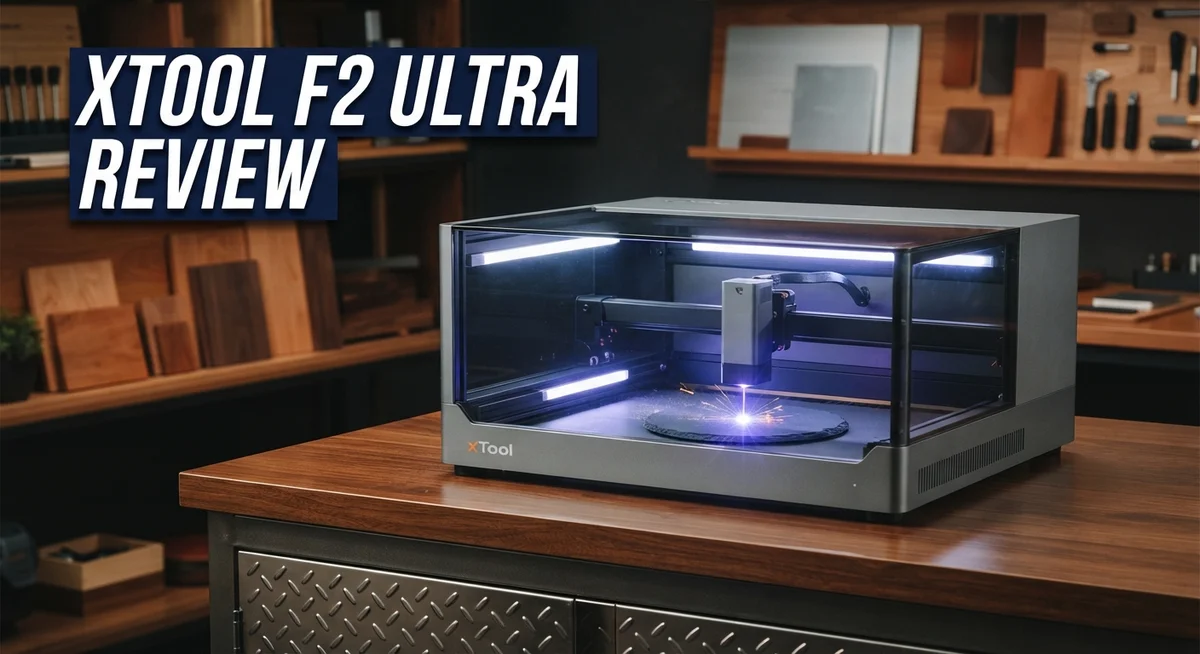
Laser cutting just got a serious upgrade. The xTool F2 Ultra brings a dual laser system into one compact machine. It combines a 60W MOPA laser with a 40W diode laser for maximum flexibility.
This machine handles metal, wood, acrylic, and glass with ease. It supports over 300 materials right out of the box. That means fewer limits and more creative freedom for you.
What makes the F2 Ultra stand out? Its 48MP dual camera system delivers precise alignment every time. You get accurate results without guesswork or wasted material.
In a Nutshell
- Dual laser power: The 60W MOPA and 40W diode combo lets you tackle almost any project. Metal marking in 100+ colors is a standout feature for creative work.
- Batch processing support: This feature saves time for small business owners handling multiple orders. It runs jobs without constant supervision.
- Software flexibility: XTool Studio comes free and works well for beginners. Advanced users can switch to LightBurn for more control.
- UV variant option: A 5W UV laser variant exists for glass and microscopic detail work. Some users report mixed experiences with this specific model.
- Compact and ergonomic: The design fits into small workspaces easily. It does not compromise on power despite its smaller footprint.
- Strong competition: Rivals like the xTool F1 Ultra, Glowforge, and OMTech offer similar features. The F2 Ultra holds its own with faster processing speeds.
- Premium positioning: This machine targets serious makers and small business owners. It delivers professional results but comes with a learning curve for beginners.
Dual-Laser System and Specifications
The dual laser system inside the xTool F2 Ultra sets it apart from single-laser competitors. You get a 60W MOPA laser paired with a 40W diode laser. This combination gives you flexibility you simply cannot find in other machines at this level.
The MOPA laser handles fiber marking on metals with incredible precision. It creates permanent marks on aluminum, stainless steel, titanium, and other metals. The 40W diode laser excels at cutting and engraving wood, acrylic, leather, and rubber materials. Together, these two lasers expand your project possibilities significantly.
The 48MP dual camera system works as your alignment assistant. These cameras use AI to position your designs with extreme accuracy. You see a live preview on your screen before the lasers fire. This means fewer mistakes and less wasted material.
Material compatibility reaches beyond 300 options. Metals, wood, acrylic, glass, stone, leather, and fabric all work with this machine. The 100+ color metal marking capability opens doors for custom jewelry, tools, and industrial parts. You can engrave different colors on the same metal surface without changing settings.
Speed improvements matter for production work. The F2 Ultra runs approximately 50% faster than its predecessor, the F1 Ultra. Batch processing support lets you queue multiple jobs and walk away. The machine handles repetitive orders without your constant attention.
The UV laser variant deserves mention for specialized applications. A 5W UV laser option exists for glass engraving and microscopic detail work. This variant targets users who need precision on delicate materials. However, some users report limitations with this option.
The specifications tell a clear story: this machine handles serious production demands. The dual camera system removes guesswork from alignment. The combination of MOPA and diode technology covers nearly every material a maker might encounter. Whether you run a small business, manage a maker space, or tackle ambitious hobby projects, the dual laser system delivers the versatility and power you need.

- Ultimate Dual-Laser Powerhouse: Equipped with a 60W MOPA fiber laser and a 40W diode laser, the...
- All-Metal Capability: The 60W MOPA fiber laser engraver handles diverse metal tasks—3D embossing...
Last update on 2026-10-21 / Affiliate links / Images from Amazon Product Advertising API Some of the links on this website are affiliate links, which means that at no additional cost to you, I earn a commission if you click through and make a purchase. I only recommend products and services that I believe will add value to my readers. Thank you for your support!
Material Compatibility and Versatility
The xTool F2 Ultra shines when it comes to handling different materials. This machine works with over 300 materials, which gives you serious flexibility for various projects.
Metal marking stands out as a key strength. The 60W MOPA laser excels at fiber marking on metals. You can mark over 100 different metal colors with precision. This capability matters if you work with stainless steel, aluminum, titanium, or anodized surfaces. The MOPA laser creates permanent marks that resist fading and wear.
Wood and acrylic work smoothly on this machine too. The 40W diode laser handles cutting and engraving on these materials efficiently. You get clean edges and detailed engravings without excessive burning or charring. The dual camera system helps you position designs perfectly before each job starts.
Glass and stone present interesting opportunities. The standard F2 Ultra manages glass engraving reasonably well. However, the optional 5W UV laser variant opens doors to microscopic detail work on glass surfaces. This UV option lets you create intricate designs that single-laser systems struggle to achieve. The UV laser also works on other delicate materials that regular lasers might damage.
Leather, fabric, and rubber all respond well to the diode laser. You can engrave detailed patterns on leather goods or cut fabric shapes with minimal fraying. This versatility appeals to makers working on personalized gifts or custom clothing items.
The batch processing feature amplifies this material versatility. You can program multiple jobs using different materials and run them back to back. The 48MP dual cameras automatically adjust positioning for each batch, saving you time and reducing setup errors.
One limitation exists with certain specialty materials. Some users report that the UV variant requires specific software adjustments for best results. The learning curve for optimizing settings across all 300+ materials takes time. You’ll need to test and adjust parameters for each new material type you try.
This broad material range makes the F2 Ultra appealing to diverse makers. Whether you run a custom engraving business, create personalized items, or prototype designs, this machine adapts to your needs.
Camera Alignment and Software Integration
The xTool F2 Ultra gives you 48MP dual cameras that work like a smart alignment system. These cameras talk directly to the software to position your designs with accuracy. You get real-time preview before the laser fires, which cuts down on wasted materials and failed projects.
The software integration starts with XTool Studio, which comes free and handles most tasks without a learning curve. You can import designs from common formats like SVG, PNG, and PDF. The interface shows your material in the preview window, so you see exactly what the laser will do.
LightBurn compatibility opens another door for users who prefer advanced editing tools. This flexibility means you’re not locked into one software ecosystem. You can switch between programs depending on your project needs.
The camera alignment system shines during batch processing. When you load multiple items on the cutting bed, the cameras map each piece individually. The software adjusts laser settings for each item automatically. This saves hours compared to manual repositioning.
One practical advantage emerges when working with irregular shapes or curved surfaces. The dual camera system captures depth information that helps the laser focus correctly. Metal marking becomes more consistent because the MOPA laser knows exactly where to fire.
The software also tracks material types through a built-in database. You can save custom settings for your favorite materials and recall them instantly. This feature matters when you’re running similar projects repeatedly.
Integration with your workflow depends on your current tools. If you already use design software like Adobe Illustrator or Inkscape, the transition feels natural. The xTool F2 Ultra accepts files from these programs without conversion headaches.
The camera system does have one limitation: it works best in controlled lighting. Bright sunlight or harsh shadows can confuse the alignment sensors. Most users solve this by working indoors or positioning the machine away from direct light.
Overall, the camera and software combination creates a system that feels responsive and intuitive. You spend less time troubleshooting alignment and more time creating finished products.
Top 3 Alternatives
xTool M1

- 3-in-1 Versatility: Laser Engraving, Laser Cutting, Blade Cutting: Meet the world's first desktop...
- Powerful Performance with High Precision: Equipped with dual laser head technology, the xTool M...
Last update on 2026-10-21 / Affiliate links / Images from Amazon Product Advertising API Some of the links on this website are affiliate links, which means that at no additional cost to you, I earn a commission if you click through and make a purchase. I only recommend products and services that I believe will add value to my readers. Thank you for your support!
Glowforge Pro

- Bring Your Ideas To Life - Glowforge Aura is a compact 6W, 450nm diode beginner friendly laser...
- Big Projects, Small Footprint - More than a wood laser engraver, Aura's spacious 12 x 12 inch...
Last update on 2026-10-14 / Affiliate links / Images from Amazon Product Advertising API Some of the links on this website are affiliate links, which means that at no additional cost to you, I earn a commission if you click through and make a purchase. I only recommend products and services that I believe will add value to my readers. Thank you for your support!
LaserPecker 4

- Compact & Multi-angle Engraving for Any Project: More flexible to use than competing products...
- Smart Screen Repeat, 5X More Orders/Day: Save & Reload Designs Instantly for Batch Engraving...
Last update on 2026-10-21 / Affiliate links / Images from Amazon Product Advertising API Some of the links on this website are affiliate links, which means that at no additional cost to you, I earn a commission if you click through and make a purchase. I only recommend products and services that I believe will add value to my readers. Thank you for your support!
Speed and Processing Performance
The xTool F2 Ultra delivers impressive speed gains that matter for serious production work. Users report approximately 50% faster processing compared to the F1 model, which translates to real time savings when running multiple jobs back to back.
The dual laser system creates a speed advantage you won’t find in single laser machines. The 60W MOPA laser handles fiber marking on metals rapidly without sacrificing quality. The 40W diode laser processes wood, acrylic, and other materials with consistent speed. This combination means you switch between different materials without waiting for laser changes.
Batch processing capability amplifies the speed benefits even further. You can queue up dozens of designs and let the machine work through them automatically. The 48MP dual cameras position each piece accurately without manual intervention. This hands off approach frees you to focus on other tasks while the F2 Ultra works.
Processing power extends beyond raw speed. The machine handles complex designs with multiple colors and intricate details. The MOPA laser executes fine fiber marking patterns that would slow down traditional engravers. Metal marking reaches speeds that make production runs economically feasible.
Real world performance depends on your material choices and design complexity. Simple engravings on wood run faster than detailed multi color work on metal. The software optimization in XTool Studio helps reduce processing time by streamlining file preparation. You get faster results when you prepare files efficiently beforehand.
The camera alignment system contributes to overall speed by eliminating positioning errors. Precise alignment on the first attempt prevents wasted material and reprinting. This accuracy matters especially when running batch jobs where one mistake multiplies across multiple pieces.
Temperature management keeps the machine running at peak performance during long sessions. The compact design allows better heat dissipation than bulkier competitors. Consistent cooling means the lasers maintain their power output throughout extended production runs.
For users who prioritize throughput, the F2 Ultra’s speed improvements represent a meaningful upgrade. The combination of dual lasers, smart cameras, and batch processing creates a system built for efficiency. Whether you run a small hobby shop or manage production orders, these speed features translate to tangible results.
Design, Portability, and Workspace Requirements
The xTool F2 Ultra combines power with a footprint that fits into serious maker spaces without demanding an entire room. This machine measures approximately 1000mm x 650mm, making it substantially more compact than industrial fiber lasers yet still robust enough for production work.
Portability stands out as a real strength here. The dual laser system weighs less than you’d expect for a 60W MOPA plus 40W diode combo. Users can relocate the machine between workshop areas without needing heavy equipment. The design includes stable feet and a clean cable management system that keeps your workspace organized.
The workspace requirements depend on your specific setup. You need a solid, level surface to prevent alignment drift. A standard workbench or dedicated table works perfectly. Good ventilation matters significantly because the MOPA laser produces some fume output, especially when marking metals. Most users run an external exhaust system or fume extractor nearby.
Ergonomic access is thoughtfully designed. The control panel sits at a comfortable height. The material bed opens easily for loading and unloading work. The dual cameras position themselves for clear visibility of your designs before processing begins. This eliminates frustrating repositioning steps that waste time.
Electrical requirements stay reasonable for a machine of this capability. Standard workshop power suffices for most operations. The machine doesn’t demand special electrical installation or dedicated circuits in most cases.
Heat management keeps the compact design from becoming a limitation. Internal cooling systems prevent thermal throttling during extended sessions. This matters when you’re running batch jobs across multiple materials.
Space efficiency extends to storage considerations too. The F2 Ultra’s vertical profile means it doesn’t sprawl across your bench. You can position it against a wall or corner without losing functionality.
The design philosophy balances serious production capability with practical workshop integration. Whether you’re setting up a home studio or adding to an existing maker space, the F2 Ultra adapts to your environment rather than forcing you to rebuild your workspace around it.
Pros and Cons
Pros
- Dual laser system (60W MOPA + 40W diode) handles 300+ materials including metal, wood, acrylic, and glass
- 48MP dual cameras enable precise AI-powered alignment, especially useful for batch processing and irregular shapes
- Processes work roughly 50% faster than the F1 model, saving significant time on production runs
- Compact and ergonomic design fits into maker spaces without consuming excessive room or requiring complicated setup
- Free XTool Studio software works smoothly for most tasks, plus LightBurn compatibility gives you advanced editing options
Cons
- Premium positioning in the market means this machine represents a substantial investment for hobbyists or small startups
- UV variant has received mixed feedback from users, with some reporting limitations in performance for glass and microscopic detail work
- Learning curve exists if you want to unlock all advanced features beyond basic operations
- Electrical requirements and heat management demand proper workspace planning before installation
Who Should Buy It
The xTool F2 Ultra works best for makers who need serious production power without sacrificing workspace. If you run a custom engraving business, you’ll appreciate the dual laser system that handles metal marking, wood etching, and acrylic cutting in one machine.
Small business owners benefit from the batch processing capability. The 48MP dual cameras let you load multiple items and walk away. The machine aligns each piece automatically, so repetitive orders move faster.
Hobbyists with growing ambitions fit this machine perfectly too. You start with simple projects on wood or acrylic. As your skills grow, you unlock metal marking and glass engraving without buying new equipment. The 300+ material compatibility means you rarely hit a limitation.
If you work with irregular shapes or need precision on every job, the AI camera alignment saves you hours. Manual positioning becomes unnecessary. This feature alone justifies the investment for anyone doing detailed batch work.
Professional studios gain speed advantages immediately. The 50% faster processing compared to the F1 model compounds over time. A studio handling 20 orders per week cuts production time significantly. That translates to more capacity without hiring extra staff.
You should skip this machine if you only engrave simple items occasionally. A smaller diode laser handles basic wood projects just fine. The F2 Ultra’s power sits unused for casual hobbyists.
Workspace constraints matter here too. While the design is compact, you need room for material loading and output. Cramped garages might struggle. Dedicated maker spaces or studios handle it easily.
Creality Falcon and Glowforge serve different audiences. Glowforge excels at CO2 cutting but costs more. Falcon offers lower entry cost but lacks the dual laser versatility. OMTech and Ortur provide alternatives, though they don’t match the F2 Ultra’s camera alignment accuracy.
The F2 Ultra targets serious makers ready to scale production. You get professional features without industrial pricing. If your work demands speed, material variety, and precision, this machine earns its place in your studio.
Final Verdict
The xTool F2 Ultra earns its place as a serious tool for makers who want to grow. It blends power and precision in one machine.
This laser cutter suits people who take their craft seriously. Casual hobbyists might find it more than they need right now.
Production speed sets this machine apart from many rivals. Teams who process multiple orders daily will notice the difference immediately.
The dual laser setup gives you flexibility other machines simply lack. You get metal marking, wood engraving, and glass etching without switching tools.
Camera guided alignment removes much guesswork from your workflow. This matters most when you handle batch orders or oddly shaped items.
Compared to the xTool F1 Ultra, this model offers more capability for scaling operations. Compared to Glowforge or Creality Falcon, it targets a different kind of user entirely.
Those machines suit casual creators. The F2 Ultra suits people building a business or running a busy studio.
OMTech, Ortur, and Atomstack users often seek simpler tasks. The F2 Ultra asks for bigger ambitions and rewards them with speed and accuracy.
If you run a small business, this machine pays off through saved hours. If you are a hobbyist testing bigger projects, it gives you room to grow without buying another machine later.
Skip this option if your projects stay small and occasional. The investment only makes sense when your output matches the machine’s capability.
For everyone else ready to scale, the xTool F2 Ultra delivers real value through speed, precision, and material versatility. It stands as one of the strongest choices among current dual laser systems.
Your decision should depend on your production needs, not just specs on paper. Match the tool to your workflow and this machine becomes an easy recommendation.
Frequently Asked Questions
Can the xTool F2 Ultra handle different materials?
Yes, absolutely. The dual laser system works on over 300 materials. You can engrave metal, wood, acrylic, glass, leather, rubber, and more. The 60W MOPA laser marks 100+ color variations on metals. The 40W diode laser handles organic materials efficiently.
This versatility means one machine covers most production needs. You won’t need separate equipment for different jobs.
What makes the camera alignment system useful?
The 48MP dual cameras let you position designs with precision. AI-powered alignment automatically adjusts for irregular shapes and batch runs. You simply place items on the bed. The system finds the exact spot for your design.
This saves enormous time on production work. Batch processing becomes fast and reliable. No more manual measuring or alignment guesswork.
Is the xTool F2 Ultra portable?
The compact design fits into maker spaces and small studios. It doesn’t require dedicated installation or complex setup. You can move it between locations if needed. The ergonomic build keeps your workspace organized.
Portability doesn’t mean it sacrifices power. The dual laser system delivers serious performance in a smaller footprint.
What software options do I have?
XTool Studio comes free with your machine. It handles most design and engraving tasks smoothly. You also get LightBurn compatibility for advanced editing. Both options give you flexibility with file formats and creative control.
The software ecosystem means you can work your way. Beginners use Studio. Advanced users leverage LightBurn’s powerful features.
How does the F2 Ultra compare to the F1?
The F2 Ultra processes work roughly 50% faster than the F1 model. You save significant time on production runs. Both machines share the portable, ergonomic design philosophy. The F2 Ultra adds more power for scaling operations.
Choose the F1 if you want a simpler entry point. Pick the F2 Ultra if you’re ready to grow.

Hi, I’m Amelia Thornton, the founder of ElectroPro.blog.
I write about smart devices, gadgets, electronics, and tech essentials from Amazon.
My goal is to help you discover reliable and innovative tech that truly makes life easier.
From home automation to everyday gear, I test and share what’s worth your investment.
Join me as I explore the smartest tech trends—one gadget at a time.