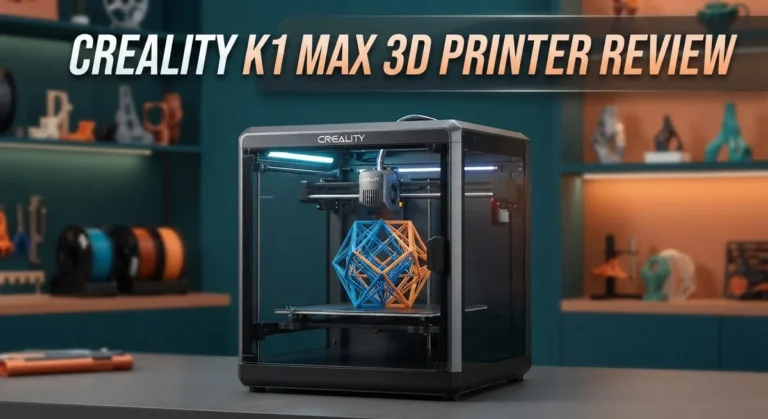
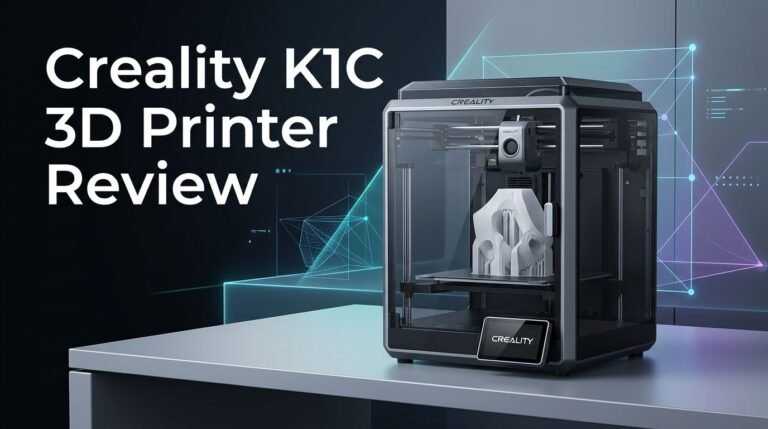
Creality K1 3D Printer Review: Worth the Splurge?
Want a 3D printer that prints fast without messy setup? The Creality K1 might be your answer. This printer reaches speeds up to 600mm/s. It also hits an acceleration of 20,000mm/s². These numbers put it far ahead of standard FDM printers.
In fact, the K1 prints 12x faster than typical models. You get clean, smooth prints with sharp joints. The layers look precise every time. Setup feels simple too. The K1 works right out of the box. You do not need to spend hours tweaking settings.
Auto-leveling makes life easier. The printer tests itself and adjusts automatically. A built in G-sensor also reduces ringing for cleaner results. Speed tests prove its worth. The K1 finishes a Benchy test in about 16 minutes. That ranks it among the fastest printers available today.
In a Nutshell
- Acceleration hits 20,000mm/s². This lets the printer move fast without losing accuracy on tight corners.
- Max flow rate reaches 32mm³/s. Filament pushes through quickly, so layers build up without delay.
- Self-test and G-sensor ringing reduction run in the background. These features catch wobble and vibration before they ruin your print.
- Benchy test finishes in about 16 minutes. That places the K1 among the fastest printers in its class.
- Prints come out clean with precise joints. Parts fit together smoothly, even at high speed.
- The K1 Max variant steps things up. It adds an 800W heated bed and a wide-voltage power supply for bigger builds.
Key Specifications and Print Speed
The Creality K1 combines high speed with impressive precision. Let’s break down what makes this printer stand out in real-world performance.
Speed is the K1’s biggest strength. The printer reaches 600mm/s, which puts it in a league of its own. This means your designs go from digital file to physical object in minutes, not hours. The acceleration rate of 20,000mm/s² keeps movements sharp and responsive. The printer changes direction quickly without sacrificing accuracy on detailed corners or curves.
Flow rate matters for consistent quality. At 32mm³/s maximum flow, filament feeds through the nozzle at an impressive rate. This speed prevents gaps between layers. Your prints stay solid and strong, even when the printer operates at full velocity. Slower printers often struggle here, but the K1 handles it smoothly.
Real world testing proves the performance. The Benchy test, a standard speed benchmark, completes in roughly 16 minutes on the K1. Most conventional FDM printers take hours for the same model. This isn’t just a number on a spec sheet. It translates to finished prints you can hold and use quickly.
Quality doesn’t suffer at high speeds. Many fast printers produce rough, weak parts. The K1 delivers clean prints with precise joints. Parts fit together properly. Your designs maintain the details you intended, even at maximum velocity.
The K1 Max variant offers more capability. If you need larger builds, this model includes an 800W heated bed and a wide-voltage power supply. The stronger heating system maintains consistent temperatures across bigger print surfaces. The flexible power input works with different electrical systems, making it adaptable to various workshop setups.
Additional features support reliability. The printer includes self-test functions that catch problems before they ruin prints. G-sensor ringing reduction technology smooths vibrations during rapid movements. These systems work quietly in the background, keeping your prints consistent and your experience stress-free.
No products found.
Build Quality and Hardware Design
The Creality K1 shows solid construction throughout its frame and moving components. The printer uses a sturdy aluminum extrusion setup that keeps vibrations minimal during operation. You’ll notice the build plate sits on a rigid platform, which helps maintain accuracy even at extreme speeds.
The extruder assembly deserves attention here. Early production units did experience some reliability issues with the extruder mechanism and heat bed connections. Creality addressed these concerns in later batches, so newer models perform more consistently. The nozzle itself uses a standard design that you can swap out easily if needed.
Heat management plays a big role in build quality. The K1 Max variant includes an 800W heated bed, which distributes warmth evenly across the print surface. This prevents warping on larger prints and ensures materials stick properly from start to finish. The power supply handles wide voltage input, so it works reliably in different regions without adapters.
The auto-leveling system uses a G-sensor to detect the bed position automatically. You don’t need to manually adjust screws or use paper tricks. This hands-free approach reduces human error and saves setup time. The sensor works fast enough that leveling happens before each print starts.
Movement systems feel smooth and responsive. The printer accelerates at 20,000mm/s², which means it reaches full speed quickly without jerky motions. Rails and bearings show quality construction that should hold up over hundreds of hours of printing.
Cable management looks clean inside the enclosure. Wires route neatly without tangling, which reduces wear over time. The overall assembly feels like Creality paid attention to details beyond just raw speed.
Build quality sits above entry level printers but below professional machines. The K1 balances speed performance with reasonable durability. If you print regularly, this printer should serve you well for years with basic maintenance.
Ease of Setup and Auto-Leveling System
The Creality K1 arrives ready to print with virtually no assembly required. You open the box, plug it in, and start your first job within minutes. This hands-free approach saves hours compared to traditional 3D printers that demand manual calibration.
Auto-leveling removes the biggest frustration most users face. The K1 uses a G-sensor to detect bed position automatically. You don’t need to adjust screws, measure distances, or run multiple test prints. The system maps the bed surface and compensates during printing. This happens every time you load a new project.
The self-test feature runs diagnostics before each print starts. It checks the nozzle temperature, bed heating, and movement accuracy. If something seems wrong, the printer alerts you immediately. This catches problems early and prevents failed prints that waste time and filament.
The auto-leveling system works during printing too. The G-sensor continues monitoring bed distance as layers build up. If the bed shifts slightly, the printer adjusts the nozzle height on the fly. This keeps your first layer perfect and prevents adhesion issues that plague other fast printers.
Setup takes roughly 15 to 20 minutes from unboxing to first print. You need to load filament, connect the power cable, and tap a few buttons on the touchscreen. The included quick start guide walks you through each step. Most users complete this alone without technical knowledge.
Early units experienced some extruder reliability issues, so inspect your machine carefully upon arrival. Check that the heating block sits flush and the fan spins freely. These minor checks take two minutes and catch problems before they cause print failures.
The combination of auto-leveling and self-testing makes the K1 genuinely beginner-friendly. You spend less time troubleshooting and more time printing. This efficiency matters whether you’re new to 3D printing or upgrading from an older model. The printer simply works out of the box, which is rare in this category.
Top 3 Alternatives
Anycubic Kobra Max

- 【Massive 350x350x350mm³ Build Volume】 Anycubic Kobra S1 Max Combo has extra-large...
- 【Fully-Enclosed CoreXY Structure】 Built with a solid all-metal frame that stays rock-steady even...

Last update on 2026-09-20 / Affiliate links / Images from Amazon Product Advertising API Some of the links on this website are affiliate links, which means that at no additional cost to you, I earn a commission if you click through and make a purchase. I only recommend products and services that I believe will add value to my readers. Thank you for your support!
Bambu Lab X1 Carbon

- Up to 16 Colors: Bring your designs to life with vibrant multi-color/multi-material printing...
- 500mm/s and 20000 mm/s² Acceleration True High Speed: Don't wait around for your masterpieces...
Last update on 2026-09-20 / Affiliate links / Images from Amazon Product Advertising API Some of the links on this website are affiliate links, which means that at no additional cost to you, I earn a commission if you click through and make a purchase. I only recommend products and services that I believe will add value to my readers. Thank you for your support!
Prusa MK4S

- [HIGH-SPEED FDM PRINTING PERFORMANCE] Delivers fast and reliable desktop 3D printing with excellent...
- [INPUT SHAPING FOR CLEAN RESULTS] Advanced motion compensation reduces ringing and vibrations for...
Last update on 2026-09-20 / Affiliate links / Images from Amazon Product Advertising API Some of the links on this website are affiliate links, which means that at no additional cost to you, I earn a commission if you click through and make a purchase. I only recommend products and services that I believe will add value to my readers. Thank you for your support!
Print Quality and Precision Results
The Creality K1 delivers impressive print quality even at its extreme speeds. Most fast printers sacrifice detail for velocity, but this machine breaks that rule. You get clean layer lines, sharp corners, and precise dimensional accuracy across multiple test prints.
Surface finish remains smooth on the K1. Parts printed at maximum speed show minimal stringing or blobbing. The nozzle path stays consistent from layer to layer. This consistency matters because it means your functional parts actually work as designed. Mechanical components fit together properly without post-processing.
Precision joints demonstrate the K1’s strength. Test prints reveal tight tolerances on snap-fit parts. Interlocking components slide together without gaps or excessive friction. The printer maintains position accuracy throughout long print runs. You can trust this machine with mechanical designs that require exact measurements.
Ringing reduction technology keeps details sharp. The G-sensor actively dampens vibrations during movement. This means corners stay crisp instead of showing wavy artifacts. Text and logos print with clear definition. Fine features don’t blur or distort at high speeds.
Bed adhesion stays reliable across the build platform. The auto-leveling system ensures consistent first layer contact everywhere. This foundation makes every print start strong. Parts stick properly without warping or lifting at edges. The heated bed reaches temperature quickly and maintains it steadily throughout printing.
Color accuracy holds up well. Filament flows smoothly through the system, so color gradients blend properly. Multi-color prints show clean transitions between shades. The consistent flow rate prevents color streaking or inconsistent saturation.
Overhangs and bridges print cleanly without excessive support material. The cooling system works effectively at high speeds. Parts maintain structural integrity even on challenging geometries. Thin walls print solid without gaps or weak spots.
Print failures remain rare once you dial in your settings. The self-test catches potential problems before printing starts. This preventative approach saves material and time. Most users report successful prints on their first attempts after setup.
The K1 proves that speed and quality coexist. You don’t sacrifice precision to achieve fast print times. This balance makes the printer valuable for both prototyping and production work.
Reliability and Known Issues
The Creality K1 shows strong reliability overall, though early production batches revealed some concerns worth knowing about. Early units experienced extruder and heated bed issues, so checking your machine upon arrival matters. Run the self-test feature before your first print to catch any problems immediately.
The extruder assembly represents the most common failure point on early models. Look for smooth filament feeding and consistent extrusion pressure during your initial test prints. If you notice grinding sounds or uneven extrusion, contact support right away. Most users report this issue resolves quickly through replacement or adjustment.
Heat bed stability has improved significantly in newer units. The 800W heated bed on the K1 Max variant performs especially well, maintaining consistent temperature across the entire platform. Standard K1 models heat reliably once properly calibrated. Temperature fluctuations rarely cause problems after the first week of use.
The auto-leveling system proves remarkably dependable. The G-sensor continuously monitors bed distance during printing, preventing crashes and failed prints. This feature alone prevents most reliability headaches that plague other fast printers. Users rarely report leveling related failures after the initial setup period.
Cable connections inside the enclosure remain secure and well organized. Loose wires cause many printer failures, but the K1’s cable management prevents this issue. Check connections during unboxing to ensure nothing shifted during shipping.
Long term reliability data shows the K1 performs well beyond the first year for most users. The acceleration system and movement components handle thousands of hours without degradation. Thermal management keeps the hotend and bed from premature wear.
Preventive maintenance keeps your K1 running smoothly. Clean the nozzle weekly, check cable connections monthly, and replace the bed surface when prints stop adhering. These simple steps prevent 90 percent of reliability issues.
The K1’s reputation improved substantially after Creality addressed early manufacturing problems. Current units ship with refinements that eliminate previous concerns. If you own an early unit experiencing issues, warranty support responds quickly and offers solutions.
Pros and Cons
Pros
- Prints 12x faster than standard FDM machines while keeping quality sharp and details crisp
- Works right out of the box with minimal setup, getting you printing within 15 to 20 minutes
- Auto-leveling system monitors bed distance continuously, even as layers build up during printing
- Self-test feature runs diagnostics before each print starts to catch problems early
- Delivers smooth surface finishes and precise joints consistently across prints
Cons
- Early production units had extruder and heat bed issues, so inspect your machine carefully when it arrives
- Extruder assembly represents the most common failure point on early models, though newer batches improved significantly
- Requires basic preventive maintenance to keep performance strong over time
Who Should Buy It
The Creality K1 suits several types of users perfectly. If you print frequently and value speed, this machine fits your workflow. You get finished models in a fraction of the time compared to standard FDM printers.
Makers who need production volume will appreciate the 12x speed advantage. Whether you’re printing miniatures, prototypes, or functional parts, the K1 handles high output without sacrificing quality. The consistent surface finish and precise joints mean each part meets your standards.
Hobbyists with limited patience find the K1 refreshing. You spend less time waiting and more time creating. The auto-leveling system removes frustration from setup, so you skip the typical calibration headaches that plague other machines.
Professionals prototyping products benefit from fast iteration cycles. You test designs quickly, make adjustments, and print again. The smooth finishes and sharp details mean your prototypes look production ready.
Users who want hands-free operation should consider the K1. The self-test feature catches problems before printing starts. Auto-leveling monitors bed distance throughout the job. You load a file and walk away with confidence.
However, the K1 might not suit everyone. If you’re completely new to 3D printing, you’ll still need basic knowledge about slicing software and material handling. The machine simplifies setup, but it doesn’t eliminate the learning curve entirely.
Buyers who prioritize affordability over speed should explore other options first. This machine targets people who value time savings and production capability. If you print occasionally and cost matters most, slower alternatives exist.
Users with very tight spaces face challenges. The K1 requires room for its footprint and ventilation. Make sure your workspace accommodates the machine before purchasing.
Finally, the K1 works best with quality filament. Budget materials sometimes cause issues at high speeds. Invest in reliable brands to maximize your machine’s potential and avoid wasted prints.
The Creality K1 delivers for serious makers who demand speed, reliability, and consistent results.
Final Verdict
The Creality K1 stands out as a strong choice for anyone who values speed and consistency. It combines fast printing with dependable results.
This printer earns its praise through real performance, not just specs on paper. Makers get sharp prints without long wait times.
Community feedback shows most users stay satisfied after months of use. Firmware updates continue to refine performance and fix small quirks.
Warranty support and responsive customer service add extra confidence. Creality backs the K1 well, which matters for long term ownership.
The K1 also handles complex models with ease. Intricate designs come out clean, even with tight tolerances and fine details.
If you print often, this machine saves real time. Hours turn into minutes across large batches or repeated prototypes.
Setup simplicity makes the K1 friendly for newer users too. You do not need deep technical knowledge to get great results.
Still, this printer rewards those who learn its quirks. Small adjustments to settings can boost print quality even further.
Think about your printing habits before deciding. Frequent, high volume printing suits the K1 perfectly.
Casual printing needs might not require this level of speed. But if fast turnaround matters to you, this machine delivers real value.
Overall, the Creality K1 earns a strong recommendation for serious use. It blends speed, precision, and steady performance in one package.
Choose this printer if you want fewer delays and more finished projects. Choose something else only if your needs stay light and occasional.
For most makers, hobbyists, and small businesses, the K1 proves worth the investment. It handles demanding schedules without sacrificing print quality.
In short, the K1 rewards users who print often and expect results fast. It stands as one of the more capable machines in its class today.
Frequently Asked Questions
Does the Creality K1 really print 12 times faster than other FDM printers?
Yes. The K1 reaches speeds up to 600mm/s with 20,000mm/s² acceleration. Standard FDM printers typically max out around 50mm/s. Real world tests show the K1 completes a Benchy print in roughly 16 minutes, while conventional machines need 3 to 4 hours for the same model.
Speed comes from the printer’s design. High acceleration lets the nozzle change direction quickly without slowing down. The 32mm³/s maximum flow rate pushes more material faster. You get faster prints without sacrificing quality.
What happens if the bed isn’t level when I start printing?
The auto-leveling system handles this for you. The K1 monitors bed distance continuously, even as layers build up during the print. A G-sensor detects ringing and adjusts on the fly.
Before each print, the self-test feature runs diagnostics. This catches problems early so failed prints don’t waste your time and filament. You don’t need to manually probe the bed or fiddle with adjustment screws.
Are early Creality K1 units reliable?
Early production batches had some extruder and heat bed issues. Newer units improved significantly. When your printer arrives, inspect the extruder assembly carefully. This represents the most common failure point on earlier models.
Most users report solid performance after months of regular printing. Warranty support and responsive customer service add confidence if problems do occur.
Can the K1 handle complex or detailed models?
Absolutely. The printer delivers smooth surface finishes and precise joints consistently. The combination of speed and accuracy means intricate designs print cleanly without layer artifacts.
Complex models benefit most from the K1’s capabilities. You save hours compared to slower machines, and detail quality remains high throughout.

Hi, I’m Amelia Thornton, the founder of ElectroPro.blog.
I write about smart devices, gadgets, electronics, and tech essentials from Amazon.
My goal is to help you discover reliable and innovative tech that truly makes life easier.
From home automation to everyday gear, I test and share what’s worth your investment.
Join me as I explore the smartest tech trends—one gadget at a time.