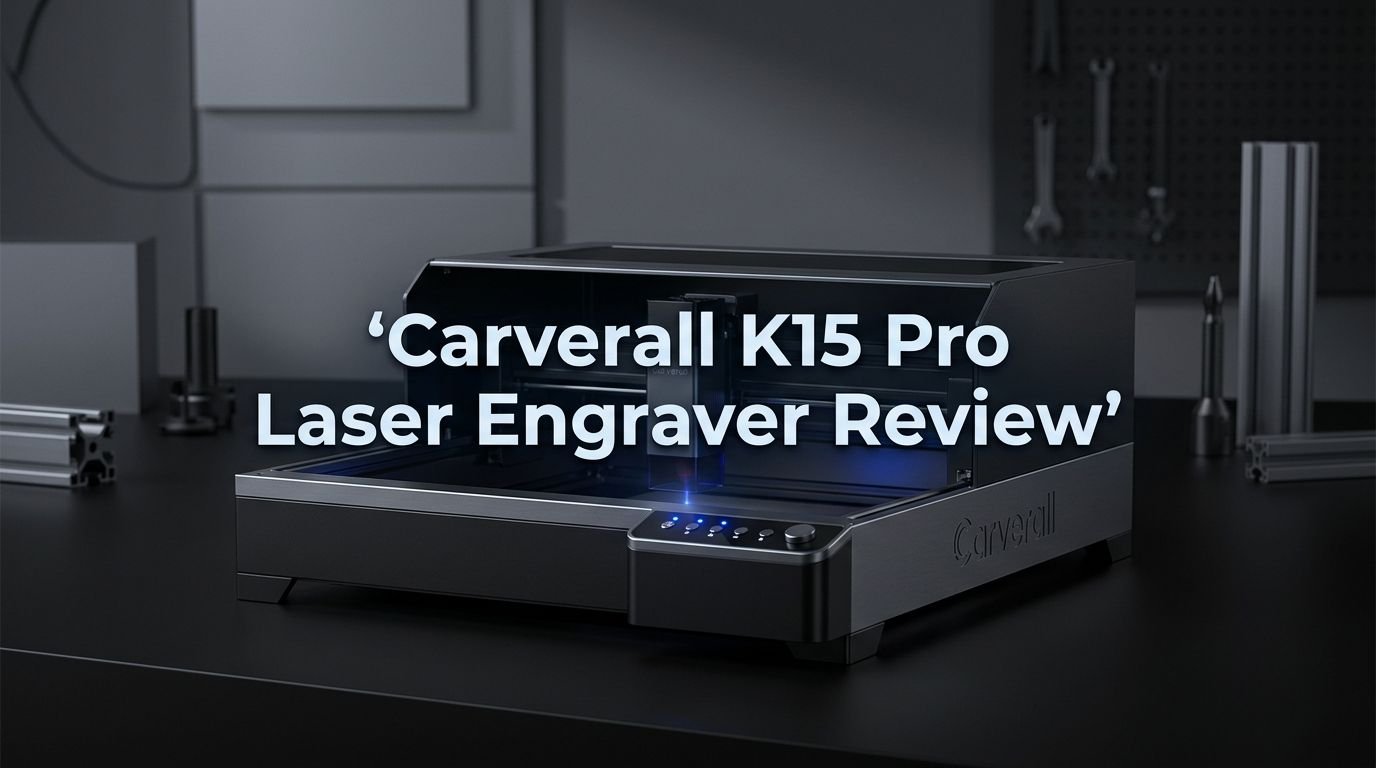
Carverall K15 Pro Laser Engraver Review 2026: Worth Your Money?
Are you searching for a compact laser engraver that won’t drain your bank account? The Carverall K15 Pro has been making waves in the DIY and small business community since its launch.
It promises 0.01mm precision, a generous 300×200mm work area, and speeds up to 15,000mm/min. But does it deliver on those promises?
In this complete review, we break down every feature, spec, and real user experience tied to this machine. Whether you want to engrave custom gifts, start a small laser business, or just enjoy creative projects at home, this post will help you decide.
Key Takeaways:
- The Carverall K15 Pro offers a 300×200mm engraving area (close to A4 size), which gives you enough room for signs, leather goods, and custom tags without needing a full workshop setup.
- It comes in multiple laser power options including 5W, 7W, 10W, and 12W diode lasers. The 5W model is great for beginners, while the 10W and 12W versions handle thicker materials and faster cutting tasks.
- Assembly takes about 90 seconds to 2 minutes. The modular design requires only 6 screws. You do not need tools or technical knowledge to get started.
- It supports over 100 materials including wood, bamboo, leather, acrylic, paper, glass, coated metals, ceramics, and fabric. This wide compatibility makes it useful for gifts, branding, education, and more.
- Safety features include a protective shield and tilt protection. These additions make it safer than many budget engravers, especially for home users.
- Budget pricing puts it well below $300 for most variants, making it one of the most affordable portable laser engravers with this level of precision and versatility available on Amazon right now.

- NERVOUS ABOUT SETUP OR GETTING STUCK? Join 500,000+ creators who trust Carverall. Your laser...
- WORRIED YOUR LASER CAN'T HANDLE DAILY PROJECTS? This 2-in-1 laser engraver and cutter delivers...
Last update on 2026-07-27 / Affiliate links / Images from Amazon Product Advertising API Some of the links on this website are affiliate links, which means that at no additional cost to you, I earn a commission if you click through and make a purchase. I only recommend products and services that I believe will add value to my readers. Thank you for your support!
What Is the Carverall K15 Pro Laser Engraver?
The Carverall K15 Pro is a portable desktop laser engraver and cutter made by Carverall, a brand focused on entry-level laser machines. It uses a diode laser system with a 455nm blue laser wavelength. The machine targets beginners, hobbyists, and small business owners who need a reliable engraver at a low price.
This engraver stands out because of its modular build. You can swap laser heads depending on your project. Carverall sells 5W, 7W, 10W, and even 12W laser modules for the K15 Pro frame. This means you can start small and upgrade later without buying a whole new machine.
The frame is made from durable aluminum with dual-axis scale marks for easy alignment. It uses a fixed-focus design, so there is no manual focusing required. You place your material, load your design file, and press start. The whole experience is simple and direct.
Carverall K15 Pro Specifications and Technical Details
Understanding the specs helps you decide if this machine fits your needs. The K15 Pro has a 300×200mm engraving area, which is close to standard A4 paper size. This is large enough for most personal and small business projects.
The machine achieves 0.01mm repeatable positioning accuracy. This level of precision allows you to engrave small text, fine patterns, and detailed artwork. Many competing machines in this price range only reach 0.05mm accuracy.
Engraving speed tops out at 15,000mm/min, though the 12W variant claims cutting speeds up to 28,000mm/min. The laser wavelength sits at 455nm (blue diode). The machine accepts standard file formats through LightBurn and LaserGRBL software on both Windows and Mac.
Power input runs on AC 100–240V, making it compatible with outlets worldwide. The full unit weighs under 3kg, which makes it easy to move between rooms or take to craft fairs.
Unboxing and Setup Experience
One of the best things about the K15 Pro is its fast assembly. Most users report full setup in under 2 minutes. You attach the laser head to the frame using 6 screws. That is the entire build process.
Inside the box, you get the main frame, laser module, USB cable, power adapter, and a small toolkit. Carverall also includes sample materials for your first test engravings. The included quick start guide is short but clear.
After assembly, you connect the machine to your computer via USB or WiFi (depending on the variant). Software installation takes about 5 minutes. The fixed-focus design means you skip the often frustrating manual focus step that cheaper machines require.
The overall first-time experience feels polished for this price bracket. Beginners will appreciate how little technical knowledge is needed to get a first successful engrave.
Top 3 Alternatives for Carverall K15 Pro
If you want to compare the K15 Pro against other popular laser engravers, here are three strong alternatives.

- 【Beginner-Friendly Software with AI Design】Hate complicated software, confusing settings, or...
- High-Precision Laser Engraving and Cutting: Acmer S1 laser engraver machine with 6000mW diode laser...
Last update on 2026-07-27 / Affiliate links / Images from Amazon Product Advertising API Some of the links on this website are affiliate links, which means that at no additional cost to you, I earn a commission if you click through and make a purchase. I only recommend products and services that I believe will add value to my readers. Thank you for your support!
The ACMER S1 is a compact laser engraver with up to 6000mW power. It offers a 130×130mm work area and 0.04mm laser spot accuracy. It works great for small engravings and comes at a similar budget price point.

- 【90W Effect Ultra-thin Laser Beam】Our new SCULPFUN S9 laser engraver uses the latest 5.5W laser...
- 【Fast Focusing and High Accurancy】With fixed focus lens and sliding design, you only need to...
Last update on 2026-07-27 / Affiliate links / Images from Amazon Product Advertising API Some of the links on this website are affiliate links, which means that at no additional cost to you, I earn a commission if you click through and make a purchase. I only recommend products and services that I believe will add value to my readers. Thank you for your support!
The SCULPFUN S9 is a full-metal CNC laser engraver with a much larger 410×420mm work area. It delivers 90W effect laser power and can cut 15mm thick wood. This machine suits users who need more cutting power and a bigger workspace.

- Compact & Multi-angle Engraving for Any Project: More flexible to use than competing products...
- Smart Screen Repeat, 5X More Orders/Day: Save & Reload Designs Instantly for Batch Engraving...
Last update on 2026-07-27 / Affiliate links / Images from Amazon Product Advertising API Some of the links on this website are affiliate links, which means that at no additional cost to you, I earn a commission if you click through and make a purchase. I only recommend products and services that I believe will add value to my readers. Thank you for your support!
The LaserPecker LP4 is a portable dual-laser engraver (10W diode + 2W IR) with galvanometer technology. It reaches speeds up to 240,000mm/min and engraves on metal, glass, and leather. It sits at a higher price but offers unmatched speed and dual-material capability.
Engraving Quality and Precision
The K15 Pro delivers crisp, clean engraving results on most supported materials. The 0.01mm accuracy shows up clearly on fine text and detailed images. Letters as small as 2mm remain readable on wood and leather surfaces.
Wood engravings come out with good contrast and smooth edges. You can adjust power and speed settings in LightBurn to control depth and darkness. Lighter passes work well for surface marking, while higher power settings create deeper cuts.
Photo engravings also perform well. The machine handles grayscale images using dithering methods. Results on plywood and MDF look sharp with visible detail. You will need to experiment with settings for each material to find the sweet spot.
One thing to note: glass engraving requires careful setup. The results are good, but the process is less forgiving than wood or leather. Coated metal engraving also works, but bare metal is not possible without the optional infrared laser module.
Materials You Can Engrave and Cut
The K15 Pro supports a wide range of materials for both engraving and cutting. This flexibility is one of its biggest selling points.
For engraving, the machine works on wood, bamboo, MDF, plywood, cork, leather, felt, paper, cardboard, glass, ceramic, coated metal, anodized aluminum, painted surfaces, acrylic, rubber stamps, and fabric. That covers most common craft and small business materials.
For cutting, the K15 Pro handles wood boards (up to 6mm with the 5W module), leather, fabric, acrylic sheets (up to 3mm), paper, and cardboard. The 10W and 12W modules can cut thicker materials at faster speeds.
T-shirt engraving is another popular use case. Users have shown successful results on cotton and denim fabric. You need to adjust power settings carefully to avoid burning through the material. The results look like a professional heat transfer print.
Software Compatibility: LightBurn and LaserGRBL
The K15 Pro works with two popular laser control software programs: LightBurn and LaserGRBL. Both connect to the machine via USB. Some newer variants also support WiFi connection.
LightBurn is the premium option. It costs a one-time license fee but offers powerful tools for design, speed control, layer management, and image processing. Most serious users prefer LightBurn for its reliability and feature set. It runs on Windows, Mac, and Linux.
LaserGRBL is a free alternative that works on Windows. It handles basic engraving tasks well. The interface is less polished than LightBurn, but it gets the job done for simple projects. Beginners often start here before upgrading to LightBurn.
The machine uses a GRBL-based controller, which means it also works with other compatible software if you prefer a different tool. File formats supported include SVG, PNG, JPG, BMP, and DXF.
Safety Features You Should Know About
Safety matters with any laser machine, and the K15 Pro includes several protective features. The machine ships with a protective shield that blocks laser light during operation. This prevents eye damage and keeps your workspace safer.
Tilt protection is another built-in feature. If the machine gets bumped or knocked over during use, it automatically shuts off the laser. This prevents accidental burns on surfaces and reduces fire risk.
Carverall markets the machine as Class 1 safe when used with the protective enclosure. Without the enclosure, it operates as a Class 4 laser, which requires proper eye protection. Always use the included safety goggles when working without the shield.
The aluminum frame stays cool during operation. The laser module includes a built-in cooling fan that prevents overheating during long sessions. These features combine to make the K15 Pro safer than many open-frame budget laser engravers.
K15 Pro Accessories and Expansion Modules
One of the strongest points of the K15 Pro system is its accessory ecosystem. Carverall sells several expansion modules that add new capabilities to the base machine.
The Honeycomb Working Panel (200×300mm) improves airflow beneath your material. This reduces burn marks on the bottom surface and gives cleaner cuts. It is almost essential for cutting operations.
The Rotary Roller lets you engrave cylindrical objects. You can personalize tumblers, water bottles, wine glasses, pens, and mugs. This accessory opens the door to profitable custom product businesses.
Risers extend the machine height by 84mm. This lets you engrave taller objects that would not fit under the standard frame height. The Offline Engraving Module removes the need for a connected computer. You load your file onto a TF card and run the job directly from the machine.
Carverall also sells an optional 1064nm infrared laser module that enables direct engraving on bare metals, stainless steel, and other reflective surfaces. This upgrade turns the K15 Pro into a true multi-material machine.
Performance for Small Business Use

- CutLabX App + LightBurn Compatibility: Designed for You, Not Tech Experts: Control your Carverall...
- High-Power 12W Performance for Next-Level Projects: Unlike standard 5W models, our genuine 12W laser...
Last update on 2026-07-27 / Affiliate links / Images from Amazon Product Advertising API Some of the links on this website are affiliate links, which means that at no additional cost to you, I earn a commission if you click through and make a purchase. I only recommend products and services that I believe will add value to my readers. Thank you for your support!
Many buyers purchase the K15 Pro to start a small engraving business. The machine handles common product types like custom keychains, wooden signs, personalized leather goods, and engraved phone cases.
Production speed is decent for small batches. A simple keychain design takes about 2 to 5 minutes depending on detail level. You can run the machine for several hours per day without overheating issues. The offline module lets you queue jobs without tying up your computer.
Profit margins on laser engraved products are strong. Material costs stay low, and customers pay premium prices for personalized items. The K15 Pro’s low entry price means you can recover your investment within a few weeks of active selling.
Craft fair vendors will appreciate the portable size. The machine fits easily in a car trunk. You can set up live engraving at markets and events to attract customers. The WiFi variant makes on-site operation even more convenient.
Pros and Cons of the Carverall K15 Pro
Every product has strengths and weaknesses. Here is an honest breakdown of the K15 Pro.
The pros are clear. The machine offers excellent precision at 0.01mm accuracy. Assembly takes less than 2 minutes. It supports over 100 materials. The price stays under $300 for most variants. The modular design means you can upgrade your laser power without buying a new frame.
The accessory ecosystem adds serious value. Rotary rollers, honeycomb panels, risers, and offline modules extend the machine’s capabilities far beyond the base unit.
On the con side, the 300×200mm work area limits project size. If you need to engrave large signs or furniture pieces, this machine is too small. The 5W module also struggles with materials thicker than 6mm.
Customer support is another concern for some users. Carverall is a newer brand, and response times vary. However, the online community on Facebook and Reddit provides helpful troubleshooting advice. The learning curve is gentle, but LaserGRBL’s interface can feel outdated.
Who Should Buy the K15 Pro?
The K15 Pro fits several buyer profiles. If you are a complete beginner interested in laser engraving, this machine is an excellent starting point. The quick setup and software compatibility reduce the learning curve.
DIY crafters and hobbyists will enjoy the variety of materials the machine handles. You can make gifts, home decor, and personalized items without spending hundreds more on a premium machine.
Small business owners looking to add laser-engraved products to their lineup will find the K15 Pro productive enough for small batch runs. The portability makes it ideal for market and event use.
Students and educators can use the machine for STEM projects and hands-on learning. The safety features make it appropriate for supervised classroom environments. The affordable price point keeps it within budget for most school programs.
If you need to cut materials thicker than 10mm or need a work area larger than A4, look at bigger machines like the SCULPFUN S9 or xTool D1 Pro instead.
How Does the K15 Pro Compare to Other Budget Engravers?
The budget laser engraver market is crowded. The K15 Pro competes with machines from ACMER, SCULPFUN, Ortur, and LaserPecker.
Against the ACMER S1, the K15 Pro wins on work area (300×200mm vs 130×130mm) and maximum laser power options. The ACMER S1 costs less and has a smaller footprint, making it better for very small projects.
Against the SCULPFUN S9, the K15 Pro loses on work area and raw cutting power. The S9 offers 410×420mm and can cut 15mm wood. However, the S9 costs more, weighs more, and takes longer to assemble. The K15 Pro wins on portability and ease of use.
Against the LaserPecker LP4, the K15 Pro offers a larger work area and lower price. The LP4 wins on speed (240,000mm/min vs 15,000mm/min) and dual-laser capability. The LP4 costs significantly more.
The K15 Pro hits a sweet spot between price, features, and portability that few competitors match in 2026.
Customer Reviews and Community Feedback
Real user feedback on the K15 Pro is mostly positive. Amazon reviews highlight the fast setup, good engraving quality, and value for money. Many users call it an ideal “first laser” for beginners.
Common praise points include the clear instructions, solid aluminum build quality, and reliable WiFi connection on newer models. Several users have posted successful T-shirt engravings and custom gift projects.
Negative feedback tends to focus on software setup. A few users experienced issues connecting LaserGRBL on Mac (since it is Windows-only). LightBurn works across all platforms but requires a paid license. Some users reported the 5W module felt underpowered for cutting thick acrylic.
The Facebook laser engraving community has active threads about the K15 Pro. Members share settings, material guides, and project ideas. This community support adds significant value for new buyers who want help getting started.
Final Verdict: Should You Buy the K15 Pro in 2026?
The Carverall K15 Pro delivers strong value for its price point. It is compact, easy to assemble, and precise enough for most personal and small business projects. The modular laser head system gives you a clear upgrade path as your skills grow.
It is not perfect. The work area is limited to A4 size. Heavy-duty cutting requires the more expensive 10W or 12W modules. Customer support could improve. But at under $300, few machines offer this combination of precision, portability, and versatility.
If you want to start laser engraving without a huge investment, the K15 Pro is one of the best entry points available right now. It earns a solid recommendation for beginners and budget-conscious makers in 2026.
Frequently Asked Questions
Can the K15 Pro engrave on metal?
The K15 Pro can engrave on coated and anodized metals using its standard blue diode laser. For bare or stainless steel engraving, you need the optional 1064nm infrared laser module sold separately by Carverall.
What software works with the K15 Pro?
The machine supports LightBurn (paid, Windows/Mac/Linux) and LaserGRBL (free, Windows only). Both connect via USB. Newer WiFi-enabled variants also allow wireless connection through LightBurn.
How long does it take to set up the K15 Pro?
Most users complete assembly in under 2 minutes. The modular design requires only 6 screws and no special tools. Software installation adds about 5 more minutes.
Is the K15 Pro safe to use at home?
Yes. The K15 Pro includes a protective laser shield, tilt protection, and a cooling fan. With the shield in place, it operates as a Class 1 laser device. Always use the included safety goggles when working without the enclosure.
Can I cut wood with the K15 Pro?
Yes. The 5W module cuts wood up to 6mm thick. The 10W and 12W modules handle thicker cuts at faster speeds. Using the honeycomb working panel improves cut quality by improving airflow.
Is the K15 Pro good for starting a small business?
Absolutely. The machine handles common business products like keychains, signs, personalized gifts, and custom tags. The low price, portable size, and optional rotary roller make it a strong choice for Etsy sellers and craft fair vendors.

Hi, I’m Amelia Thornton, the founder of ElectroPro.blog.
I write about smart devices, gadgets, electronics, and tech essentials from Amazon.
My goal is to help you discover reliable and innovative tech that truly makes life easier.
From home automation to everyday gear, I test and share what’s worth your investment.
Join me as I explore the smartest tech trends—one gadget at a time.